- 30 -
Attaching an arm stand
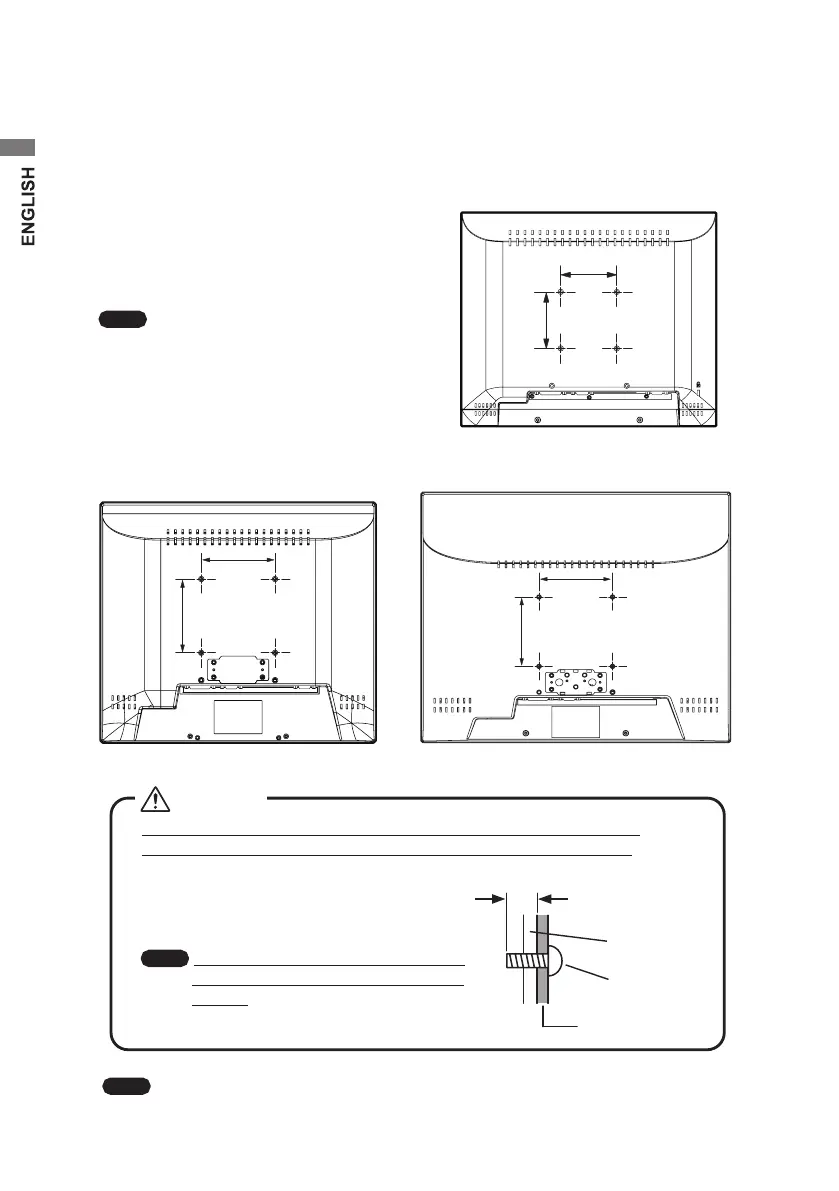
The tilt stand is interchangeable with any commercially available arms that:
• Applies to a 75 × 75 mm or 100 × 100 mm mounting holes pattern
(75 × 75 mm mounting hole pattern for CV532P, 100 × 100 mm for CV732PJ and
CV932PJ)
• Bears the total weight of the LCD panel
(without the stand) and the cables connected
to it. For more information, ask the stand/
arm maker.
Note
Choose the right-sized screws
according to the plate thickness. To
reattach the tilt stand, use the screws
for the removed tilt stand.
100 mm
100 mm
CV732PJ
75 mm
75 mm
CV532PJ
CV932PJ
Note
To use the monitor without the stand, install the monitor in a well-ventilated
place to release internal heat properly.
Use M4 screws that screw in 7 to 8 mm inward from the outer
surface of the cabinet (excluding the mount plate thickness).
If the screws are too long, they could
damage the internal parts.
If they are too short, the monitor could
fall.
Note
We are not liable for any damage
or injury resulting from replacing
stands.
Warning
7–8 mm
Mounting plate
Cabinet
M4 Screw


 To Next Page
 Loading...