EasyManua.ls Logo

JVC DLA-X7 - Connecting Via Pc Cable

JVC DLA-X7
62 pages
Print Icon
To Next Page IconTo Next Page
To Previous Page IconTo Previous Page
Loading...
28
Preparation
2
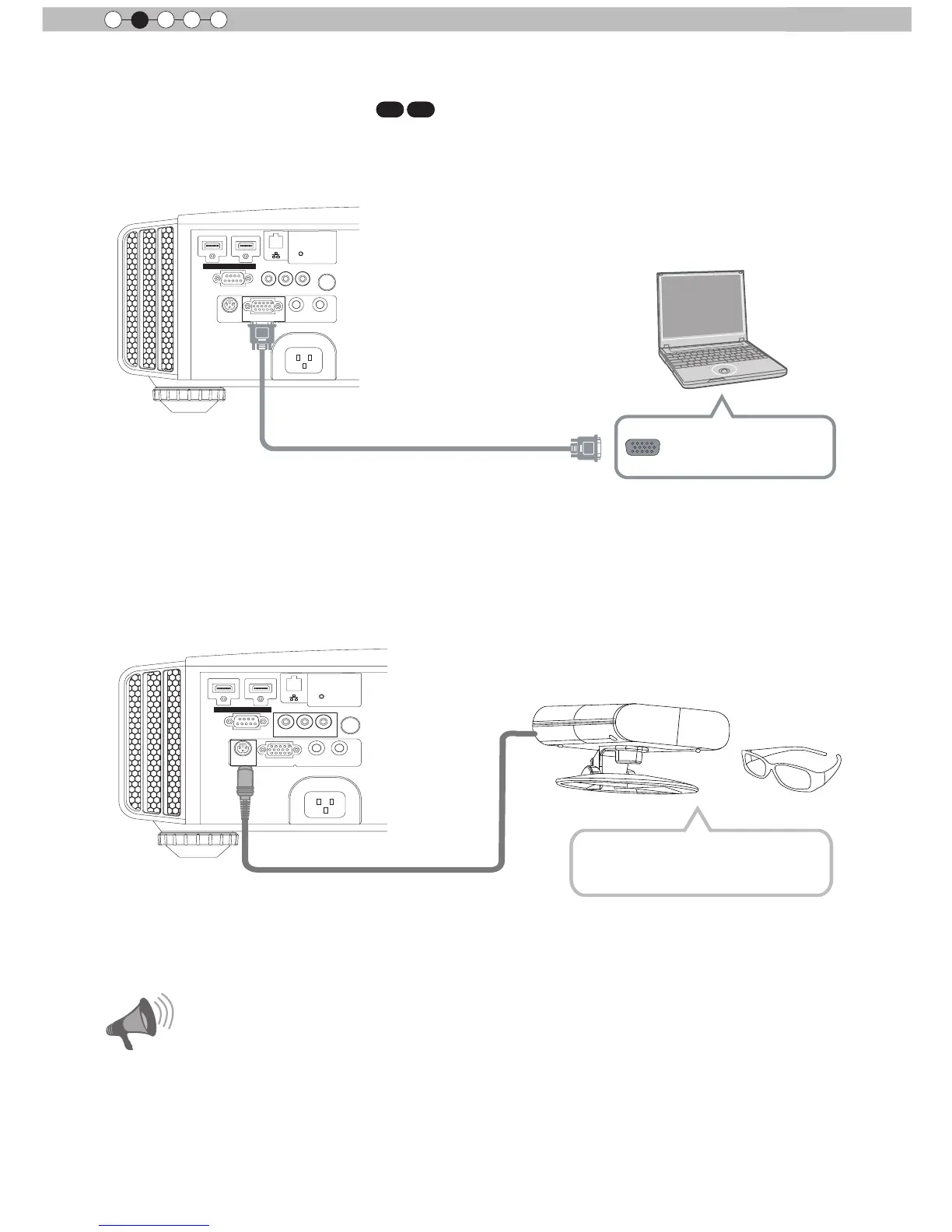
Connecting via PC Cable
X7 X9
About the connection (Continued)
This unit
For information on supported input signals, please refer to
Specications
.
(Reference page: 73)
PC cable
(
sold separately
)
To PC input terminal
VGA output terminal
Notebook PC
Connected by a 3D SYNCHRO terminal
1 HDMI 2
RS-232-C
3D
C
R/
P
R
C
B/
P
B
Y
SYNCHRO
PC
TRIGGER
REMOTE
CONTROL
STANDBY/ON
MENU
BACK
INPUT
OK
This unit
3D synchro emitter: This is a dedicated terminal for PK-EM1 (sold separately).
3D glasses (PK-AG1-B) is an optional device, and is not included in the 3D synchro emitter.
Before you watch 3D video images, make sure to read "3D description of the system"
(Reference page 57 to 59).
3D synchro emitter
3D-glasses
CAUTION

Other manuals for JVC DLA-X7

Related product manuals