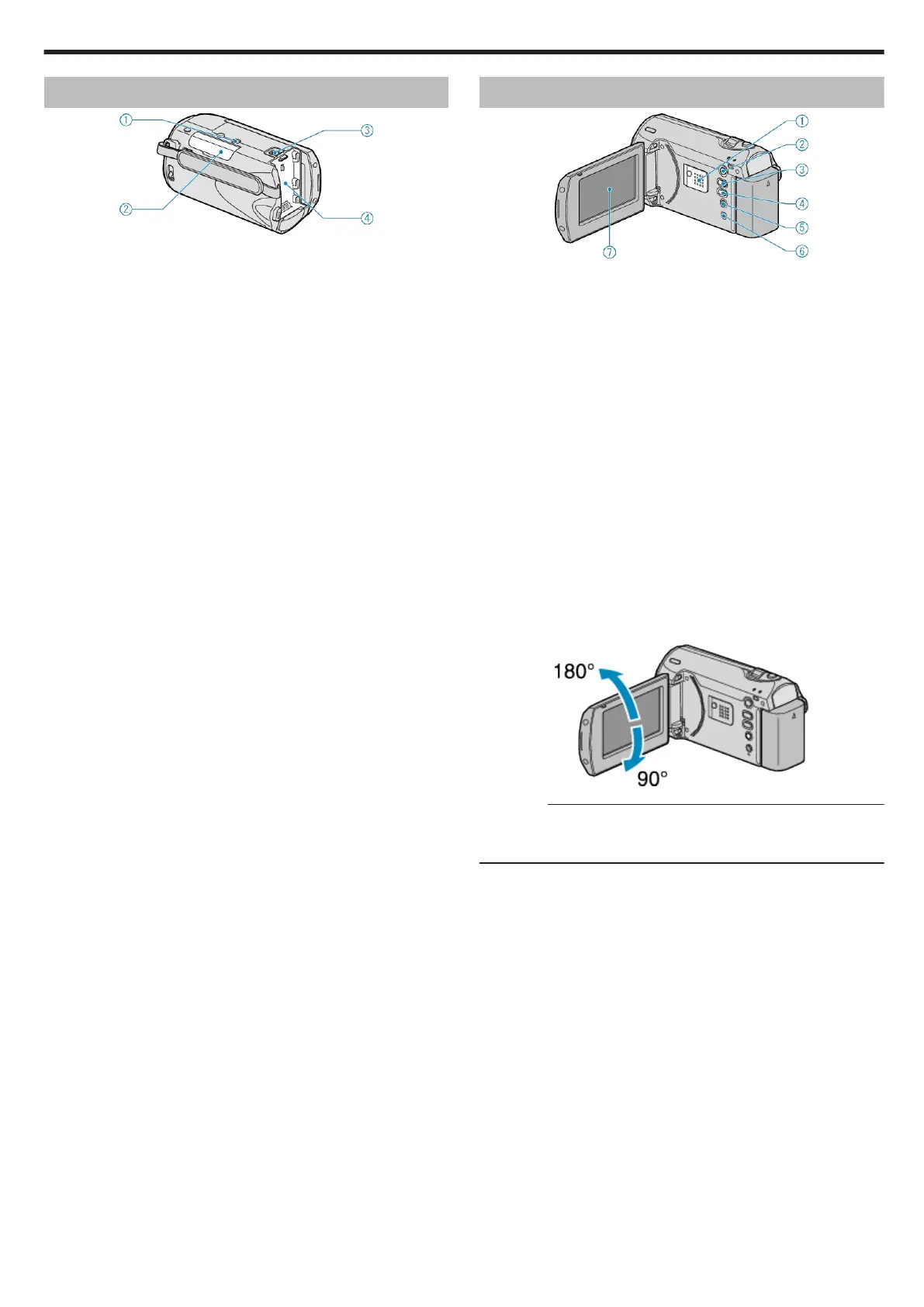
Bottom
.
1
Tripod Mounting Hole
"Tripod Mounting" (A P.15)
2
SD Card Slot
●
Insert an optional SD card.
"Inserting an SD Card" (A P.12)
"Types of Usable SD Card" (A P.13)
3
Battery Release Lever
"Charging the Battery Pack" (A P.11)
4
Battery Mount
Interior
.
1
Speaker
●
Outputs audio sound during video playback.
2
L (Play) Button
●
Switches between the recording and playback modes.
3
G / H (Recording Mode) / + Button
●
During recording: Switches the recording mode (Auto/Manual).
●
During playback: Increases the volume.
4
INFO (Information)/ - Button
●
During recording: Displays the remaining time and battery power.
●
During playback: Decreases the volume.
●
During playback: Displays file information such as recording date.
5
MENU Button
●
Displays the settings menu.
6
AV Terminal
●
Connects to a TV.
7
LCD Monitor
●
Turns the power on/off by opening and closing.
●
Enables self-portraits to be taken by rotating the monitor.
.
CAUTION:
●
Do not press against the surface with force or subject it to strong im-
pact.
Doing so may damage or break the screen.
Name of Parts
63


 To Next Page
 Loading...