30 EN
1/50
1/100
1/250
1/50
1/100
1/250
4
P
1
2
.
S
S
V
S
S
S
A
L
L
I
O
H
H
H
E
O
O
D
F
U
U
U
/
W
W
E
F
T
T
T
E
O
T
T
T
F
E
E
E
F
1
2
E
R
R
R
E
C
C
H
T
O
RECORDING
Advanced Features (cont.)
Programme AE With Special Effects
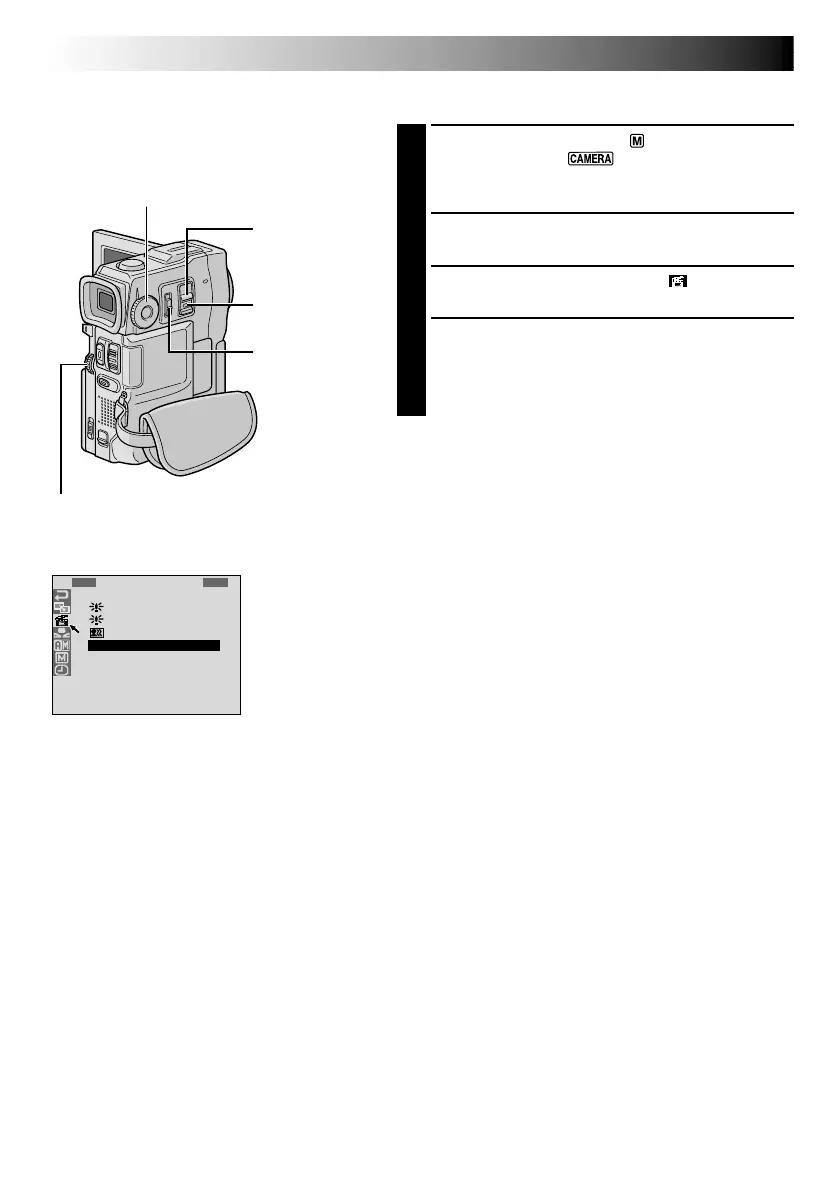
1
Set the Operation Switch to “ ”, then set the
POWER Switch to “ ” while pressing down the
Lock Button located on the switch. Pull out the
viewfinder fully or open the LCD monitor fully.
2
Press the MENU wheel. The Menu Screen appears.
3
Rotate the MENU wheel to select “ ”, then press it.
4
Rotate the MENU wheel to select the desired mode,
then press it. Selection is complete.
•The P.AE/EFFECT Menu disappears and the selected
mode is activated. The selected mode indicator
appears.
To Deactivate The Selected Mode . . .
.... select “OFF” in step 4.
NOTE:
Programme AE with special effects can be changed during
recording or during Record-Standby.
MENU Wheel
POWER Switch
IMPORTANT:
Some modes of Programme AE with special
effects cannot be used with certain Fade/Wipe
Effects (
pg. 29). If an unusable mode is
selected, its indicator blinks or goes out.
MODE Dial
Display
Menu Screen
Lock Button
Operation Switch



 To Next Page