EasyManua.ls Logo

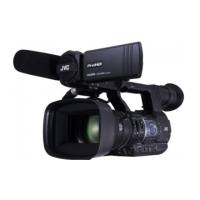
JVC GY-HM660U/GY-HM660E - User Manual

JVC GY-HM660U/GY-HM660E
192 pages
Print Icon
To Next Page IconTo Next Page
Loading...
.
HD MEMORY CARD CAMERA RECORDER
GY-HM660U/GY-HM660E/
GY-HM660RE/
GY-HM620U/GY-HM620E
INSTRUCTIONS
.
TIME CODE
The specifications and appearance of this unit are subject to change for further improvement without
prior notice.
Please check the latest version of the INSTRUCTIONS from the following Mobile User Guide. You can
also download the PDF from the Mobile User Guide.
Mobile User Guide
When you are outside, you can refer to the instructions from your Android phone or iPhone.
http://manual3.jvckenwood.com/pro/mobile/global/
You can view the Mobile User Guide using the browser on your Android phone or iPhone.
Thank you for purchasing this product.
Before operating this unit, please read the
instructions carefully to ensure the best
possible performance.
In this manual, each model number is
described without the last letter (U/E) which
means the shipping destination.
(U: for USA and Canada, E: for Europe)
Only ā€œUā€ models (GY-HM660U/GY-HM620U)
have been evaluated by UL.
Please read the following before getting started:
For Customer Use:
Model No.
Serial No.
Enter below the Serial No. which is located
on the body.
Retain this information for future reference.
GY-HM660U/GY-HM620U
IM 1.08
B5A-1237-20

Table of Contents

Other manuals for JVC GY-HM660U/GY-HM660E

Questions and Answers

  • V
    Victoria PhelpsSep 7, 2025
    Why is there no sound during JVC GY-HM660U/GY-HM660E Camcorder playback?
    • H
      Heather DorseySep 7, 2025
      If there is no sound during JVC Camcorder playback, it might be because the clip was recorded in Variable Frame Rec mode.
  • J
    Jessica BlevinsAug 25, 2025
    Why is my JVC GY-HM660U/GY-HM660E power not turning on?
    • M
      Mark MyersAug 25, 2025
      If your JVC Camcorder isn't powering on, ensure the AC adapter is properly connected and the battery is adequately charged. Also, if you've just turned it off, wait at least 5 seconds before attempting to power it on again.
  • A
    ashleyhowellAug 25, 2025
    How to fix JVC GY-HM660U/GY-HM660E Camcorder when power does not turn on?
    • A
      Amy WilliamsAug 26, 2025
      If your JVC Camcorder isn't powering on, ensure the AC adapter is properly connected and the battery is adequately charged. Also, if you've just turned it off, wait at least 5 seconds before attempting to power it on again.
  • L
    Lisa NicholsSep 17, 2025
    How to connect JVC GY-HM660U/GY-HM660E to wireless LAN?
    • C
      Christine BellSep 18, 2025
      To connect your JVC Camcorder to a wireless LAN, check the connection mode and settings, specifically the [SSID] and [Passphrase] if you're not using WPS. If you encounter a message about the Passphrase during browser setup, double-check and adjust the [Passphrase] again.
  • S
    sgomezSep 23, 2025
    Why is the actual recording time shorter than the estimated time on my JVC GY-HM660U/GY-HM660E Camcorder?
    • A
      alexanderzunigaSep 23, 2025
      The recordable time on your JVC Camcorder may be shorter than estimated depending on the shooting conditions or the subject.
  • T
    Tara WatsonSep 12, 2025
    How to resolve incorrect display on the viewfinder of JVC Camcorder?
    • B
      Brandi WileySep 12, 2025
      To resolve an incorrect display on the viewfinder of your JVC Camcorder, ensure that the LCD monitor is used with [LCD/VF] B [LCD + VF] set to ā€œOffā€.
  • J
    jbrockSep 3, 2025
    Why can't I upload clips to the FTP server from my JVC Camcorder?
    • C
      Catherine CunninghamSep 3, 2025
      If you're unable to upload clips to the FTP server from your JVC Camcorder, verify the [Clip Server] settings. Also, note that the maximum size of the recorded clip is 64 GB. If the FTP server has a file size limit, ensure it's set to more than 64 GB.
  • K
    Kelly JonesSep 3, 2025
    Why does the wireless LAN keep disconnecting on my JVC Camcorder?
    • R
      rwrightSep 3, 2025
      The wireless LAN on your JVC Camcorder may be disconnecting due to the environment. Try changing the usage environment or connect via wired LAN.
  • T
    Toni CastroSep 23, 2025
    Why is there an incorrect display on the viewfinder of my JVC GY-HM660U/GY-HM660E?
    • T
      Theresa HarrisSep 23, 2025
      If you notice an incorrect display on the viewfinder of your JVC Camcorder, check if the LCD monitor is used with [LCD/VF] B [LCD + VF] set to ā€œOffā€.
  • B
    barry12Aug 29, 2025
    What to do if the camera image is not output on the LCD monitor and viewfinder screen of my JVC GY-HM660U/GY-HM660E?
    • J
      Jeffrey NicholsonAug 29, 2025
      If the camera image is not output on the LCD monitor and viewfinder screen of your JVC Camcorder, ensure that the camera recorder is set to the Camera mode by using the [MODE] selection button.

JVC GY-HM660U/GY-HM660E Specifications

General IconGeneral
Camera TypeProfessional camcorder
Optical Zoom20x
Image StabilizationOptical
Max Video Resolution1920 x 1080
MicrophoneBuilt-in stereo microphone
TimecodeYes
Sensor Type3x 1/3" CMOS
Effective Pixels1920 x 1080
Aperture Rangef/1.6
ND FilterYes (1/4, 1/16)
Recording FormatMOV, MP4
Recording MediaSD/SDHC/SDXC memory cards
Audio FormatDolby Digital
Audio InputXLR
Video OutputHDMI, Composite
LCD Screen3.5" LCD
Battery TypeLithium-ion battery

Related product manuals