EasyManua.ls Logo

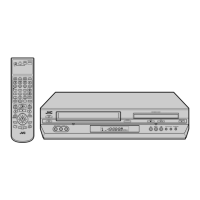
JVC HR-XVC27U - User Manual

JVC HR-XVC27U
92 pages
Print Icon
To Next Page IconTo Next Page
Loading...
Filename [XVC27U_02Cov1.fm]
DVD PLAYER &
VIDEO CASSETTE RECORDER
INSTRUCTIONS
LPT0893-001A
HR-XVC27U
For Customer Use:
Enter below the Model No. and
Serial No. which are located on the
rear of cabinet. Retain this
information for future reference.
Model No.
Serial No.
XVC27U_01.book Page 1 Wednesday, January 7, 2004 10:48 AM

Questions and Answers

  • C
    charlotte75Sep 18, 2025
    Why are the subtitles not appearing on the TV screen of JVC DVD VCR Combo?
    • M
      Marcus JoyceSep 18, 2025
      If the subtitles do not appear on the TV screen of your JVC DVD VCR Combo, it could be because the disc does not contain the subtitles, the subtitle display is set to off, or A-B Repeat Playback is in progress. Set the subtitles display to on. Note that the subtitles recorded around A-B point may not appear.
  • P
    patricia57Aug 25, 2025
    What to do if my JVC HR-XVC27U won't play a disc?
    • B
      Benjamin HoldenAug 25, 2025
      The JVC DVD Player may not play the disc for several reasons: * The disc's region number may not match the unit. In this case, use discs whose region number includes 'ALL' or '1'. * The disc type may be unplayable. Consult the section on 'Unplayable Discs'. * The disc may not be placed properly. Remove the disc and place it correctly in the disc tray. * The Parental Lock might be engaged, and the disc's rating is higher than the set level. Either temporarily release the Parental Lock or change the set level.
  • C
    Carrie BushAug 25, 2025
    Why is timer recording not working on my JVC HR-XVC27U?
    • S
      stephanie97Aug 26, 2025
      Timer recording won't work if the clock or timer settings are incorrect. Re-perform the clock and timer settings. Also, ensure the timer is engaged by pressing TIMER and confirming that '#' is displayed on the front display panel.
  • A
    Anthony BurnsAug 26, 2025
    How to operate the DVD deck on JVC HR-XVC27U?
    • H
      Hannah WaltonAug 26, 2025
      To operate the JVC DVD deck, press VCR/DVD repeatedly on the unit until the DVD indicator lights up. Alternatively, press DVD on the remote so that the DVD indicator illuminates.
  • M
    Morgan MooreSep 22, 2025
    Why is timer programming not possible on JVC DVD VCR Combo?
    • J
      Jason RodriguezSep 22, 2025
      Timer programming can’t be performed on your JVC DVD VCR Combo while a timer recording is in progress. Wait until it finishes.
  • W
    Wendy PachecoSep 23, 2025
    Why have channel settings that were made manually changed or disappeared on JVC DVD VCR Combo?
    • J
      Joseph DouglasSep 23, 2025
      If channel settings that were made manually seem to have changed or disappeared on your JVC DVD VCR Combo, it's because Auto Channel Set was performed after the manual settings were made. Perform manual setting again.
  • C
    christianlowerySep 9, 2025
    What does it mean when “#” on the front display panel won’t stop blinking on JVC DVD VCR Combo?
    • A
      Alexis BruceSep 9, 2025
      If “#” on the front display panel won’t stop blinking on your JVC DVD VCR Combo, it indicates that the timer is engaged but there’s no cassette loaded, or the loaded cassette has had its record safety tab removed. Load a cassette with the record safety tab intact, or remove the cassette and cover the hole with adhesive tape, or insert a cassette with the record safety tab intact.
  • S
    Shelia MendezSep 12, 2025
    Why does “N”, “” and “$” on the front display panel won’t stop blinking on JVC DVD VCR Combo?
    • T
      turnerpamelaSep 12, 2025
      If “N”, “” and “$” on the front display panel won’t stop blinking on your JVC DVD VCR Combo, it could be because the Satellite Auto Recording mode is engaged but there is no cassette loaded, the loaded cassette has had its record safety tab removed, or the end of the tape was reached during Satellite Auto Recording. Load a cassette with the record safety tab intact, remove the cassette and cover the hole with adhesive tape, or insert a cassette with the record safety tab intact. Next time make sure you have enough time on the tape to record the entire program.
  • J
    James PaulSep 3, 2025
    What to do if the disc cannot be played back on JVC DVD VCR Combo?
    • E
      Emily FlowersSep 3, 2025
      If your JVC DVD VCR Combo won't play a disc, there might be several reasons. First, ensure the disc's region code includes "ALL" or "4" to match the unit. Second, check if the disc type is supported. Third, remove the disc and place it properly in the disc tray. Finally, the Parental Lock might be engaged; either release it temporarily or change the set level.
  • A
    Andrew FoleySep 1, 2025
    Why can't I record TV broadcasts on my JVC HR-XVC27U?
    • M
      Michael SmithSep 1, 2025
      If TV broadcasts cannot be recorded on your JVC DVD Player, it may be because “F-1” has been selected as the input mode. Set the input mode to the desired channel.

Summary

Safety and Cautions

General Safety Warnings

Covers essential safety precautions for product use and electrical hazards.

Installation and Usage Safety

Details safety rules for installation, grounding, power, and ventilation.

Operational and Handling Precautions

Covers safe usage, cleaning, heat, servicing, and damage risks.

Environmental and Specific Warnings

Addresses moisture condensation, mobile phones, and placement advice.

Disc Information and Handling

Disc Types, Regions, and File Structure

Explains playable/unplayable discs, region codes, and disc file organization.

Disc Placement and Maintenance

Provides instructions on loading, handling, and caring for discs.

Unit Overview and Remote Control

Front Panel Controls and Indicators

Identifies and explains buttons, indicators, and ports on the front of the unit.

Rear Panel Connections

Details the various input and output connectors on the rear of the unit.

Remote Control Functions

Explains the operation and features of the remote control unit.

Installation and Initial Setup

Basic Connection Procedures

Guides on connecting the unit to the TV via RF or AV.

Advanced Video Connections

Instructions for S-VIDEO connection for DVD.

Component Video Connection

Instructions for Component Video connection for DVD.

Initial Setup (Plug & Play)

Automatic clock and tuner channel setup process.

Monitor Type Settings

Guides on selecting the appropriate monitor type for DVD playback.

Language and Menu Settings

Procedures for setting on-screen language for VCR and DVD decks.

Clock and Tuner Configuration

Guides on setting the clock and tuning channels manually or semi-automatically.

VCR Deck Operations

Basic VCR Playback

Steps for loading a cassette and starting playback.

VCR Playback Features

Details on still picture, slow motion, search, and playback controls.

VCR Recording Procedures

Covers basic recording, timer, express timer, and satellite recording.

DVD Deck Operations

Basic DVD Playback and Disc Loading

Instructions for loading discs and starting DVD playback.

DVD Playback Features and Menus

Covers navigating menus, search, audio, subtitle, angle, and picture settings.

Media File Playback (MP3;JPEG)

Guides on playing MP3 and JPEG files from discs.

Editing and Dubbing Functions

VCR Editing and Dubbing

Procedures for editing from camcorders and other recorders.

DVD Dubbing and Audio Transfer

Steps for dubbing DVD to VCR and digital audio transfer.

Audio Output Configuration

Connecting Dolby Digital and DTS Devices

Instructions for connecting to audio decoders or amplifiers.

Subsidiary Settings

VCR Deck Mode Settings

Explains picture control, sound monitor, and timer settings for VCR.

DVD Deck Mode Settings

Covers resume function, parental lock, and scan mode settings for DVD.

Troubleshooting and Q&A

Troubleshooting VCR Issues

Guides for resolving power, tape transport, and playback problems on VCR.

Troubleshooting DVD and Media Issues

Solutions for DVD, MP3, JPEG playback, and recording errors.

General Problems and Q&A

Addresses other system issues and frequently asked questions.

Specifications

General and Tuner Specifications

Provides detailed technical data for general components and the tuner.

VCR and DVD Deck Specifications

Lists technical details for the VCR and DVD deck sections.

JVC HR-XVC27U Specifications

General IconGeneral
BrandJVC
ModelHR-XVC27U
CategoryDVD Player
LanguageEnglish

Related product manuals