KEY TRANSPOSE '
This
function
makes
it possible
to
transpose
the
key
of
any piece; this
is
convenient when
the
vocalist sings
in
a different key from
that
in
which
the
piece
is
written; by transposing
to
the key of C,
you
can also avoid playing
so,
many black notes.
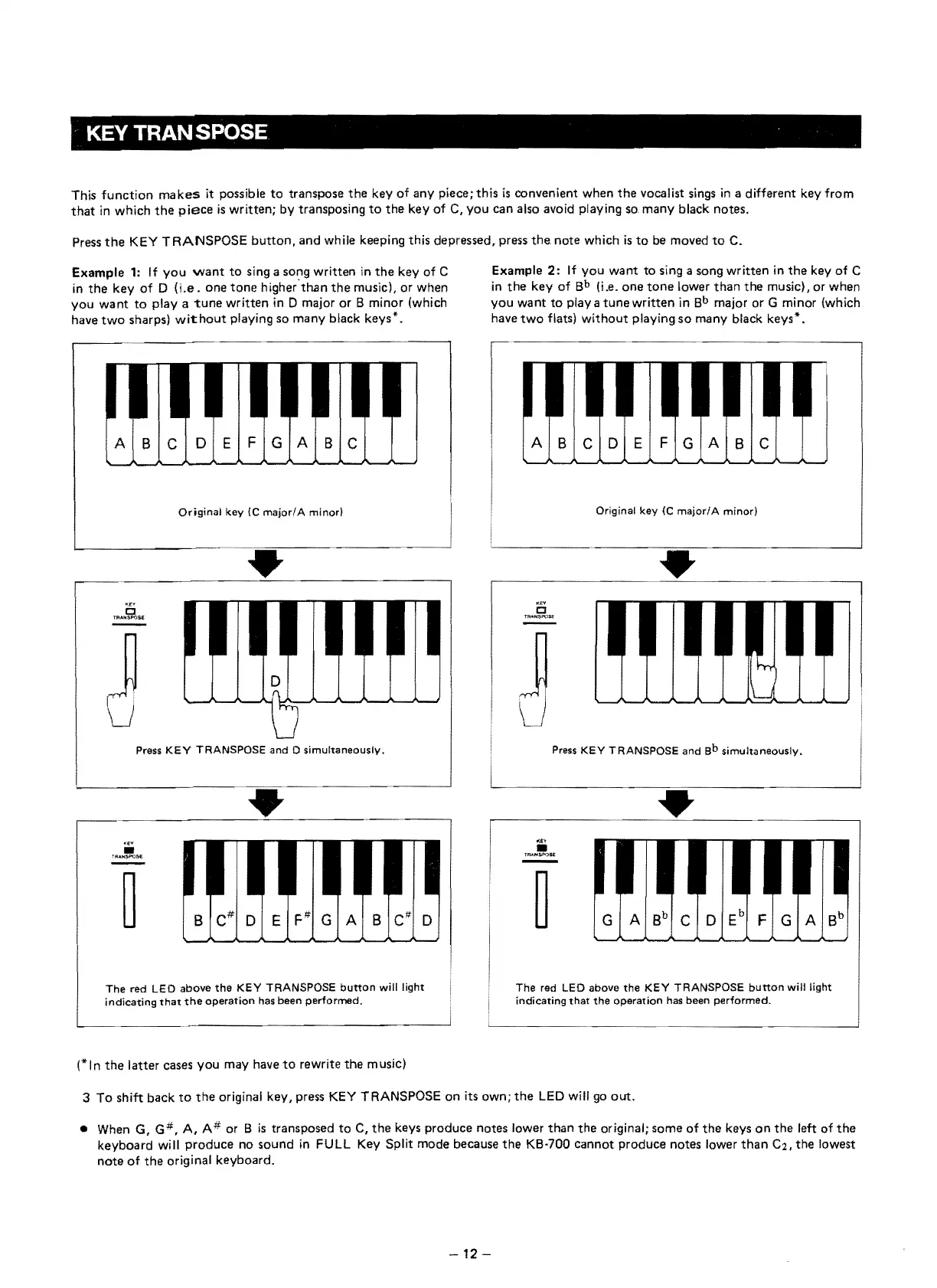
Press
the
KEY
TRANSPOSE
button,
and while keeping this depressed, press
the
note which
is
to
be moved
to
C.
Example
1:
If
you
want
to
sing a song written
in
the
key of C
in
the
key
of
D
O.e.
one
tone
higher'th.an
the
musicl, or when
you
want
to
playa
tune
written
in
D major or B minor (which
have
two
sharps)
wit:hout
playing so many black keys".
ABC
DEFGABC
Original
key
{C
majorl
A
minorl
•
J
u
Press
KEY
TRANSPOSE
and 0 simultaneously.
'"
•
1'R,r.NsPOSE
The
red
LEO
above
the
KEY
TRANSPOSE
button
will
light
indicating
that
the
operation
has
been
performed.
(* I n
the
latter cases you may have
to
rewrite
the
m usic)
Example
2:
If
you
want
to sing a song written
in
the
key
of
C
in
the
key
of
Bb
(i .e. one
tone
lower
than
the
music), or when
you
want
to
playa
tune
written
in
Bb
major or G minor (wh ich
have
two
flats)
without
playing
so
many black keys*.
ABC
0 E F
GAB
Original
key
(C
major/A
minor)
•
j
l)
Press
KEY
TRANSPOSE
and
Sb
simultaneously.
•
The
red LEO above
the
KEY
TRANSPOSE
button
will
light
indicating
that
the
operation
has
been
performed,
3 To shift back
to
the
original key, press
KEY
TRANSPOSE
on
its own;
the
LED
will
go
out.
• When G,
G#,
A, A #
er
B
is
transposed
to
C,
the
keys produce notes lower
than
the original; some
of
the
keys
on
the
left
of
the
keyboard will produce no sound
in
FULL Key Split mode because
the
KB·700 cannot produce notes lower
than
C2,
the
lowest
note
of
the
original keyboard.
-12-


 To Next Page