EasyManua.ls Logo

JVC KB-700 - Magic Foot Switch and Expression Pedal; Magic Foot Switch

JVC KB-700
19 pages
Print Icon
To Next Page IconTo Next Page
To Previous Page IconTo Previous Page
Loading...
MAGie
FOOT
SWITCH AND EXPRESSION PEDAL
MAGie
FOOT
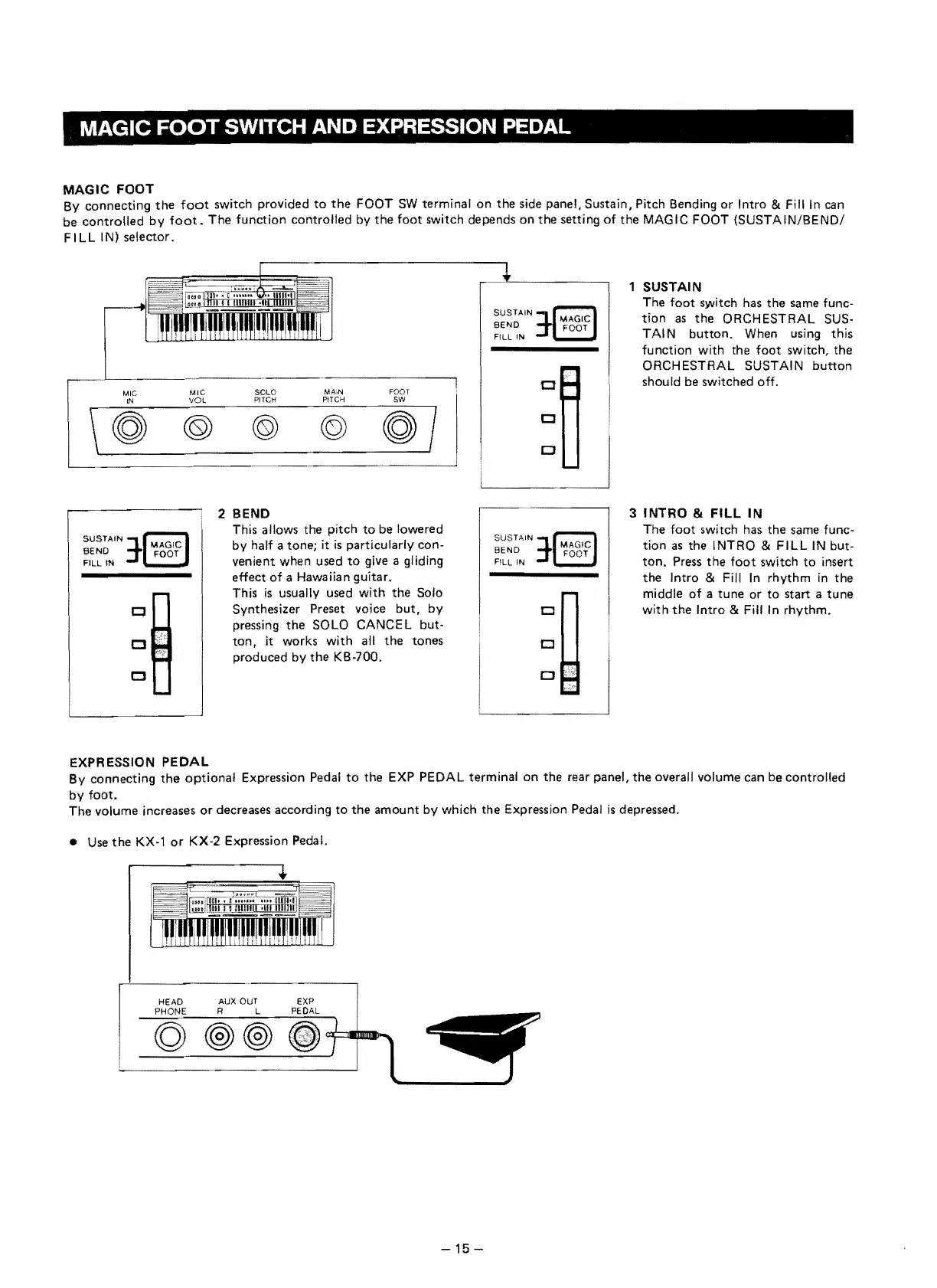
By
eonneeting
the
foot
switeh provided
to
the
FOOT
SW
terminal
on
the
side panel,
Sustain,
Piteh Bending
or
Intro &
Filiin
can
be
eontrolled
by
foot.
The
function
eontrolled
by
the
foot
switeh depends
on
the
setting
of
the
MAGIC FOOT (SUSTAIN/BEND/
FILL
IN)
selector.
MA,N
FOOT
LN
VOl
PITCH
PITCH
sw
MIC
M'C
SOLO
\
~
©
® ©
~I
1 SUSTAIN
The
foot
switeh has
the
same fune-
SUSTAIN
Cl
CJ
CJ
tion
as
the
ORCHESTRAL SUS-
SEND
FILL IN
TAIN
button.
When using
this
funetion with the
foot
switeh,
the
ORCHESTRAL SUSTAIN
button
should be switehed off.
3
INTRO
&
FILL
IN
The
foot
switeh has
the
same fune-
tion
as
the
INTRO &
FILL
IN but-
ton.
Press
the
foot
switeh
to
insert
the
Intro & Fill
In
rhythm
in
the
middle
of
a
tune
or
to
start a
tune
with
the
Intro & Fill In
rhythm.
2 SEND
This allows the piteh
to
be lowered
by
half a
tone;
it
is
partieularly eon-
venient
when
used
to
give a gliding
effeet
of
a Hawaiian guitar.
This
is
usually used
with
the
Solo
Synthesizer Preset voiee
but,
by
pressing
the
SOLO CANCEL but-
ton,
it works
with
all
the
tones
produeed
by
the
KB-700.
EXPRESSION
PEDAL
Sy
eonneeting
the
optional
Expression Pedal
to
the
EXP PEDAL terminal
on
the
rear panel,
the
overall volume
ean
be eontrolled
by
foot.
The
volume inereases
or
deereases aeeording
to
the
amount
by whieh
the
Expression Pedal
is
depressed.
Use
the
KX-1
or
KX-2 Expression Pedal.
HEAD AUX OUT
PHONE
R L
-15
-

Other manuals for JVC KB-700