Select ONE
FI
NGER
or
MULTI FINGER mode of
COMPUCORDER
..
. .
-"
When used
together
with
the
Fascinating Chord and
Auto
Rhythm,
the
Compucorder allows
the
accompaniments for up
to
three
tunes
to
be
stored
(RECORDed)
and
reproduced (REPLAYed).
Once a
tune's
rhythmic
accompaniment
is
stored
in
memory,
to
play back
the
complete
tune,
all
that
is
necessary is.to play
the
melody.
The
chords and bass
patterns
are stored
in
memory so
that
the
rhythm,
rhythm
tempo,
arpeggio, melody voices, effects and volumes
can
be
va
ried
to
produce
any required effect.
For recording,
it
is
either
possible
to
store chords and basses simultaneously or separately:
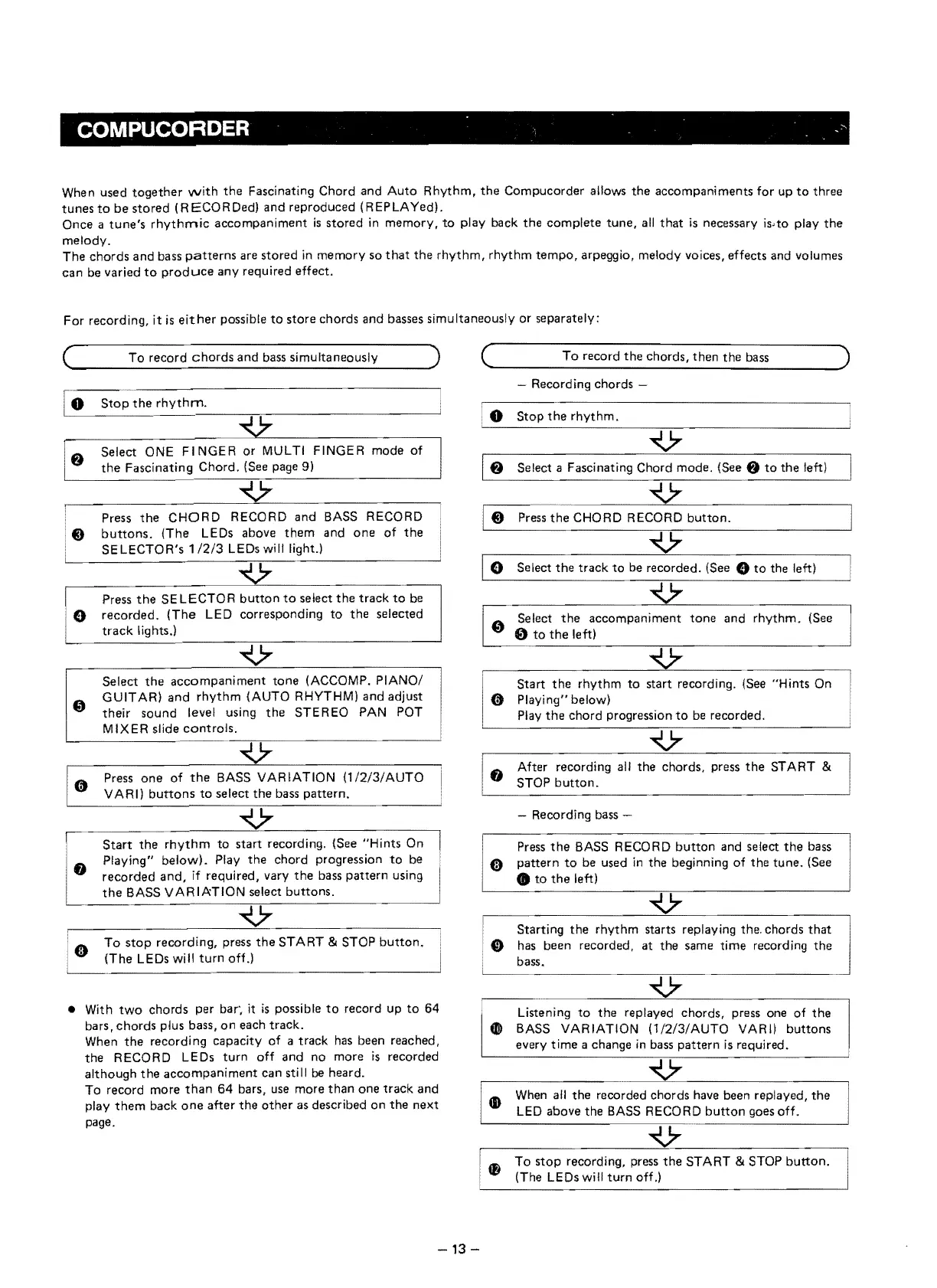
To
record
chords
and
bass simultaneously
the
Fascinating Chord. (See page 9)
Press
the
CHORD
RECORD
and
(The LEDs above
them
1/2/3
LEDs will
BASS RECORD
and
one
of
the
Press
the
SELECTOR
button
to
select
the
track
to
be
iO
recorded.
(The
LED corresponding
to
the
selected
track
lights.l
Select
the
accompaniment
tone
(ACCOMP. PIANO/
GUIT AR)
and
rhythm
(AUTO RHYTHMI and adjust
their sound level using
the
STEREO PAN POT
MIXER slide
controls.
Press
one
of
the
BASS VARIATION
(1/2/3/AUTO
V ARI)
buttons
to
select
the
bass
pattern.
'
r
,
Start
the
rhythm
to start recording. (See "Hints On
Playing"
belowl.
Play
the
chord progression
to
be
8 recor.
ded
and,
if required, vary
the
bass
pattern
using
the
BASS VARIATION select buttons.
Cl)
To
stop
recording, press
the
START & STOP
button.
(The LEDs will
turn
off.)
'---
..
_----------------------'
• With
two
chords per bar',
it
is
possible
to
record up
to
64
bars,
chords
plus bass,
on
each track.
When
the
recordi
ng
capacity
of
a track has been reached,
the
RECORD LEDs
turn
off and no more
is
recorded
although
the
accompaniment
can still
be
heard.
To record more
than
64
bars,
use
more
than
one
track
and
play
them
back
one
after
the
other
as described on
the
next
page.
(
To
record the chords, then the bass )
~--------------------
Recording chords
o
Stop
the
rhythm.
8 Select a Fascinating Chord mode. (See 8
to
the
left)
Press
the
CHORD RECORD
button.
o Select
the
track
to
be recorded.
(See"
to
the left)
[
0se
..
lect
the
accompaniment
tone
and
rhythm.
(See
o
to
the
left)
....
V
Start
the
rhythm
to
start recording. (See "Hints On
Ci)
Playing" below)
Play
the
chord progression
to
be recorded.
8 After recording all
the
chords, press
the
START &
STOP
button.
Recording bass
Press
the
BASS
RECORD
button
and select
the
bass
o
pattern
to
be used
in
the beginning
of
the tune. (See
•
to
the
left)
Starting
the
rhythm starts replaying the. chords
that
o has been recorded, at
the
same time recording
the
bass.
Listening
to
the
replayed chords, press one
of
the
• BASS VARIATION (1/2!3/AUTO VARI) buttons
every time a change
in
bass pattern
is
required.
(D
When
all the recorded chords have been replayed,
the
LED
above the BASS RECORD
button
goes
off.
V···
4&
To
stop
recording, press
the
START & STOP
button.
(The LEDs will
turn
off.)
-13
-


 To Next Page