PREPARATIONS
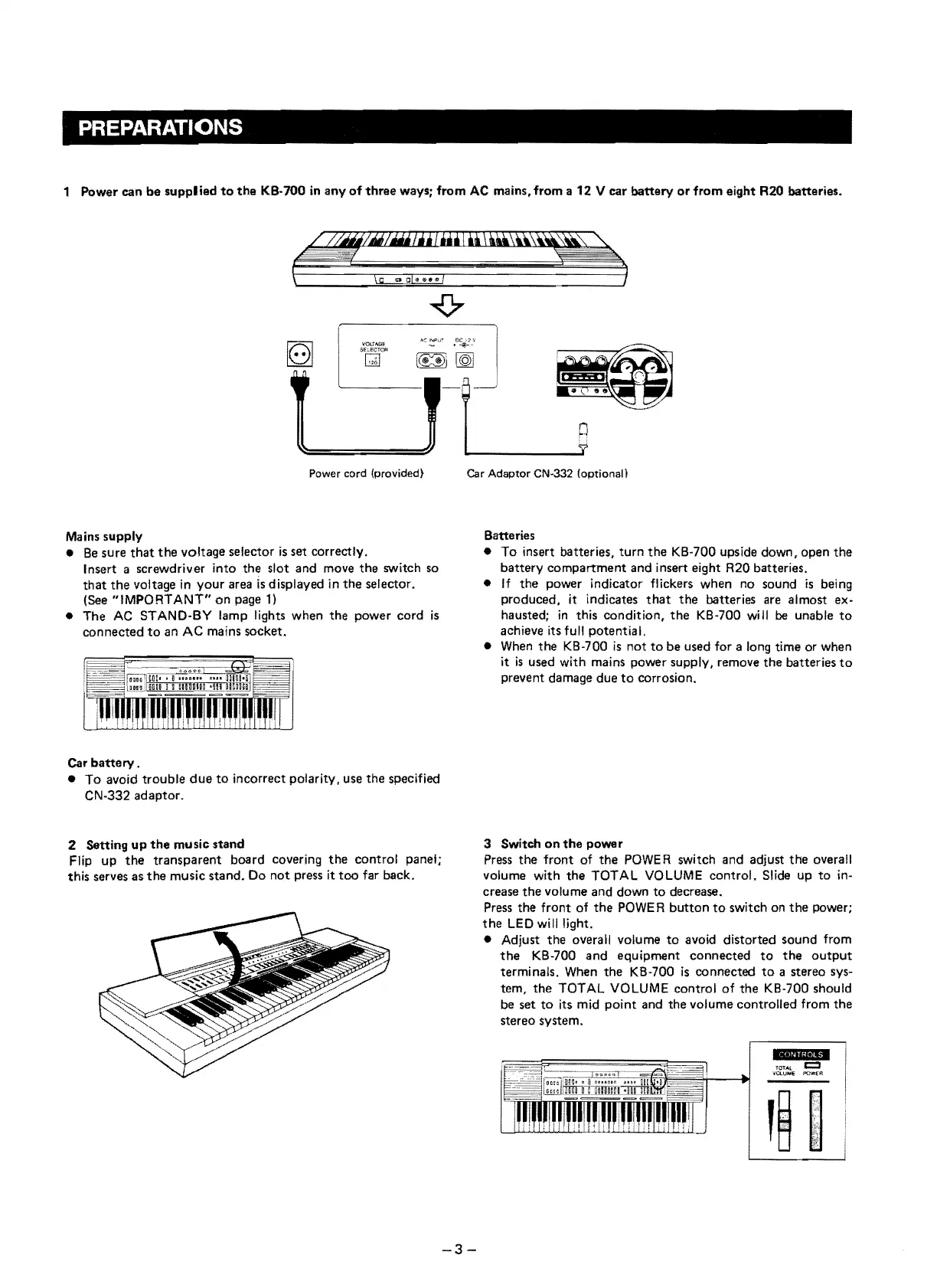
1 Power can
be
supplied
to
the
KB-700
in
any
of
three
ways; from
AC
mains, from a 12 V car battery
or
from eight R20 batteries.
Power cord
(provided)
p
Car
Adaptor
CN·332
(optional)
Mains supply
•
Be
sure
that
the
voltage selector
is
set correctly.
Insert a screwdriver into the slot and move
the
switch so
that
the
voltage
in
your area
is
displayed
in
the
selector.
(See
"IMPORTANT"
on
page
1)
• The
AC
STAND·BY lamp lights when the power cord
is
connected
to
an
AC
mains socket.
Batteries
• To insert batteries, turn
the
KB·700 upside down, open
the
battery compartment and insert eight R20 batteries.
•
If
the power indicator flickers when no sound
is
being
produced, it indicates
that
the batteries are almost ex-
hausted;
in
this condition,
the
KB-700 will
be
unable
to
achieve its full potential.
•
When
the KB-700
is
not
to
be used 10r a long time or when
it
is
used with mains power supply. remove the batteries
to
prevent damage due
to
corrosion.
Car
battery
.
• To avoid trouble
due
to
incorrect polarity, use the specified
CN-332 adaptor.
2 Setting
up
the
music stand
Flip up
the
transparent board covering the control panel;
this serves as
the
music stand.
00
not press it
too
far back.
3 Switch
on
the
power
Press the front of the
POWER
switch and adjust the overall
volume with the TOTAL VOLUME contro!. Slide up
to
in-
crease the volume and down
to
decrease.
Press the front of
the
POWE
R
button
to
switch on
the
power;
the
LED
will light.
• Adjust the overall volume
to
avoid distorted sound fram
the
KB-700 and equiprnent connected
to
the
output
terminals. When the KB-700
is
connected
to
a stereo sys-
tem, the TOTAL VOLUME
contra
I
of
the KB-700 should
be set
to
its mid
point
and the volume controlled from the
stereo system.
.dlilill.
..
TOTAL
c::::I
VOLUh1l€
f'OW€A
-3-


 To Next Page