NAMES
OF
SECTIONS
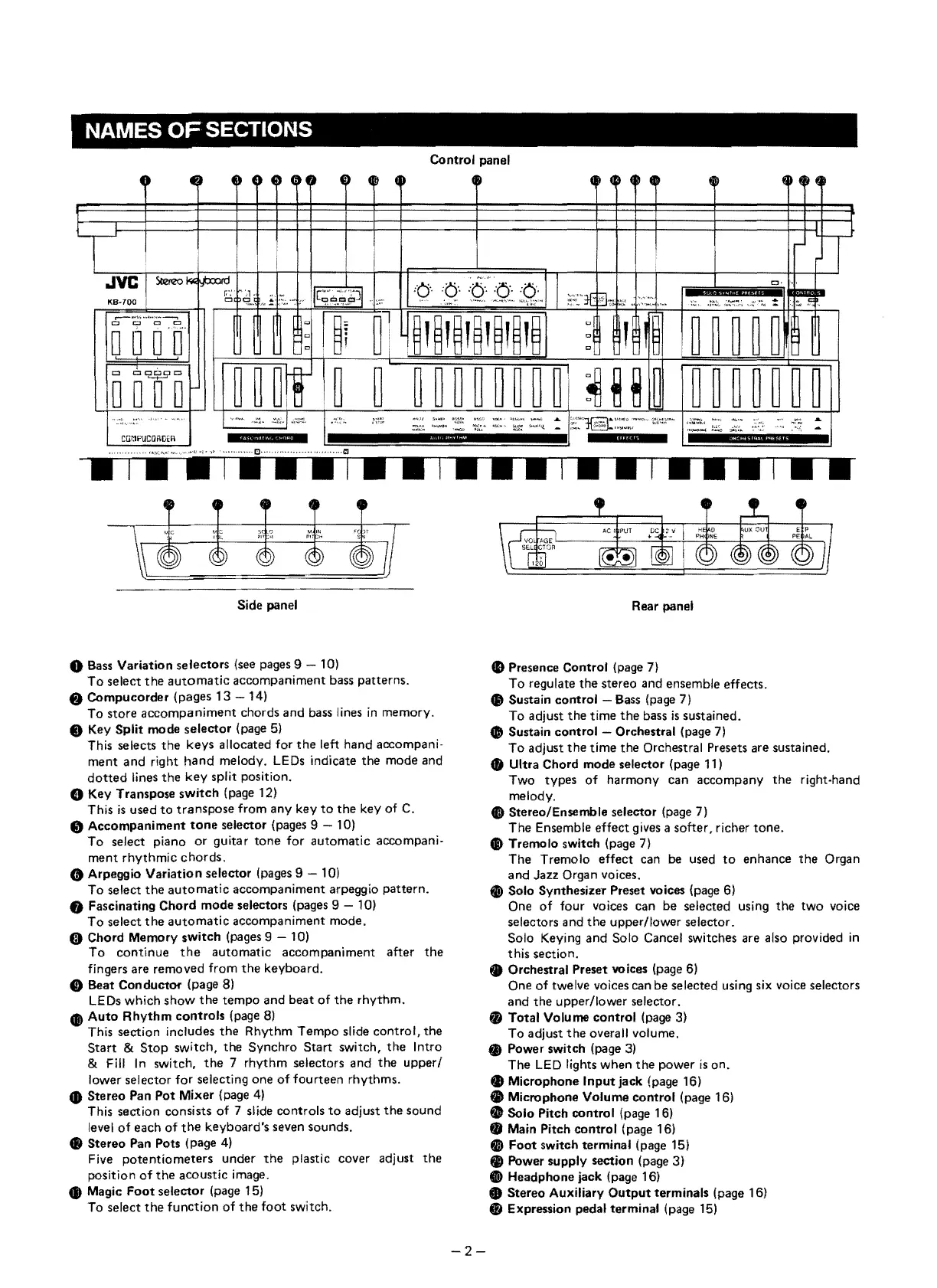
Control panel
0
~~
U
4~ 4~
0
4~
4>
4~
~~
U
~~
(
o 4
@~
~
H
~
~
r
I
,....1.
rr
i
JVC
SI.e!TZO"'"
fJ=ro.
11
.
~
..
~..
1
CJ·
'~
r,
..
~~,!
o
11[9"!.9:~)1
.
:6"
'.Q"
':~t:Q::
~~:'"
~~·lt
~.~,
~:L
I::·.~
...
,.
:c
.:~~.
~~,;
..
~':.
:::
!I
KB-700
D &.
'~'.
,
,.
~l
~~,~,~,~,~,~,~
-
---
..
,"
..
~
..
"
...
---,
I
'"
~l
"
,
~~
I
~
~
~
~
~
~
t::l
c:J
C
Cl
0000
I
"
0
c
"
t::l
cc::a:JCJc
~
~
~I!
I~
~ ~
~
~
~
~
~
~
~!
~~ij
~
~
~
~
~
~
~
~
'-+-'
0
0 0 0
. "
~,",'
""''''~
..
".1
•.
~tl.1
1~~~
....
,'.
s ..... >
~s.
-
,,.,
....:,
~
E~1§:::~:.:·"'·
i~loi
..
ft"
':;;:,::
:O:i
&
:;;:;::..
"_tA
.~.
~--:
~~""'-l
-
,.""',"'"
~
;;.~;;~
-
CGr:1PUCGRGtR
,
!iM
"iililli
inil
H"Mii6"9"e
, , ,
.,
..
...
,
..
,
...
,
..
...
..
Side panel
o Bass Variation selectors (see pages 9 - 10)
To
seleet
the
automatie
aeeompaniment bass patterns,
..
Compucorder (pages
13
- 14)
To store
accompaniment
ehords and bass lines
in
memory.
@)
Key Split mode selector (page
5)
This seleets
the
keys alloeated for
the
left hand accompani-
ment
and right
hand
melody. LEDs indieate the mode and
dotted
lines
the
key
split position.
o Key Transpose
switch
(page 12)
This
is
used
to
transpose
from any key
to
the
key of C.
• Accompaniment
tone
selector (pages 9 - 10)
To
seleet piano
or
guitar
tone
for automatie accompani-
ment
rhythmie
ehords.
G Arpeggio Variation selector (pages 9 - 10)
To seleet
the
automatie
aeeompaniment arpeggio pattern.
• Fascinating Chord mode selectors (pages 9 10)
To
seleet
the
automatie
aecompaniment mode.
G Chord Memory switch (pages 9 - 10)
To
eontinue
the
automatie aeeompaniment after
the
fingers are removed from
the
keyboard.
CI)
Beat Conductor (page
8)
LEDs whieh
show
the
tempo and beat
of
the
rhythm.
•
Auto
Rhythm
controls
(page
8)
This section ineludes
the
Rhythm Tempo slide eontrol,
the
Start
&
Stop
switeh,
the
Synehro Start switeh,
the
Intro
& Fill
In
switeh,
the
7 rhythm seleetors and
the
upper/
lower seleetor for selecting one
of
fourteen rhythms.
• Stereo Pan Pot Mixer (page
4)
This section eonsists
of
7 slide controls
to
adjust
the
sound
level
of
eaeh
of
the
keyboard's seven sounds.
48
Stereo Pan Pots (page
4)
Five
potentiometers
under
the
plastic cover adjust
the
position
of
the
acoustic image.
• Magic
Foot
selector (page 15)
To select
the
function
of
the
foot
switeh,
Rear panel
CD
Presence Control (page 7)
To regulate the stereo and ensemble effeets .
.,
Sustain control - Bass (page 7)
To adjust
the
time
the
bass
is
sustained.
.,
Sustain control - Orchestral (page
7)
To
adjust
the
time
the
Orchestral Presets are sustained.
• Ultra Chord mode selector (page 11)
Two types
of
harmony ean aecompany
the
right-hand
melody.
I)
Stereo/Ensemble selector (page 7)
The Ensemble effeet gives a softer, richer
tone.
6\)
Tremolo switch (page
7)
The Tremolo effeet can
be
used
to
enhanee
the
Organ
and Jazz Organ voices.
Ci)
Solo SynthesizErr Preset voices (page
6)
One
of
tour
voices ean be seleeted using
the
two
voiee
selectors and
the
upperflower selector.
Solo Keying and Solo Caneel switehes are also provided
in
this seetion.
• Orchestral Preset voices (page
6)
One
of
twelve voices can be selected using six voiee seleetors
and the upper/lower seleetor.
• Total Volume control (page 3)
To adjust
the
overall volume.
• Power switch (page
3)
The
LED
lights when
the
power
is
on.
• Microphone
Inputjack
(page 16)
.,
Microphone Volume control (page 16)
..
Solo Pitch control (page 16)
.,
Main Pitch control (page 16)
GI
Foot
switch terminal (page 15)
..
Power supply section (page 3)
e Headphone jack (page 16)
• Stereo Auxiliary
Output
terminals (page 16)
• Expression pedal terminal (page
15)
2-


 To Next Page
 Loading...