EasyManua.ls Logo

JVC KB-700 - Auto Rhythm; Rhythm Selection

JVC KB-700
19 pages
Print Icon
To Next Page IconTo Next Page
To Previous Page IconTo Previous Page
Loading...
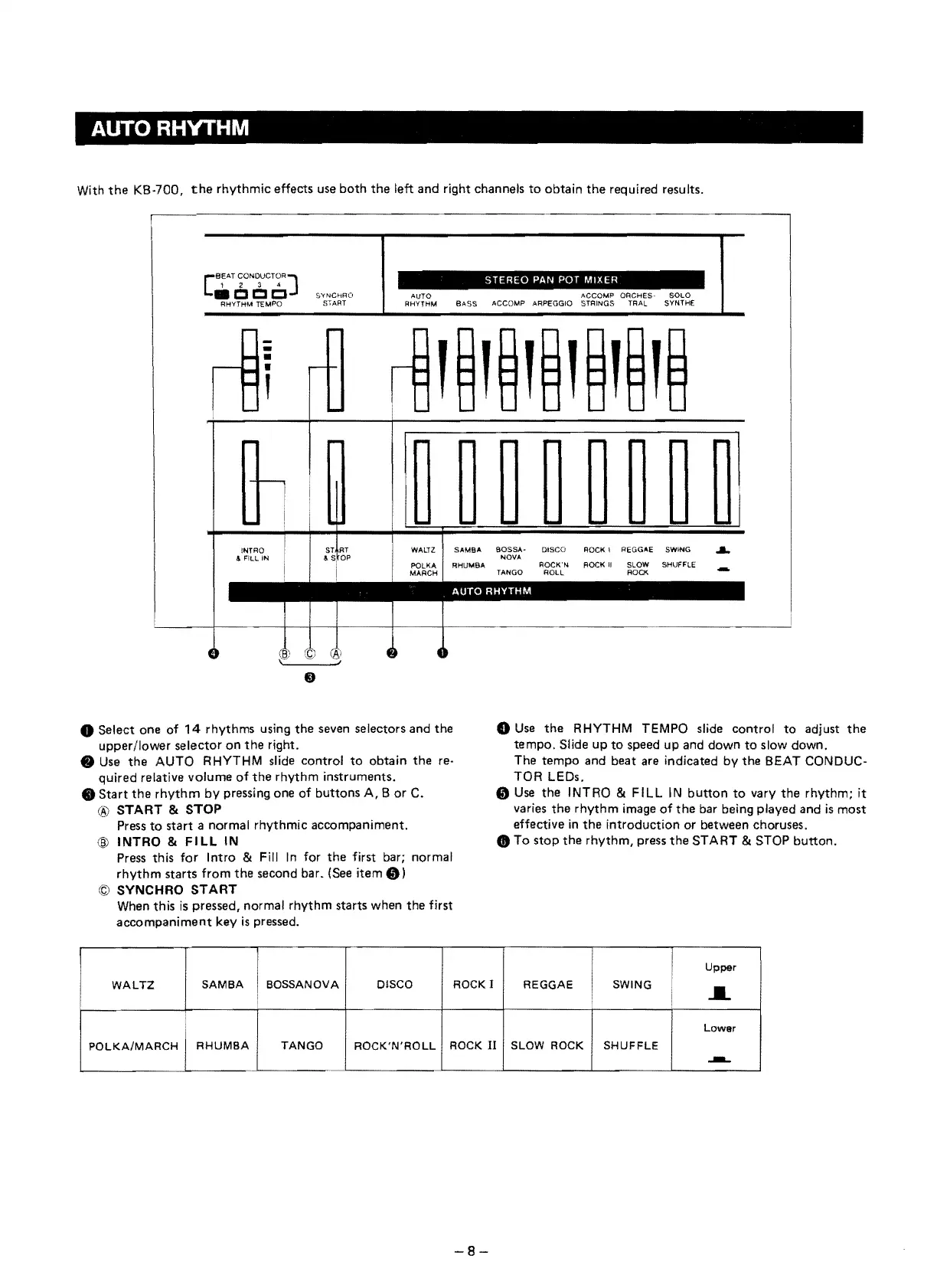
AUTORHYTHM
With
the
KB·700,
the
rhythmic effeets use
both
the
left and right ehannels
to
obtain
the
required results.
BEAT
CONOUCTORJ
STEREO
PAN
POT
MIXER
' 2 3 4
AUTO ACCOMP ORCHES- SOLO
[
C C
Cl
$YNCHRO
RHVTHM
BASS
ACCOMP
ARPEGGIO STRINGS
TRAl
SYNTH€
RHYTHM
TEMPO
S,ART
Seleet one of
14
rhythms using
the
seven seleetors and the
upper/lower seleetor
on
the
right .
..
Use
the
AUTO RHYTHM slide eontrol
to
obtain
the
re·
quired relative volume
of
the
rhythm instruments.
Start
the
rhythm
by pressing one
of
buttons A, B
or
C.
® START &
STOP
Press
to
start
anormal
rhythmie aeeompaniment.
@ INTRO &
FILL
IN
Press this
for
Intro & Fill
In
for
the
first bar; normal
rhythm
starts from
the
seeond bar. (See item
Cf))
© SYNCHRO
START
When this
is
pressed, normal rhythm starts when
the
first
aeeompaniment
key
is
pressed.
o
Use
the
RHYTHM TEMPO slide eontrol
to
adjust
the
tempo.
Slide up
to
speed
up
and down
to
slow down.
The tempo and beat are indieated by
the
BEAT CONDUC·
TOR LEDs.
Cf)
Use
the
INTRO & FILL
IN
button
to
vary
the
rhythm; it
varies
the
rhythm
image
of
the
bar being played and
is
most
effeetive
in
the
introduetion or between ehoruses.
..
To
stop
the
rhythm, press
the
START & STOP
button.
WALTZ
SAMBA
BOSSANOVA DISCO ROCK I
POLKA/MARCH
I
RHUMBA
TANGO
ROCK'N'ROLL
ROCK
II
1
Upper
REGGAE SWING
i
.....
Lower
SLOW ROCK
SHUFFLE
..JIIIL.
8-

Other manuals for JVC KB-700