EasyManua.ls Logo

JVC KD-21 - Page 6

JVC KD-21
29 pages
Print Icon
To Next Page IconTo Next Page
To Previous Page IconTo Previous Page
Loading...
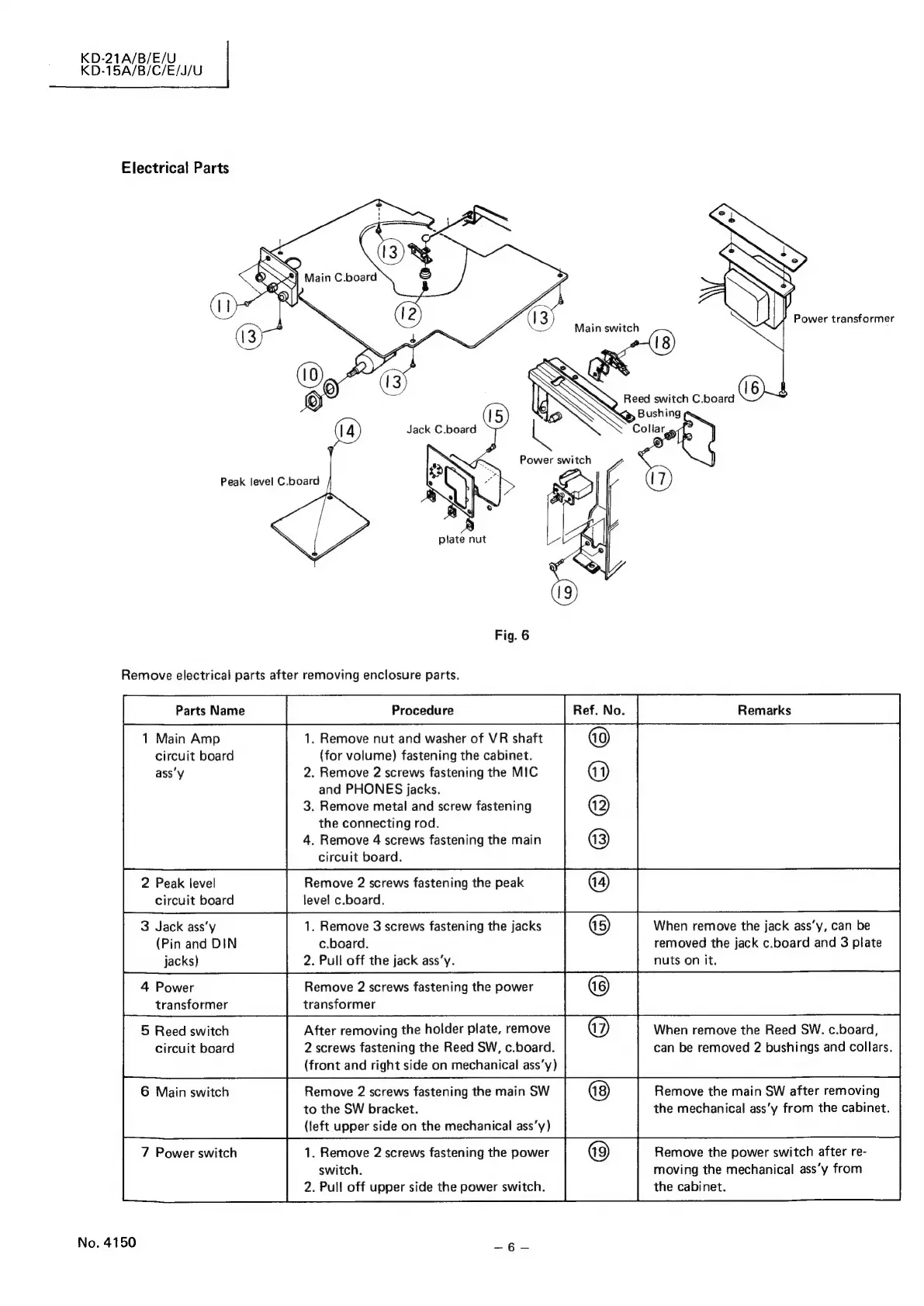
Electrical
Parts
Peak
level
C.board
plate
nut
Fig.
6
Remove
electrical
parts
after
removing
enclosure
parts.
1
Main
Amp
circuit
board
assy
2
Peak
level
circuit
board
3
Jack
ass’y
(Pin
and
DIN
jacks)
5
Reed
switch
circuit
board
No.
4150
.
Remove
nut
and
washer
of
VR
shaft
(for
volume)
fastening
the
cabinet.
.
Remove
2
screws
fastening
the
MIC
and
PHONES
jacks.
.
Remove
metal
and
screw
fastening
the
connecting
rod.
.
Remove
4
screws
fastening
the
main
circuit
board.
1.
Remove
3
screws
fastening
the
jacks
c.board.
2.
Pull
off
the
jack
ass’y.
After
removing
the
holder
plate,
remove
2
screws
fastening
the
Reed
SW,
c.board.
(front
and
right
side
on
mechanical
ass‘y)
Remove
2
screws
fastening
the
main
SW
to
the
SW
bracket.
(left
upper
side
on
the
mechanical
ass’y)
1.
Remove
2
screws
fastening
the
power
switch.
2.
Pull
off
upper
side
the
power
switch.
When
remove
the
jack
ass’y,
can
be
removed
the
jack
c.board
and
3
plate
nuts
on
it.
When
remove
the
Reed
SW.
c.board,
can
be
removed
2
bushings
and
collars.
Remove
the
main
SW
after
removing
the
mechanical
ass’y
from
the
cabinet.
Remove
the
power
switch
after
re-
moving
the
mechanical
ass’y
from
the
cabinet.

Related product manuals