EasyManua.ls Logo

JVC KD-21 - Page 7

JVC KD-21
29 pages
Print Icon
To Next Page IconTo Next Page
To Previous Page IconTo Previous Page
Loading...
|
KD-21A/B/E/U
KD-15A/B/C/E/J/U
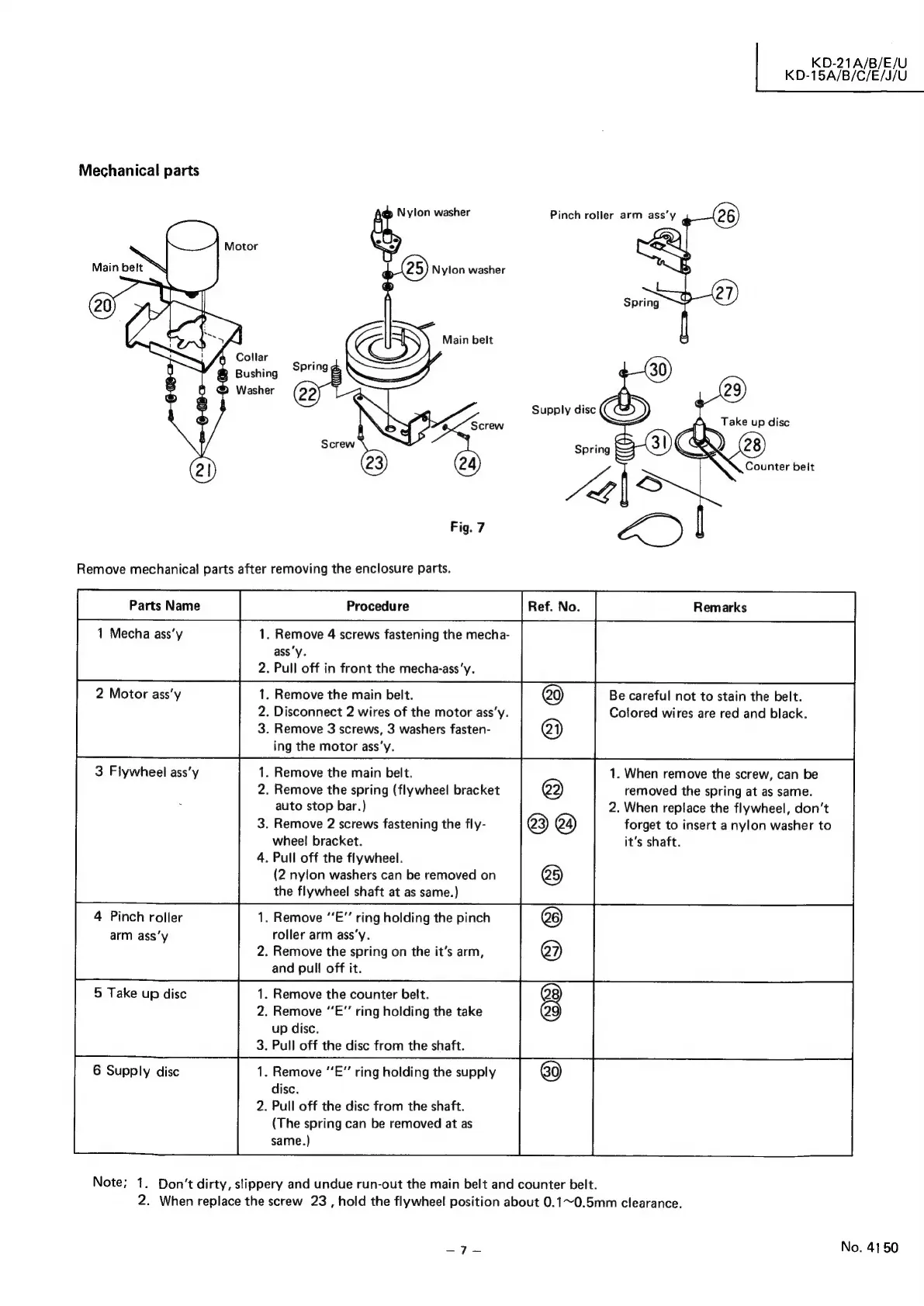
Mechanical
parts
@
Nylon
washer
Pinch
roller
arm
ass’y
|
Nylon
washer
Main
belt
Collar
R
Bushing
Washer
Fig.
7
Remove
mechanical
parts
after
removing
the
enclosure
parts.
1
Mecha
ass’y
1.
Remove
4
screws
fastening
the
mecha-
ass'y.
.
Pull
off
in
front
the
mecha-ass’y.
3
Flywheel
ass’y
Be
careful
not
to
stain
the
belt.
Colored
wires
are
red
and
black.
1.
Remove
the
main
belt.
2.
Disconnect
2
wires
of
the
motor
ass’y.
3.
Remove
3
screws,
3
washers
fasten-
ing
the
motor
ass’y.
®
®
1.
When
remove
the
screw,
can
be
removed
the
spring
at
as
same.
2.
When
replace
the
flywheel,
don’t
forget
to
insert
a
nylon
washer
to
it’s
shaft.
.
Remove
the
main
belt.
.
Remove
the
spring
(flywheel
bracket
auto
stop
bar.)
3.
Remove
2
screws
fastening
the
fly-
wheel
bracket.
4.
Pull
off
the
flywheel.
(2
nylon
washers
can
be
removed
on
the
flywheel
shaft
at
as
same.)
nNO—
®
©
®
.
Remove
“E”’
ring
holding
the
pinch
roller
arm
ass’y.
2.
Remove
the
spring
on
the
it’s
arm,
and
pull
off
it.
4
Pinch
roller
arm
ass‘y
5
Take
up
disc
6
Supply
disc
Note;
1.
Don’t
dirty,
slippery
and
undue
run-out
the
main
belt
and
counter
belt.
2.
When
replace
the
screw
23
,
hold
the
flywheel
position
about
0.1~0.5mm
clearance.
©
©]
©
1.
Remove
the
counter
belt.
2.
Remove
“E”
ring
holding
the
take
up
disc.
3.
Pull
off
the
disc
from
the
shaft.
1.
Remove
“E”
ring
holding
the
supply
disc.
2.
Pull
off
the
disc
from
the
shaft.
(The
spring
can
be
removed
at
as
same.)
ay
eee
No.
4150

Related product manuals