EasyManua.ls Logo

JVC KD-A11 - Page 11

JVC KD-A11
29 pages
Print Icon
To Next Page IconTo Next Page
To Previous Page IconTo Previous Page
Loading...
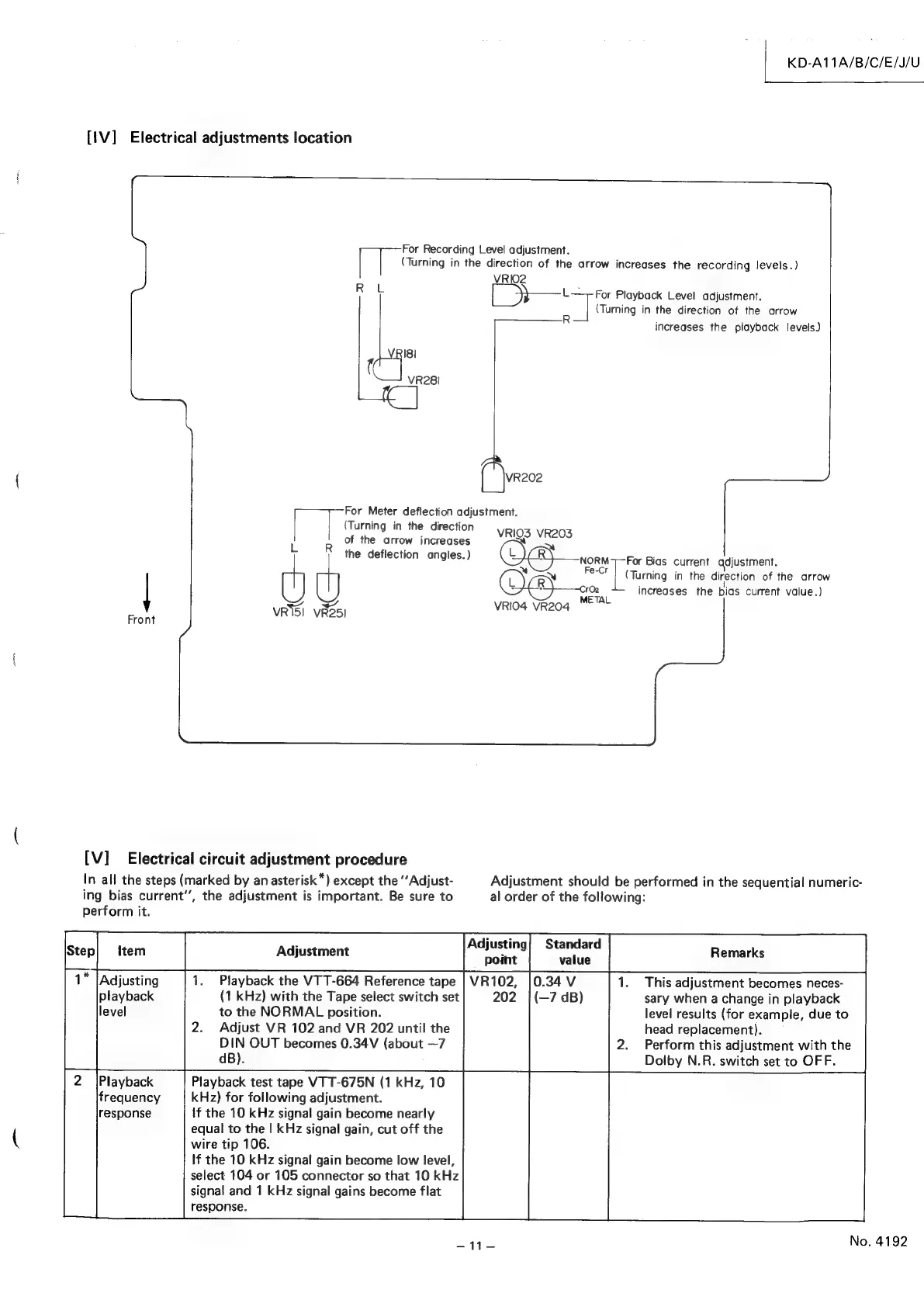
{1V]
Electrical
adjustments
location
For
Recording
Level
adjustment.
vRiQ2
RL
L-
VRI8I
VR28!
VR202
For
Meter
deflection
adjustment.
(Turning
in
the
direction
VRIQS
VR203
of
the
arrow
increases
~
Oe
NORM
Fe-
cal
the
deflection
angles.)
eas
y
u
OO
32
VRS!
5)
VBO5I
VRIO4
VR204
METAL
Front
(Turning
in
the
direction
of
the
arrow
increases
the
recording
levels.)
For
Playback
Level
adjustment.
(Turning
in
the
direction
of
the
arrow
KD-A11A/B/C/E/J/U
increases
the
playback
levels)
For
Bias
current
adjustment.
(Turning
in
the
direction
of
the
arrow
increases
the
bias
current
value.)
[V]
Electrical
circuit
adjustment
procedure
In
all
the
steps
(marked
by
an
asterisk*)
except
the
““Adjust-
ing
bias
current’,
the
adjustment
is
important.
Be
sure
to
perform
it.
Playback
the
VTT-664
Reference
tape
(1
kHz)
with
the
Tape
select
switch
set
to
the
NORMAL
position.
Adjust
VR
102
and
VR
202
until
the
DIN
OUT
becomes
0.34V
(about
—7
dB).
Playback
test
tape
VTT-675N
(1
kHz,
10
kHz)
for
following
adjustment.
If
the
10
kHz
signal
gain
become
nearly
equal
to
the
|
kHz
signal
gain,
cut
off
the
wire
tip
106.
If
the
10
kHz
signal
gain
become
low
level,
select
104
or
105
connector
so
that
10
kHz
signal
and
1
kHz
signal
gains
become
flat
response.
Adjustment
should
be
performed
in
the
sequential
numeric-
al
order
of
the
following:
This
adjustment
becomes
neces-
sary
when
a
change
in
playback
level
results
(for
example,
due
to
head
replacement).
Perform
this
adjustment
with
the
Dolby
N.R.
switch
set
to
OFF.

Related product manuals