EasyManua.ls Logo

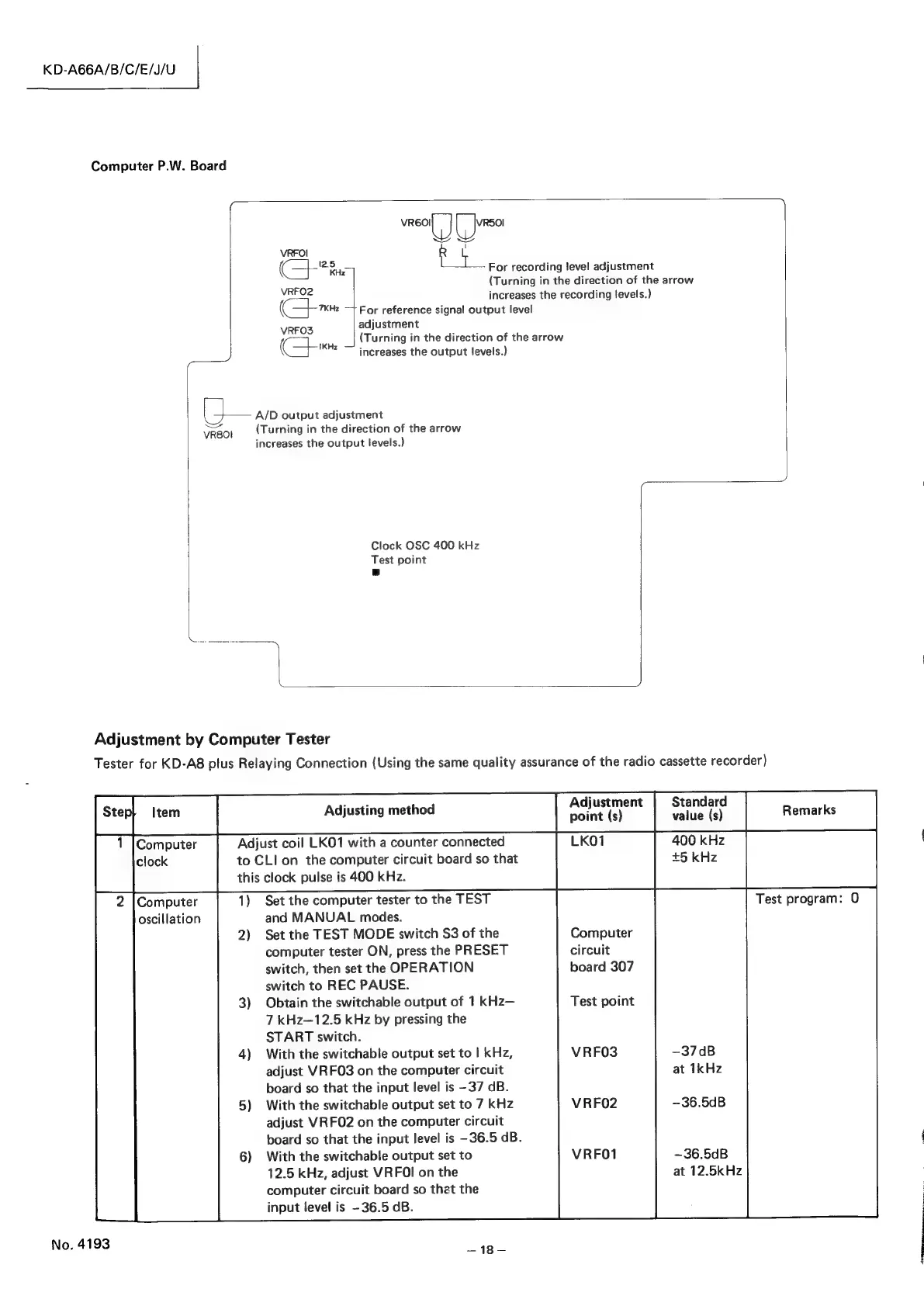
JVC KD-A66 - Adjustment by Computer Tester; Computer Clock and Oscillation Adjustments

JVC KD-A66
55 pages
Print Icon
To Next Page IconTo Next Page
To Previous Page IconTo Previous Page
Loading...
KD-A66A/B/C/E/J/U
Computer
P.W.
Board
meat
[
J750
raid
VRFOI
(
5
bors
For
recording
level
adjustment
(Turning
in
the
direction
of
the
arrow
VRFO2
increases
the
recording
levels.)
(Com
—}
For
reference
signal
output
level
adjustment
VRFO3
poe
: 7
|
(Turning
in
the
direction
of
the
arrow
(
—IKHz
—.
increases
the
output
levels.)
—-
ca
A/D
output
adjustment
vreo|
{Turning
in
the
direction
of
the
arrow
increases
the
output
levels.)
Clock
OSC
400
kHz
Test
point
a
Ne
~~)
Adjustment
by
Computer
Tester
Tester
for
KD-A8
plus
Relaying
Connection
(Using
the
same
quality
assurance
of
the
radio
cassette
recorder)
Adjusting
method
Adjustment
Standard
point
(s)
value
(s)
Adjust
coil
LKO1
with
a
counter
connected
LKO1
400
kHz
to
CLI
on
the
computer
circuit
board
so
that
+5
kHz
this
clock
pulse
is
400
kHz.
Set
the
computer
tester
to
the
TEST
Test
program:
0
2
|Computer
oscillation
and
MANUAL
modes.
2)
Set
the
TEST
MODE
switch
S3
of
the
Computer
computer
tester
ON,
press
the
PRESET
circuit
switch,
then
set
the
OPERATION
board
307
switch
to
REC
PAUSE.
3)
Obtain
the
switchable
output
of
1
kHz—
7
kHz—12.5
kHz
by
pressing
the
START
switch.
4)
With
the
switchable
output
set
to
|
kHz,
adjust
VRFO3
on
the
computer
circuit
board
so
that
the
input
level
is
-37
dB.
5)
With
the
switchable
output
set
to
7
kHz
adjust
VRFO2
on
the
computer
circuit
board
so
that
the
input
level
is
-36.5
dB.
6)
With
the
switchable
output
set
to
12.5
kHz,
adjust
VRFOI
on
the
computer
circuit
board
so
thet
the
input
level
is
-36.5
dB.
Test
point
-37dB
at
1kHz
VRFO3
VRFO2
-36.5dB
VRFO1
~36.5dB
at
12.5kHz
No.
4193
a4

Related product manuals