EasyManua.ls Logo

JVC KD-AHD69 - Bluetooth Dialing and Audio; Bluetooth Audio Player Operation

JVC KD-AHD69
60 pages
Print Icon
To Next Page IconTo Next Page
To Previous Page IconTo Previous Page
Loading...
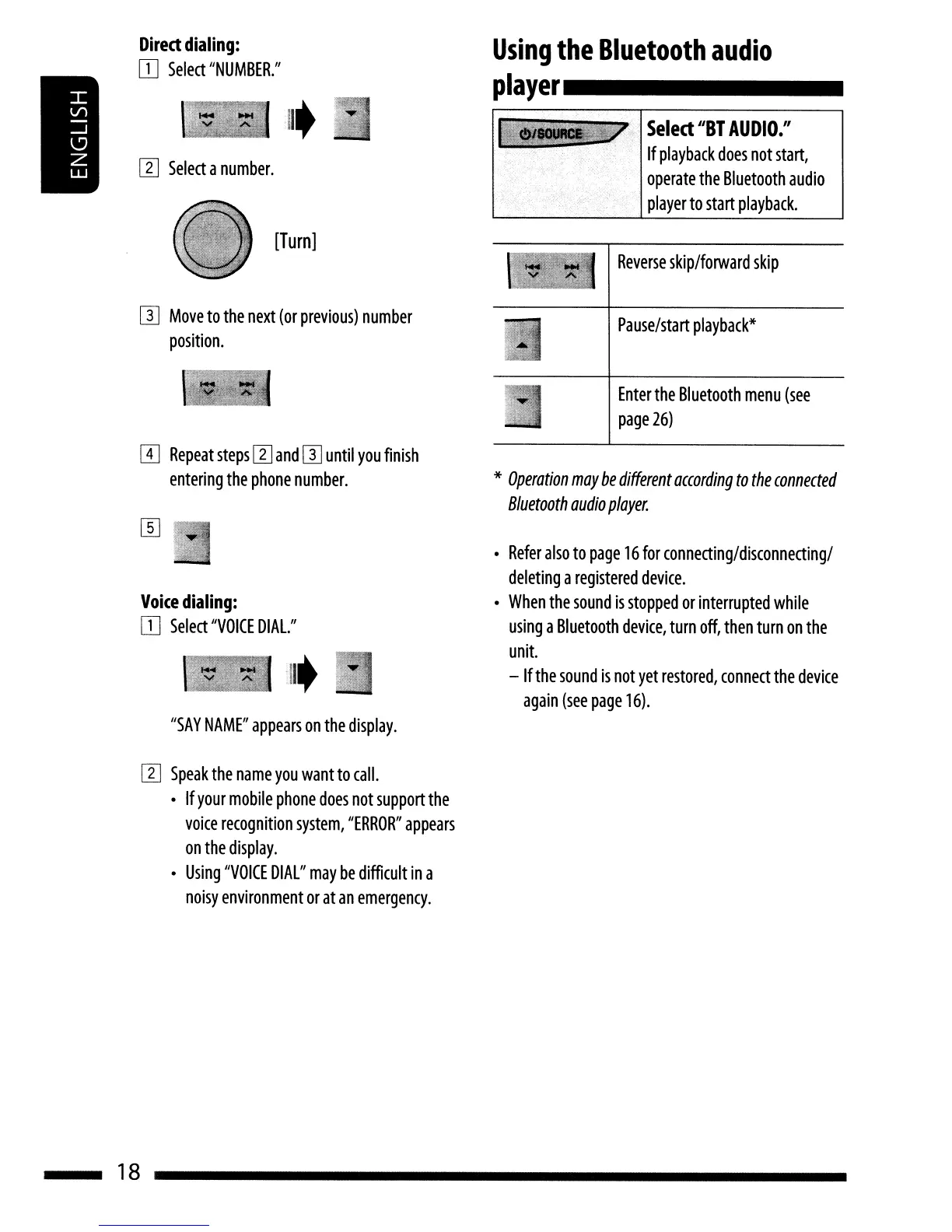
Reverse
skip/forward
skip
Select
"BY
AUDIO."
If
playback
does
not
start,
operate
the
Bluetooth
audio
player
to
start
playback.
Using
the
Bluetooth
audio
player
_
[Turn]
[I]
Select
a
number.
Direct
dialing:
IT]
Select
"NUMBER."
IJJ
Move
to
the
next
(or
previous)
number
position.
rn
Repeat
steps
[I]
and
IJJ
until
you
finish
entering
the
phone
number.
Pause/start
playback*
Enter
the
Bluetooth
menu
(see
page
26)
*
Operation
may
be
different
according
to
the
connected
Bluetooth
audio
player.
Voice
dialing:
IT]
Select
"VOICE
DIAl."
Refer
also
to
page
16
for
connecting/disconnecting/
deleting
a
registered
device.
When
the
sound
is
stopped
or
interrupted
while
using
a
Bluetooth
device,
turn
off,
then
turn
on
the
unit.
-
If
the
sound
is
not
yet
restored,
connect
the
device
again
(see
page
16).
"SAY
NAME"
appears
on
the
display.
[I]
Speak
the
name
you
want
to
call.
If
your
mobile
phone
does
not
support
the
voice
recognition
system,
"ERROR"
appears
on
the
display.
Using
"VOICE
DIAL"
may
be
difficult
in
a
noisy
environment
or
at
an
emergency.
18
Reverse
skip/forward
skip
Select
"BY
AUDIO."
If
playback
does
not
start,
operate
the
Bluetooth
audio
player
to
start
playback.
Using
the
Bluetooth
audio
player
_
[Turn]
[I]
Select
a
number.
Direct
dialing:
IT]
Select
"NUMBER."
IJJ
Move
to
the
next
(or
previous)
number
position.
rn
Repeat
steps
[I]
and
IJJ
until
you
finish
entering
the
phone
number.
Pause/start
playback*
Enter
the
Bluetooth
menu
(see
page
26)
*
Operation
may
be
different
according
to
the
connected
Bluetooth
audio
player.
Voice
dialing:
IT]
Select
"VOICE
DIAl."
Refer
also
to
page
16
for
connecting/disconnecting/
deleting
a
registered
device.
When
the
sound
is
stopped
or
interrupted
while
using
a
Bluetooth
device,
turn
off,
then
turn
on
the
unit.
-
If
the
sound
is
not
yet
restored,
connect
the
device
again
(see
page
16).
"SAY
NAME"
appears
on
the
display.
[I]
Speak
the
name
you
want
to
call.
If
your
mobile
phone
does
not
support
the
voice
recognition
system,
"ERROR"
appears
on
the
display.
Using
"VOICE
DIAL"
may
be
difficult
in
a
noisy
environment
or
at
an
emergency.
18

Other manuals for JVC KD-AHD69

Related product manuals