EasyManua.ls Logo

JVC KD-AHD69 - Selecting the Playback Modes

JVC KD-AHD69
60 pages
Print Icon
To Next Page IconTo Next Page
To Previous Page IconTo Previous Page
Loading...
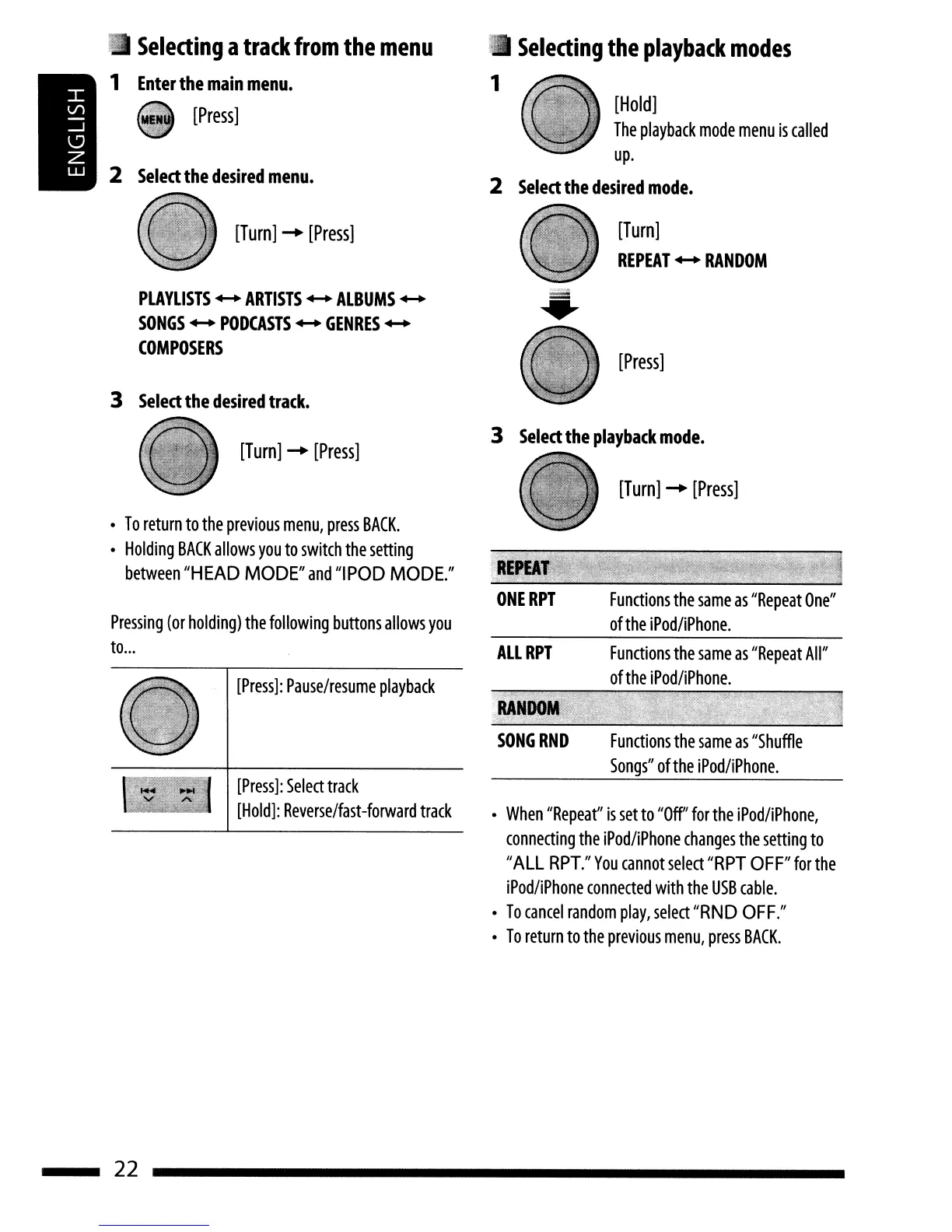
[Press]
[Turn]
REPEAT'"
RANDOM
[Hold]
The
playback
mode
menu
is
called
up.
2
Select
the
desired
mode.
•
Selecting
the
playback
modes
1
[Turn]
-.
[Press]
PLAYLISTS
...
ARTISTS'"
ALBUMS
...
SONGS'"
PODCASTS
...
GENRES
...
COMPOSERS
3
Select
the
desired
track.
2
Select
the
desired
menu.
•
Selecting
a
track
from
the
menu
1
Enter
the
main
menu.
[Press]
[Turn]
-.
[Press]
Functions
the
same
as
"Shuffle
Songs"
ofthe
iPod/iPhone.
Functions
the
same
as
"Repeat
All"
of
the
iPod/iPhone.
Functions
the
same
as
"Repeat
One"
of
the
iPod/iPhone.
SONG
RND
ALLRPT
•
When
"Repeat"
is
set
to
"Off"
for
the
iPod/iPhone,
connecting
the
iPod/iPhone
changes
the
setting
to
"ALL
RPT."
You
cannot
select
"RPT
OFF"
for
the
iPod/iPhone
connected
with
the
USB
cable.
•
To
cancel
random
play,
select
"RND
OFF."
•
To
return
to
the
previous
menu,
press
BACK.
3
Select
the
playback
mode.
[Turn]
-.
[Press]
[Press]:
Select
track
[Hold]:
Reverse/fast-forward
track
[Press]:
Pause/resume
playback
Pressing
(or
holding)
the
following
buttons
allows
you
to
...
•
To
return
to
the
previous
menu,
press
BACK.
•
Holding
BACK
allows
you
to
switch
the
setting
between
"HEAD
MODE"
and
"IPOD
MODE."
22
[Press]
[Turn]
REPEAT'"
RANDOM
[Hold]
The
playback
mode
menu
is
called
up.
2
Select
the
desired
mode.
•
Selecting
the
playback
modes
1
[Turn]
-.
[Press]
PLAYLISTS
...
ARTISTS'"
ALBUMS
...
SONGS'"
PODCASTS
...
GENRES
...
COMPOSERS
3
Select
the
desired
track.
2
Select
the
desired
menu.
•
Selecting
a
track
from
the
menu
1
Enter
the
main
menu.
[Press]
[Turn]
-.
[Press]
Functions
the
same
as
"Shuffle
Songs"
ofthe
iPod/iPhone.
Functions
the
same
as
"Repeat
All"
of
the
iPod/iPhone.
Functions
the
same
as
"Repeat
One"
of
the
iPod/iPhone.
SONG
RND
ALLRPT
•
When
"Repeat"
is
set
to
"Off"
for
the
iPod/iPhone,
connecting
the
iPod/iPhone
changes
the
setting
to
"ALL
RPT."
You
cannot
select
"RPT
OFF"
for
the
iPod/iPhone
connected
with
the
USB
cable.
•
To
cancel
random
play,
select
"RND
OFF."
•
To
return
to
the
previous
menu,
press
BACK.
3
Select
the
playback
mode.
[Turn]
-.
[Press]
[Press]:
Select
track
[Hold]:
Reverse/fast-forward
track
[Press]:
Pause/resume
playback
Pressing
(or
holding)
the
following
buttons
allows
you
to
...
•
To
return
to
the
previous
menu,
press
BACK.
•
Holding
BACK
allows
you
to
switch
the
setting
between
"HEAD
MODE"
and
"IPOD
MODE."
22