14
ENGLISH
3 Confirm the selection.
To move back to the previous menu,
press 5.
• If a track is selected, playback starts
automatically.
• If the selected item has another layer, you will
enter the layer. Repeat steps 2 and 3 until the
desired track is played (see page 21).
• Holding
4/¢ can skip 10 items at
a time.
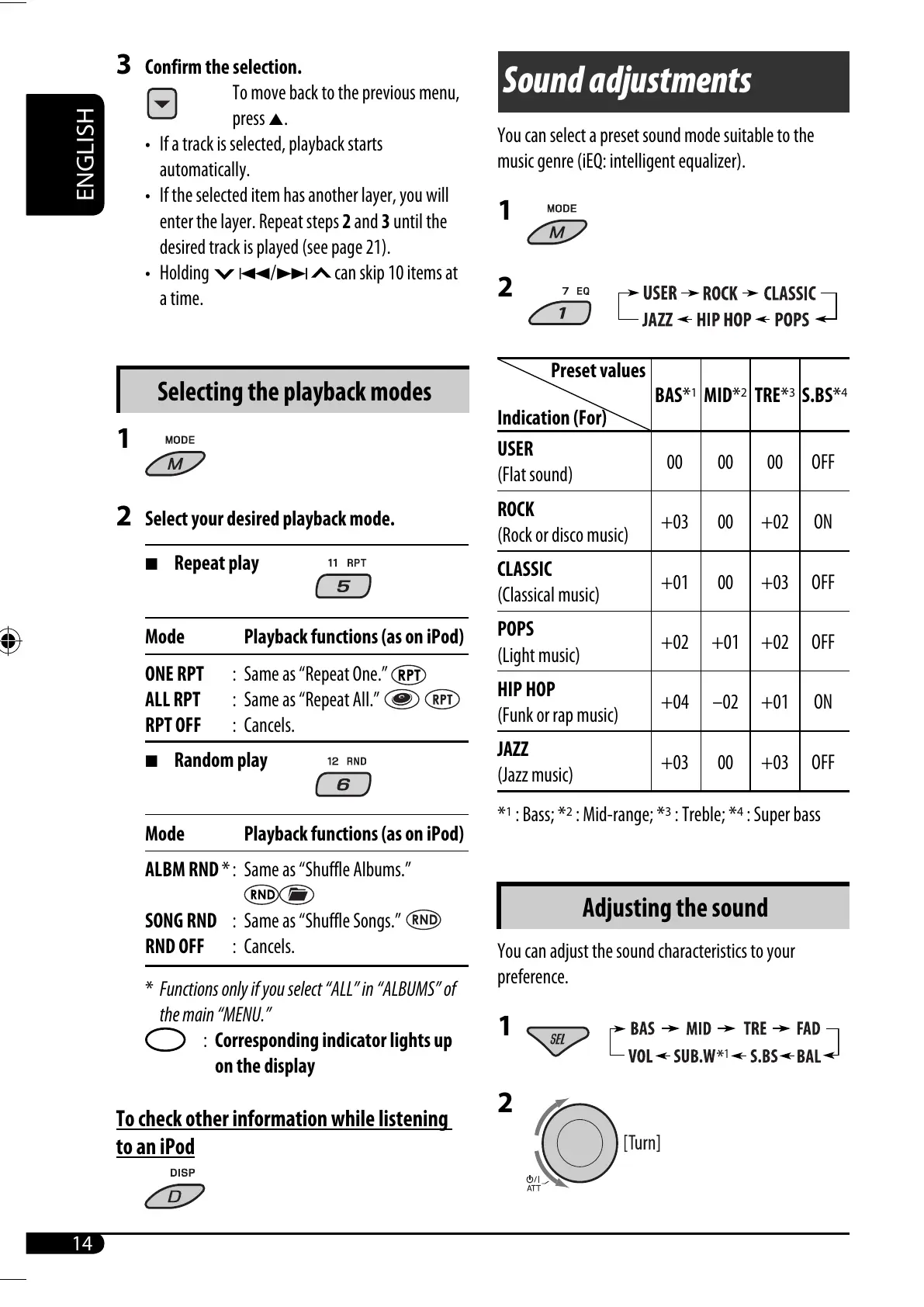
Selecting the playback modes
1
2 Select your desired playback mode.
7 Repeat play
Mode Playback functions (as on iPod)
ONE RPT : Same as “Repeat One.”
ALL RPT : Same as “Repeat All.”
RPT OFF : Cancels.
7 Random play
Mode Playback functions (as on iPod)
ALBM RND * : Same as “Shuffle Albums.”
SONG RND : Same as “Shuffle Songs.”
RND OFF : Cancels.
* Functions only if you select “ALL” in “ALBUMS” of
the main “MENU.”
: Corresponding indicator lights up
on the display
To check other information while listening
to an iPod
Sound adjustments
You can select a preset sound mode suitable to the
music genre (iEQ: intelligent equalizer).
1
2
Indication (For)
BAS*
1
MID*
2
TRE*
3
S.BS*
4
USER
(Flat sound)
00 00 00 OFF
ROCK
(Rock or disco music)
+03 00 +02 ON
CLASSIC
(Classical music)
+01 00 +03 OFF
POPS
(Light music)
+02 +01 +02 OFF
HIP HOP
(Funk or rap music)
+04 –02 +01 ON
JAZZ
(Jazz music)
+03 00 +03 OFF
*
1
: Bass; *
2
: Mid-range; *
3
: Treble; *
4
: Super bass
Adjusting the sound
You can adjust the sound characteristics to your
preference.
1
2
Preset values
EN14-19_KD-PDR51_003A_f.indd 14EN14-19_KD-PDR51_003A_f.indd 14 12/11/06 3:21:56 PM12/11/06 3:21:56 PM


 To Next Page