ENGLISH
22
Listening to the CD changer
It is recommended to use a JVC MP3-compatible CD changer with your unit. You can connect a CD changer to the
CD changer jack on the rear of the unit.
• You can only play conventional CDs (including CD Text) and MP3 discs.
Preparation: Make sure “Changer” is selected for the external input setting, see page 34.
1
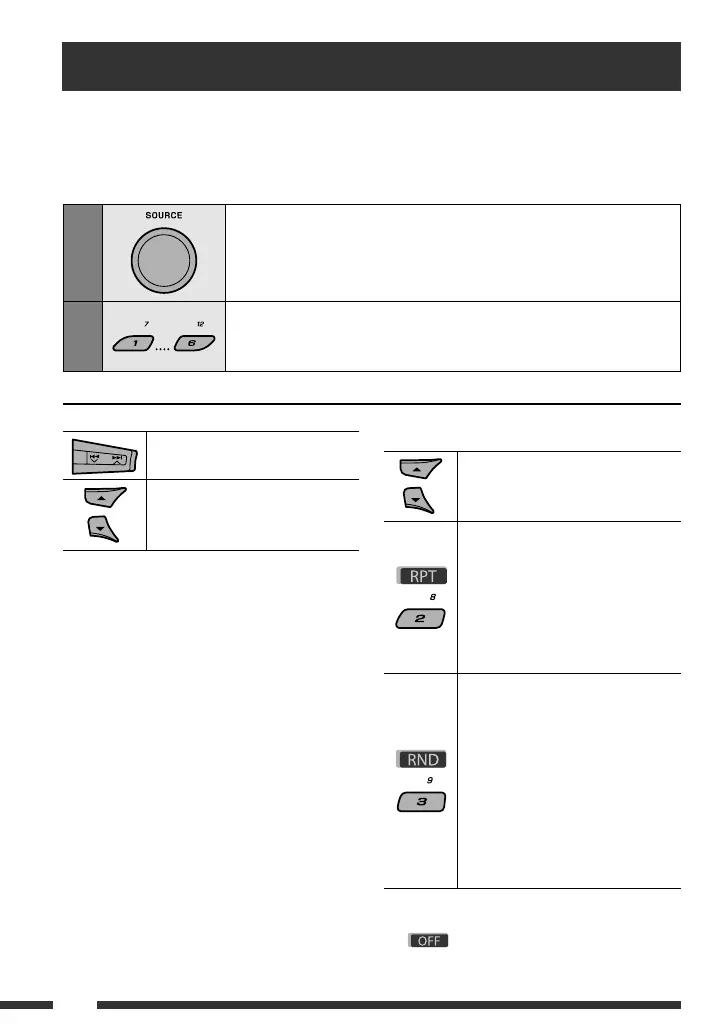
Select “CD-CH.”
2
Select a disc to start playing.
[Press] For selecting disc number 1 – 6.
[Hold] For selecting disc number 7 – 12.
[Press] Select track
[Hold] Reverse/fast-forward track
MP3: Select folders
* By holding either one of the buttons, you can display
the Disc List (see page 14).
To select a disc/folder/track on the list
See “Selecting a folder/track on the list (only for MP3/
WMA/AAC file)” on page 14.
Select “Disc” in step 3 to display the Disc List of the CD
changer.
After pressing M MODE, press the following buttons to...
Skip 10 tracks
MP3: Within the same folder
Repeat Track:
Repeat current track
Repeat Folder:
MP3: Repeat all tracks of current
folder
Repeat Disc:
Repeat all tracks of the current disc
Random Folder:
MP3: Randomly play all tracks of
the current folder, then tracks of the
next folder
Random Disc:
Randomly play all tracks of current
disc
Random All:
Randomly play all tracks of the discs
in the magazine
• You can also cancel the playback mode by selecting
“Off” or press number button 4 (
).
*
Se recomandă utilizarea unui schimbător de CD-uri JVC compatibil cu formatul MP3 împreună cu acest aparat. Puteţi conecta
un schimbător de CD-uri la mufa schimbătorului de CD-uri de pe partea posterioară a aparatului.
• Puteţi reda doar CD-uri obişnuite (inclusiv CD-uri text) şi discuri MP3.
Pregătire: Asiguraţi-vă că este selectată opţiunea „Changer” (Schimbător) pentru setarea intrării externe, vezi pagina 34.
Funcţionarea schimbătorului de CD-uri
Selectaţi funcţia „CD-CH” (schimbător de CD-uri).
Selectaţi un disc pentru începerea redării.
[Apăsaţi] Pentru a selecta un disc numerotat de la 1 la 6.
[Apăsaţi] Pentru a selecta un disc numerotat de la 7 la 12.
[Apăsare] Selectaţi piesa
[Apăsare continuă] Căutare înapoi/rapidă
înainte
MP3: selectaţi directoarele
*
Prin apăsarea continuă a oricărei taste, puteţi aşa Lista de
directoare (vezi pagina 14).
Selectarea unui disc/director/piesă de pe listă
Vezi secţiunea „Selectarea unui director/unei piese de pe
listă (numai pentru şierele MP3/WMA/AAC)” de la pagina
14.
În timpul etapei 3 selectaţi „Disc” pentru a aşa Lista
discurilor pentru schimbătorul de CD-uri.
După apăsarea tastei M MODE, apăsaţi următoarele taste
pentru a...
Trece peste 10 piese
MP3: În cadrul aceluiaşi director
Repetare piesă:
repetă piesa curentă
Repetare director:
MP3: repetă toate piesele din directorul
curent
Repetare disc
repetă toate piesele de pe discul curent
Redarea în ordine aleatorie a
directoarelor:
MP3: redă în ordine aleatorie toate piesele
din directorul curent, apoi pe cele din
directorul următor.
Redare aleatorie a discului:
redă în ordine aleatorie toate piesele de pe
discul curent.
Redarea aleatorie a pieselor:
redă aleatoriu toate piesele de pe discurile
din magazie
• Puteţi, de asemenea, anula modul de redare selectând
„O” (Dezactivare) sau apăsaţi tasta numerică
4 (
ENGLISH
22
Listening to the CD changer
It is recommended to use a JVC MP3-compatible CD changer with your unit. You can connect a CD changer to the
CD changer jack on the rear of the unit.
• You can only play conventional CDs (including CD Text) and MP3 discs.
Preparation: Make sure “Changer” is selected for the external input setting, see page 34.
1
Select “CD-CH.”
2
Select a disc to start playing.
[Press] For selecting disc number 1 – 6.
[Hold] For selecting disc number 7 – 12.
[Press] Select track
[Hold] Reverse/fast-forward track
MP3: Select folders
* By holding either one of the buttons, you can display
the Disc List (see page 14).
To select a disc/folder/track on the list
See “Selecting a folder/track on the list (only for MP3/
WMA/AAC file)” on page 14.
Select “Disc” in step 3 to display the Disc List of the CD
changer.
After pressing M MODE, press the following buttons to...
Skip 10 tracks
MP3: Within the same folder
Repeat Track:
Repeat current track
Repeat Folder:
MP3: Repeat all tracks of current
folder
Repeat Disc:
Repeat all tracks of the current disc
Random Folder:
MP3: Randomly play all tracks of
the current folder, then tracks of the
next folder
Random Disc:
Randomly play all tracks of current
disc
Random All:
Randomly play all tracks of the discs
in the magazine
• You can also cancel the playback mode by selecting
“Off” or press number button 4 (
).
*


 To Next Page
 Loading...