ENGLISH
6
Basic operations
Using the control panel
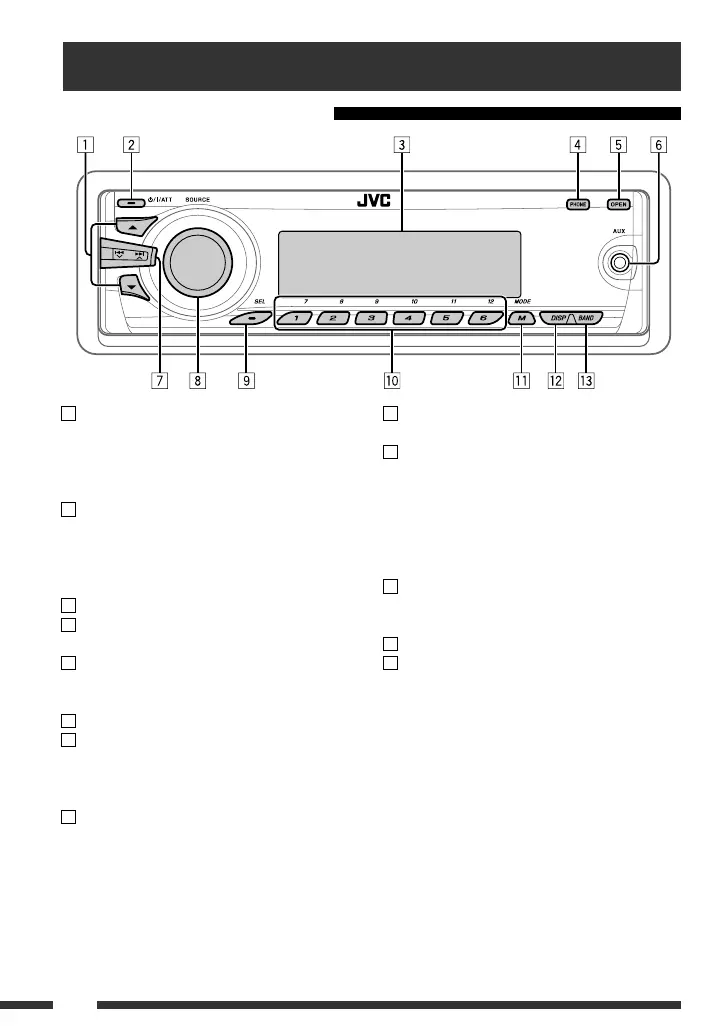
9 • Select/adjust the sound mode.
• Enter the PSM settings [Hold].
p • TUNER/DAB: Select preset station/DAB service.
• CD/USB/CD-CH: Select folder/track/disc (for CD
changer).
• USB-iPod: Select preset top menu items.
• Bluetooth: Dial preset phone number *
2
.
q • Enter functions mode.
• Bluetooth: Activate Voice Dialing [Hold].
w Change the display information and pattern.
e • TUNER/DAB: Select the bands.
• USB-iPod: Start/pause playback.
• BT-AUDIO: Start/pause playback.
*
1
You cannot select these sources if they are not ready
or not connected.
*
2
For storing preset phone number, see page 20.
1 • DAB: Select DAB service.
• CD/USB/CD-CH: Select folder.
• USB-iPod: Enter the main menu [Hold].
• iPod: Enter the main menu/Pause playback/
Confirm selection.
2 • Turn on the power.
• Turn off the power [Hold].
• Attenuate the sound (if the power is on).
• Bluetooth: Switch the conversation media
during a phone call conversation.
3 Display window
4 • Enter/exit Bluetooth menu.
• Display the dialed list [Hold].
5 Flip down the control panel.
• To eject the disc, flip down the control panel
then press
0 on the unit.
6 AUX (auxiliary) input jack
7 • TUNER: Search for station.
• DAB: Search for DAB ensemble.
• CD/USB/CD-CH/USB-iPod/iPod: Select track.
• BT-AUDIO: Reverse skip/forward skip.
8 • Volume control [Turn].
• Select the source [Press].
TUNER
= DAB *
1
= CD *
1
= USB *
1
(or
USB-iPod) *
1
= CD-CH *
1
/iPod *
1
(or EXT IN)
= BT-AUDIO = AUX IN = (back to the
beginning)
1
• DAB: selectează un serviciu DAB.
• CD/USB/CD-CH: selectează un director.
• USB-iPod: accesează meniul principal [Ţineţi apăsat].
• iPod: accesează meniul principal/întrerupeţi temporar
redarea/conrmaţi selecţia.
2
• Porneşte alimentarea cu energie.
•Opreşte alimentarea cu energie [Ţineţi apăsat].
• Atenuează sunetul (când aparatul este deja pornit).
• Bluetooth: schimbă dispozitivul de comunicare în
timpul unei conversaţii telefonice.
3
Aşajul
4
• Accesare/ieşire din meniul Bluetooth.
• Aşează lista de numere apelate [Ţineţi apăsat].
5
Rabatarea panoului de comandă.
• Pentru a ejecta un disc, rabataţi panoul de comandă
apoi tasta
ENGLISH
6
Basic operations
Using the control panel
9 • Select/adjust the sound mode.
• Enter the PSM settings [Hold].
p • TUNER/DAB: Select preset station/DAB service.
• CD/USB/CD-CH: Select folder/track/disc (for CD
changer).
• USB-iPod: Select preset top menu items.
• Bluetooth: Dial preset phone number *
2
.
q • Enter functions mode.
• Bluetooth: Activate Voice Dialing [Hold].
w Change the display information and pattern.
e • TUNER/DAB: Select the bands.
• USB-iPod: Start/pause playback.
• BT-AUDIO: Start/pause playback.
*
1
You cannot select these sources if they are not ready
or not connected.
*
2
For storing preset phone number, see page 20.
1 • DAB: Select DAB service.
• CD/USB/CD-CH: Select folder.
• USB-iPod: Enter the main menu [Hold].
• iPod: Enter the main menu/Pause playback/
Confirm selection.
2 • Turn on the power.
• Turn off the power [Hold].
• Attenuate the sound (if the power is on).
• Bluetooth: Switch the conversation media
during a phone call conversation.
3 Display window
4 • Enter/exit Bluetooth menu.
• Display the dialed list [Hold].
5 Flip down the control panel.
• To eject the disc, flip down the control panel
then press 0 on the unit.
6 AUX (auxiliary) input jack
7 • TUNER: Search for station.
• DAB: Search for DAB ensemble.
• CD/USB/CD-CH/USB-iPod/iPod: Select track.
• BT-AUDIO: Reverse skip/forward skip.
8 • Volume control [Turn].
• Select the source [Press].
TUNER
= DAB *
1
= CD *
1
= USB *
1
(or
USB-iPod) *
1
= CD-CH *
1
/iPod *
1
(or EXT IN)
=
BT-AUDIO
=
AUX IN
=
(back to the
beginning)
de pe aparat.
6
Mufa de intrare AUX (echipamente auxiliare)
7
• TUNER: caută posturi de radio.
• DAB: caută un ansamblu DAB.
• CD/USB/CD-CH/USB-iPod/iPod: selectează piesa.
• BT-AUDIO: trece la piesa anterioară/următoare.
8
• Butonul pentru volum [Rotiţi].
• Selectează sursa [Apăsaţi].
TUNER DAB *
1
CD *
1
USB *
1
(sau USB-iPod) *
1
CD-CH *
1
/iPod *
1
(sau EXT IN) BT-AUDIO
INTRARE AUX (înapoi la punctul de pornire)
9
• Selectează/reglează modul de sunet.
• Accesează setările PSM [Ţineţi apăsat].
10
• TUNER/DAB: selectează postul de radio/serviciul DAB
presetat.
• CD/USB/CD-CH: selectează directorul/piesa/discul
(pentru schimbătorul de CD-uri).
• USB-iPod: selectează opţiunile presetate ale
meniului.
• Bluetooth: formează numerele de telefon presetate *
2
.
11
• Accesează modul de funcţii.
• Bluetooth: activează funcţia „Voice Dialing” (Apelarea
Vocală) [Ţineţi apăsat].
12
Schimbarea informaţiilor şi tipului de aşare.
13
• TUNER/DAB: selectează frecvenţele.
• USB-iPod: pornirea şi întreruperea redării.
• BT-AUDIO: pornirea şi întreruperea redării.
*
1
Nu veţi putea selecta aceste surse dacă nu sunt activate sau
conectate.
*
2
Pentru memorarea numerelor de telefon presetate, vezi
pagina 20.
Operaţii de bază
Utilizarea panoului de comandă



 To Next Page
 Loading...