EasyManua.ls Logo

JVC KD-BT1 - User Manual

JVC KD-BT1
54 pages
Print Icon
To Next Page IconTo Next Page
Loading...
ENGLISH
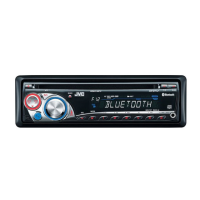
CD RECEIVER
KD-BT1
For installation and connections, refer to the separate manual.
INSTRUCTIONS
GET0437-003A
[EX]
For canceling the display demonstration, see page 6.
Cover_KD-BT1_003A_f.indd 1 1/26/07 2:31:35 PM

Table of Contents

Other manuals for JVC KD-BT1

Question and Answer IconNeed help?

Do you have a question about the JVC KD-BT1 and is the answer not in the manual?

JVC KD-BT1 Specifications

General IconGeneral
BrandJVC
ModelKD-BT1
CategoryCar Receiver
LanguageEnglish

Summary

Important for Laser Products

Class 1 Laser Product Safety

Details about Class 1 Laser Product safety requirements.

Laser Radiation Warnings

Cautions regarding unit opening and laser radiation exposure.

Environmental Responsibility

Unit Operation Guides

Resetting and Ejecting

Instructions for resetting the unit and forcibly ejecting a disc.

Using Control Buttons

Explains the functionality of M MODE and SEL buttons.

Control Panel Operations

Initial Setup and Preparation

Display Demo and Clock Settings

Steps for disabling demo mode and configuring clock settings.

Basic Operations

Using the Control Panel

Detailed guide on using the unit's buttons and controls.

Remote Controller Usage (RM-RK50)

Listening to the Radio

Station Tuning and Presets

How to tune FM/AM stations and save presets.

Radio Presetting Methods

Manual and Automatic Presets

Steps for manually saving stations and using SSM for automatic storage.

Advanced Radio Features

Preset List Navigation and PTY Search

How to use the preset list and search for RDS programs.

Radio Reception Modes

Standby Reception and Program Types

Enabling TA/PTY Standby Reception and storing favorite program types.

Program Tracking Features

Network-Tracking and AF Reception

How the unit tracks programs using stronger signals or alternative frequencies.

Disc Operations

Disc Eject and Control

Steps for stopping playback, ejecting discs, and prohibiting ejection.

Selecting Disc;Folder;Track (MP3;WMA;AAC)

Bluetooth Device Usage

Features and Device Registration

Overview of Bluetooth features and the process for registering devices.

Bluetooth Pairing Methods

Registering via Open Method

Instructions for registering a device using the 'Open' method and entering a PIN.

Managing Bluetooth Connections

Bluetooth Cellular Phone Operations

Handling Incoming Calls

Explains how the unit handles incoming calls, including auto-answer settings.

Bluetooth Phone Calls and SMS

Making Calls via Bluetooth Phone

Bluetooth Phone Number Presets

Bluetooth Audio Player Usage

Listening to the USB Device

Listening to the CD Changer

CD Changer File Selection

Listening to the DAB Tuner

DAB Service Presets

Preset DAB Service List

Standby Reception Modes

Alternative Frequency Reception (DAB AF)

How the unit switches to better DAB or FM signals for the same program.

Dynamic Label Segment (DLS) Information

Listening to iPod;D. Player

Selecting Tracks from iPod;D. Player Menu

Listening to Other External Components

Selecting Preset Sound Modes

General Settings: PSM

Adjusting Sound Characteristics

Storing Custom Sound Modes

How to create and save personalized sound profiles.

General Settings: PSM (Continued)

Display Settings Configuration

Clock Settings Configuration

How to set the clock display, hour, minute, and auto-adjustment.

Display Customization Options

Tuner Settings Configuration

Configuring AF reception, TA volume, P-Search, IF Band, and DAB AF.

Audio Settings Configuration

Color Settings Configuration

How to select display colors for different sources or create custom colors.

Setting Dimmer Time

Changing Display Color

Steps to select preferred display colors for various sources.

Creating Custom User Colors

Bluetooth Settings Configuration

How to configure various Bluetooth connection and feature settings.

Maintenance and Disc Handling

Connector Cleaning and Disc Care

Proper methods for cleaning connectors and handling discs.

Moisture Condensation Advice

Advice on dealing with moisture inside the unit to prevent malfunctions.

Disc Care and Playback Notes

General Information and Settings

Disc Playback Details

Playing CD-R;CD-RW and MP3;WMA;AAC Discs

Specifics on playing various disc formats and file types.

Playing Audio from USB Device

Bluetooth Operations Overview

Troubleshooting Common Issues

Troubleshooting (Continued)

Troubleshooting (Continued)

Specifications: Audio Amplifier and Tuner

Specifications: CD Player, USB, and Bluetooth

Specifications: General Information

Related product manuals