ENGLISH
7OPERATIONS
Basic operations
Using the control panel
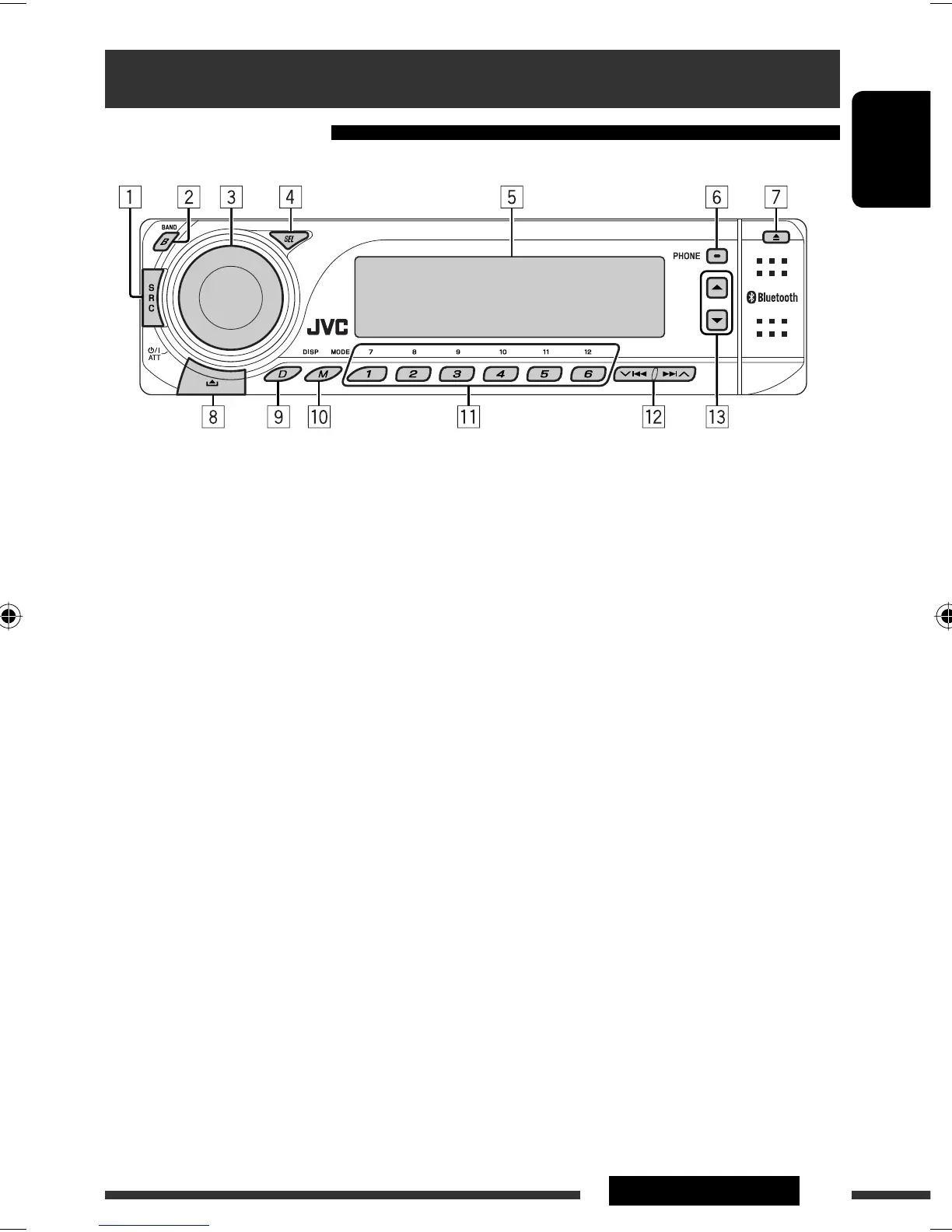
1 Select the source.
TUNER = DAB * = CD * = USB * =CD-CH */
iPod */D.PLAYER * (or EXT IN) = Bluetooth
Phone = Bluetooth Audio = (back to the
beginning)
*
You cannot select these sources if they are not
ready or not connected.
2 Select the bands.
3 • Turn on the power.
• Turn off the power [Hold].
• Attenuate the sound (if the power is on).
• Volume control [Turn].
4 • Select/adjust the sound mode.
• Enter the PSM settings [Hold].
5 Display window
6 • Display ”Dial Menu.”
• Display ”Redial” list [Hold].
7 Eject disc.
8 Detach the panel.
9 Change the display information and pattern.
p • Enter functions mode.
• Activate Voice Dialing [Hold].
q • TUNER/DAB: Select preset station/DAB service.
• CD/USB/CD-CH: Select folder/track/disc (for CD
changer).
• Bluetooth Phone: Select preset phone
number.
w • TUNER/DAB: Search for station/DAB ensemble.
• CD/USB/CD-CH: Select track.
• iPod/D.PLAYER: Select track.
• Bluetooth Audio: Reverse skip/forward skip.
e • DAB: Select DAB service.
• CD/USB/CD-CH: Select folder.
• iPod/D.PLAYER: Enter the main menu/Pause or
stop playback/Confirm selection.
• Bluetooth Phone/Audio: Select a registered
device.
EN02-07_KD-BT1_003A_4.indd 7EN02-07_KD-BT1_003A_4.indd 7 2/7/07 9:48:02 AM2/7/07 9:48:02 AM



 To Next Page