40
3
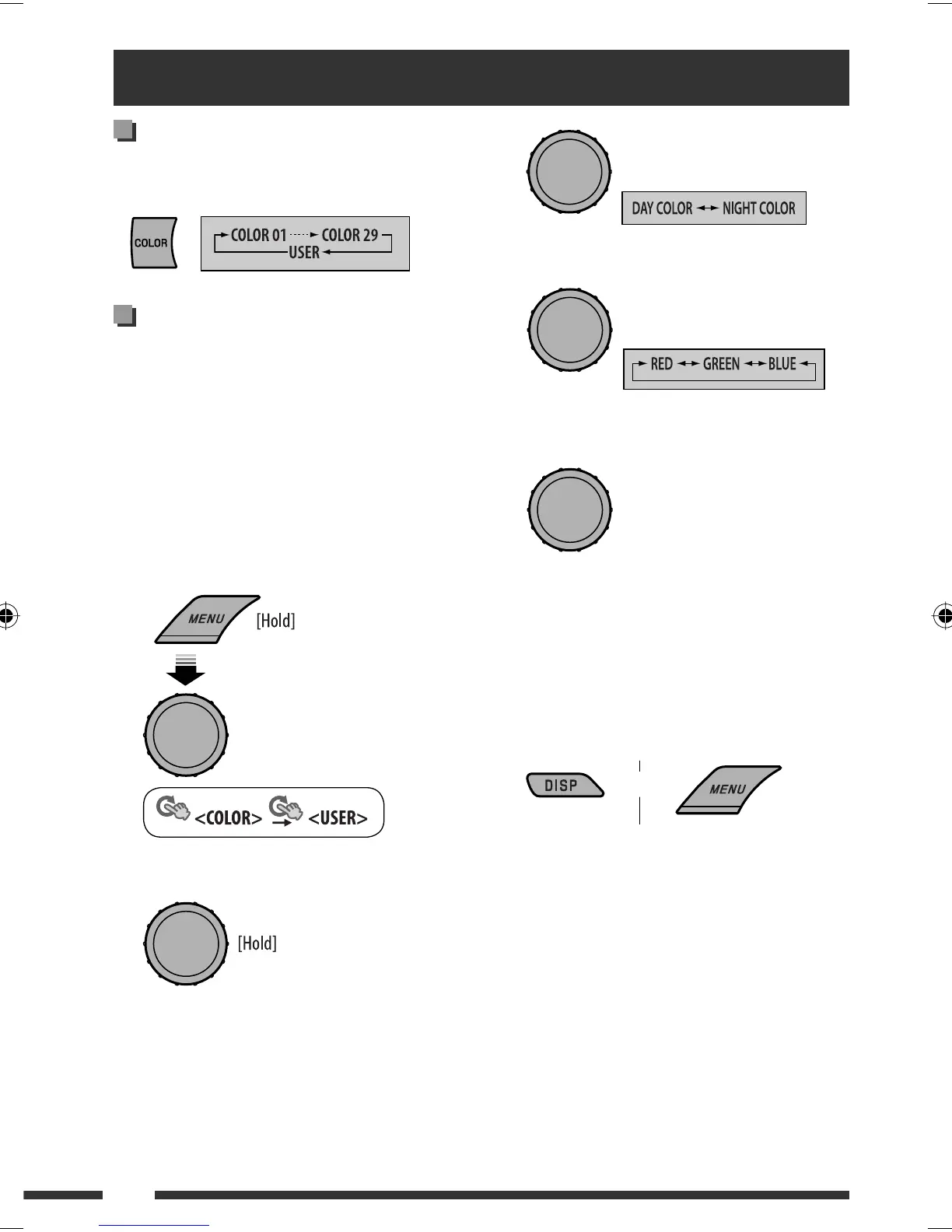
4 Select a primary color.
5 Adjust the level (00 to 31) of the selected
primary color.
If <00> is selected for all the primary colors,
nothing appear on the display.
6 Repeat steps 4 and 5 to adjust other primary
colors.
7 Exit from the setting.
Select <USER> to show your own colors for the
buttons and display.
Selecting a preset color
You can select a preset color for the buttons and display.
• See also page 38.
Creating your own color
—USER Color
You can create your own colors—<DAY COLOR> or
<NIGHT COLOR>.
DAY COLOR : Color for the display and buttons.
NIGHT COLOR : Color for the display and buttons
when the display is dimmed.
To dim the display, see <DIMMER>
on page 37.
1 Select <USER>.
2 While <USER> is shown on the display...
Color settings
or
[Turn] = [Press]
[Turn] = [Press]
[Turn] = [Press]
[Turn] = [Press]
EN36-45_KD-DV5506_001A_f.indd 40EN36-45_KD-DV5506_001A_f.indd 40 2/24/09 3:15:27 PM2/24/09 3:15:27 PM



 To Next Page