ENGLISH
22
EXTERNAL DEVICES
Listening to the other external components
You can connect an external component to:
• CD changer jack on the rear of this unit using the following adapters:
– Line Input Adapter, KS-U57
– AUX Input Adapter, KS-U58
Preparation: Make sure “Ext Input” is selected for the external input setting, see page 27.
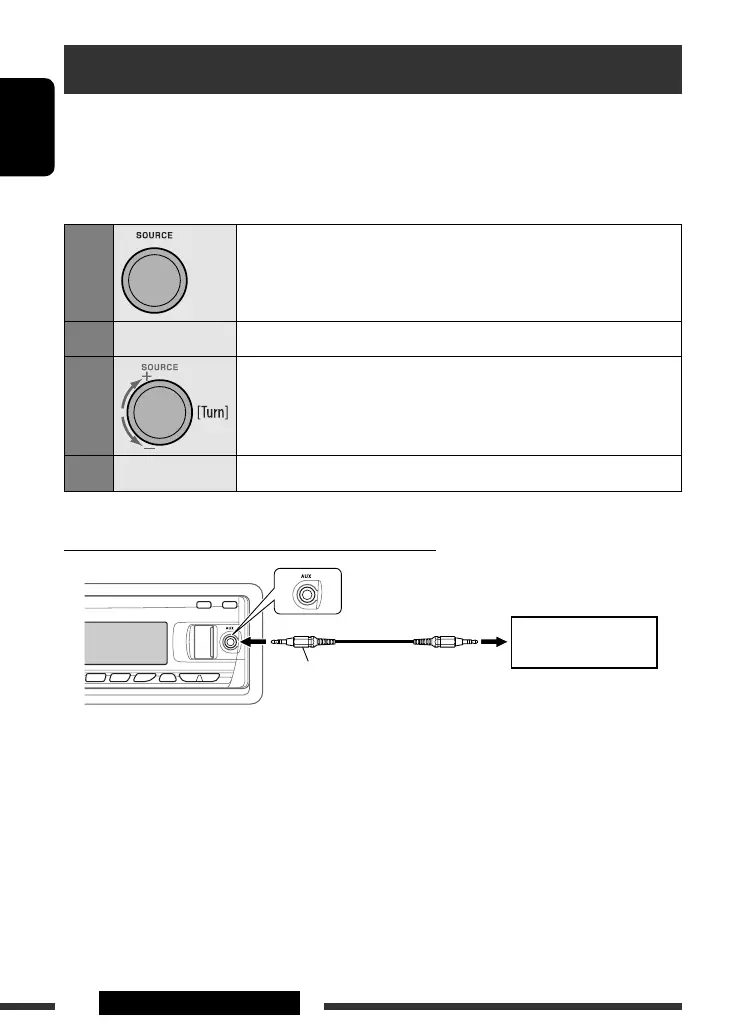
• AUX (auxiliary) input jack on the control panel.
1
Select “EXT IN” or “AUX IN.”
2
—
Turn on the connected component and start playing the source.
3
Adjust the volume.
4
—
Adjust the sound as you want (see pages 23 and 24).
Connecting an external component to the AUX input jack
3.5 mm stereo mini plug
(not supplied)
Portable audio player, etc.
EN22-29_KD-847[EE]_2.indd 22EN22-29_KD-847[EE]_2.indd 22 12/31/07 9:12:50 AM12/31/07 9:12:50 AM


 To Next Page