ENGLISH
26
Category Indication Item
( : Initial)
Setting, [reference page]
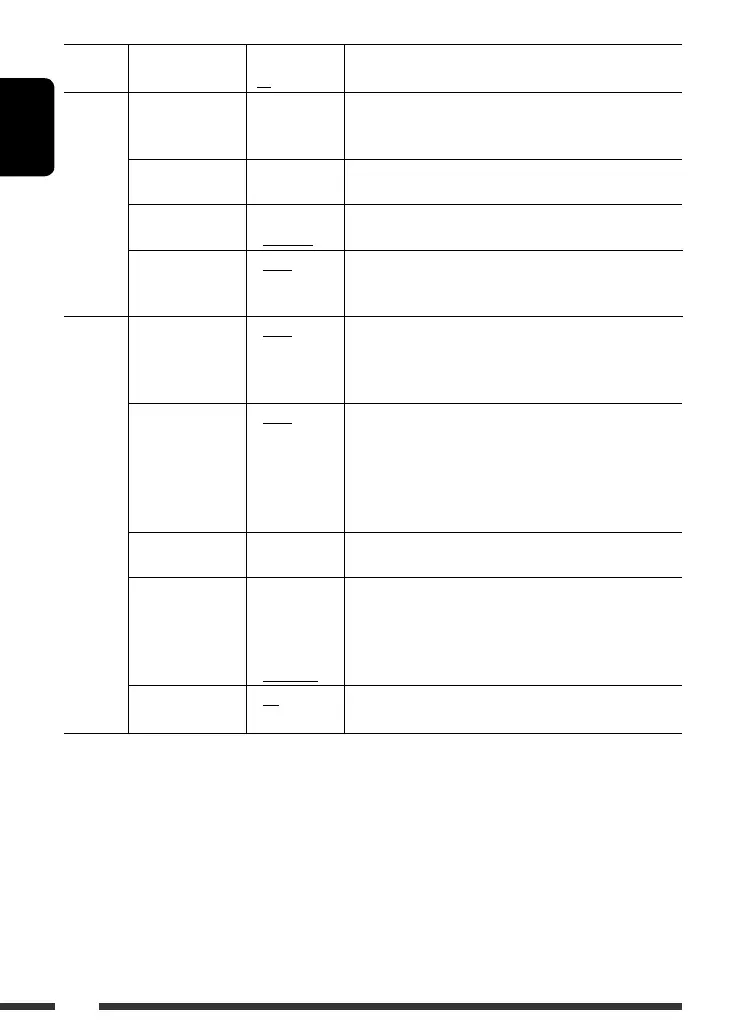
CLOCK
Clock Hr
Hour adjustment
0 – 23
(1 – 12AM/
1 – 12PM)
: Initial: 0 (0:00AM), [4].
Clock Min
Minute adjustment
00 – 59 : Initial: 00 (0:00AM), [4].
24H/12H
Time display mode
• 12Hours
• 24Hours
: See also page 4 for setting.
Clock Adj
Clock adjustment
• Auto
• Off
: The built-in clock is automatically adjusted using the CT
(clock time) data in the RDS signal.
: Cancels.
DISP (display)
Scroll *
2
Scroll
• Once
• Auto
• Off
: Scrolls the track information once.
: Repeats scrolling (at 5-second intervals).
: Cancels. (Holding DISP can scroll the display regardless of
the setting.)
Dimmer
Dimmer
From – To *
3
• Auto
• Off
• On
• Time Set
—
: Dims the display when you turn on the headlights.
: Cancels.
: Dims the display and button illumination.
: Set the timer for dimmer, [28].
Any hour – Any hour
: Initial: 18 – 7.
Contrast
Contrast
1 – 8
Initial: 5
: Adjust the display contrast to make the display indications
clear and legible.
LCD Type
Display type
• Auto
• Positive
• Negative
: Positive pattern will be selected during the day time *
4
;
while negative pattern will be used during the night
time *
4
.
: Positive pattern of the display.
: Negative pattern of the display.
Tag
Tag display
• On
• Off
: Shows the tag while playing MP3/WMA/WAV tracks.
: Cancels.
*
2
Some characters or symbols will not be shown correctly (or will be blanked) on the display.
*
3
Adjustable only when “Dimmer” is set to “Time Set.”
*
4
Depends on the “Dimmer” setting.
EN22-29_KD-847[EE]_2.indd 26EN22-29_KD-847[EE]_2.indd 26 12/31/07 9:12:54 AM12/31/07 9:12:54 AM


 To Next Page
 Loading...