10 ENGLISH
Connecting the other external components
3.5 mm (3/16”) stereo
mini plug (with “L” shaped
connector) (not supplied)
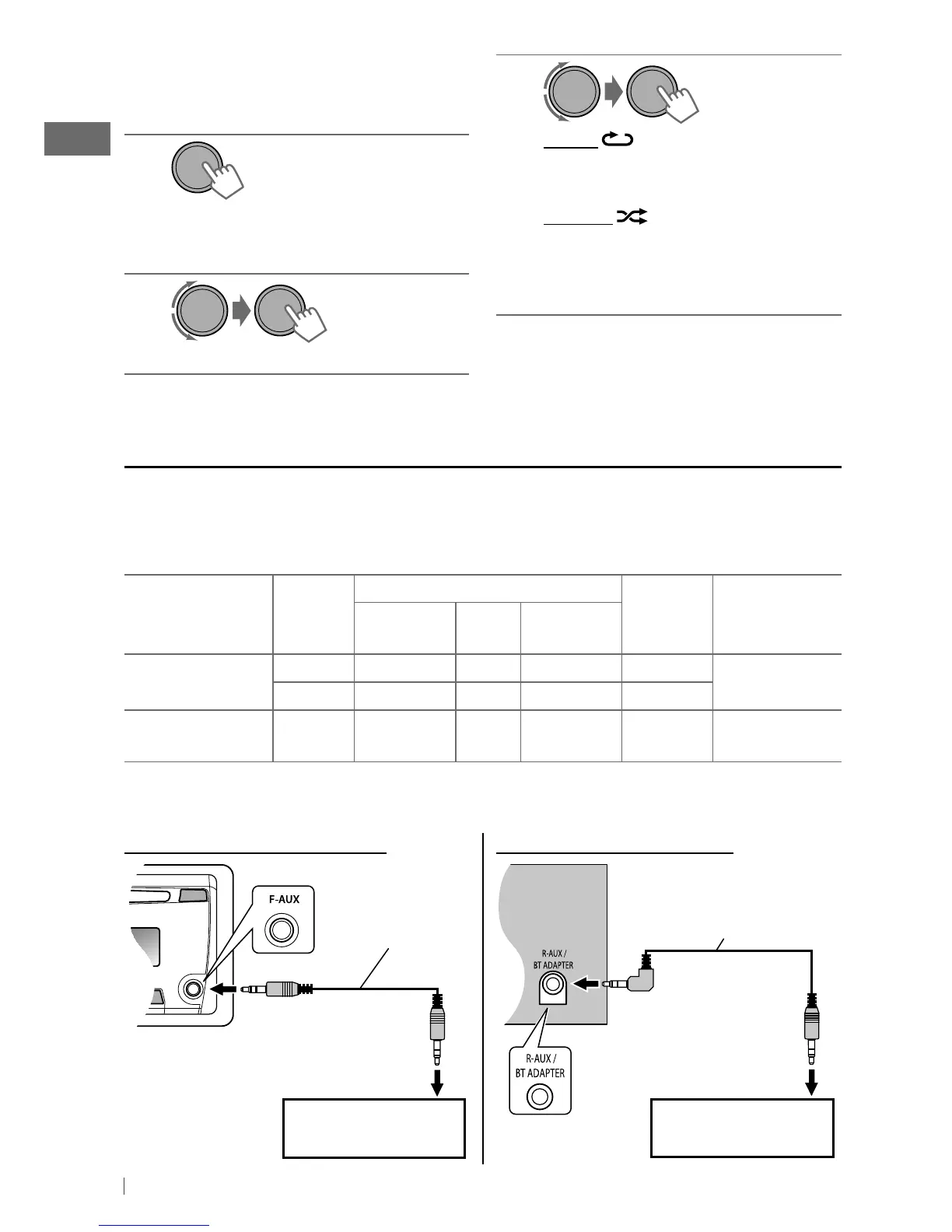
You can connect an external component to the auxiliary input jack on the control panel (F-AUX)
and/or on the rear side of the unit (R-AUX).
Summary of using the external components through the auxiliary input jacks:
External component
Auxiliary
input jack
Preparation
Source
name
Connecting
cable/device
(not supplied)
Menu setting
item
Sub-
item
Setting
Portable audio
player
Front SRC SELECT F-AUX ON F-AUX
See below.
Rear SRC SELECT R-AUX ON R-AUX
Bluetooth device Rear SRC SELECT R-AUX BT ADAPTER BT AUDIO/
BT PHONE *
KS-BTA100
(page 16)
* ”BT PHONE” appears when a Bluetooth phone is in use.
On the control panel (F-AUX): On the rear panel (R-AUX):
Portable audio player,
etc.
Portable audio player,
etc.
3.5 mm (3/16”)
stereo mini plug
(not supplied)
Selecting the playback modes
You can use only one of the following playback
modes at a time.
1
• Pressing number button 1 (RPT) or
2 (RND) can enter REPEAT/RANDOM
setting directly. Then, perform step 3.
2
]
“REPEAT”
j
“RANDOM”
[Hold]
3
REPEAT
TRACK RPT : Repeats current track
FOLDER RPT : Repeats current folder
RANDOM
FOLDER RND : Randomly plays all tracks
of current folder, then
tracks of next folders
ALL RND : Randomly plays all tracks
To cancel repeat play or random play, select
“RPT OFF” or “RND OFF.”
EN02-17_KD-HDR44[J]_f.indd 10 11/23/10 11:14:34 AM





 To Next Page