17
ENGLISH
Continued on the next page
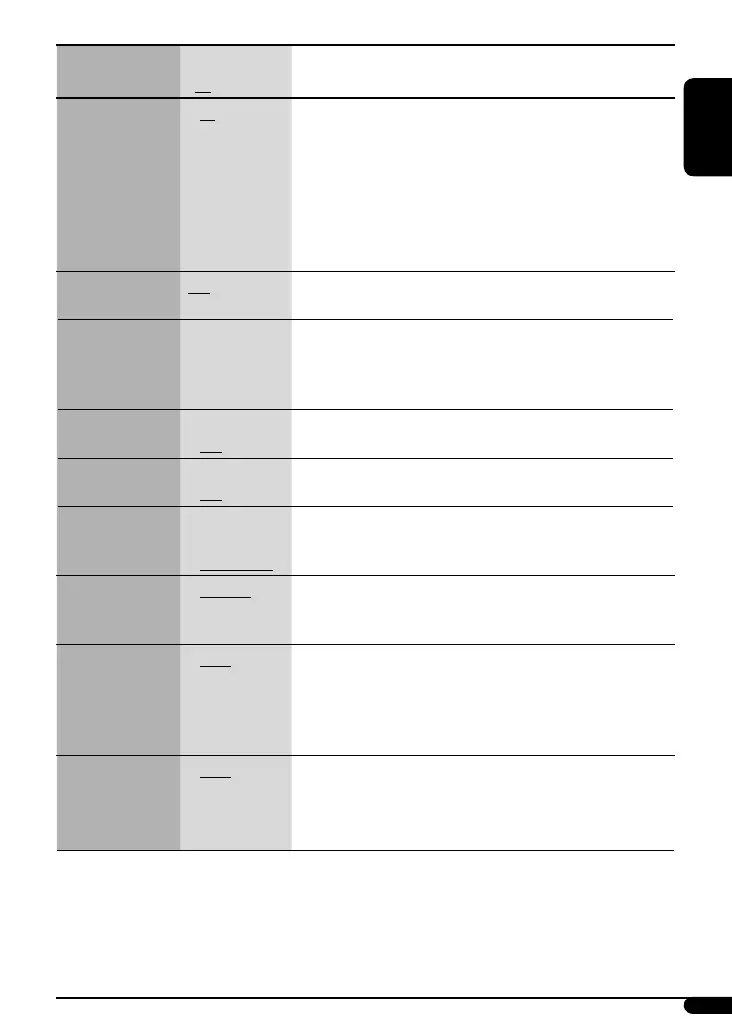
Indications Item
( : Initial)
Selectable settings, [reference page]
AF-REG *
2
Alternative
frequency/
regionalization
reception
• AF
• AF-REG
• AF OFF
: When the currently received signals become weak, the unit
switches to another station (the programme may differ from the
one currently received), [9].
• The AF indicator lights up.
: When the currently received signals become weak, the unit
switches to another station broadcasting the same programme.
• The AF and REG indicators light up.
: Cancels.
PTY-STANDBY *
2
PTY standby
OFF, PTY codes Activates PTY Standby Reception with one of the PTY codes, [8, 9].
TA VOLUME *
2
Traffic
announcement
volume
VOLUME 00
– VOLUME 50
(or VOLUME 00
– VOLUME 30)*
3
Initial: VOLUME 15
P-SEARCH *
2
Programme search
• ON
• OFF
: Activates Programme Search, [9].
: Cancels.
DIMMER
Dimmer
• ON
• OFF
: Dims the display and button illumination.
: Cancels.
TEL MUTING
Telephone muting
• MUTING 1/
MUTING 2
• MUTING OFF
: Select either one which mutes the sounds while using a cellular
phone.
: Cancels.
AUDIOBOOKS *
4
Speed control of
“Audiobook”
• NORMAL
• FASTER
• SLOWER
: You can select the playback speed of the “Audiobook” sound file in
your iPod.
SCROLL *
5
Scroll
• ONCE
• AUTO
• OFF
: Scrolls the displayed information once.
: Repeats scrolling (at 5-second intervals).
: Cancels.
• Pressing DISP for more than one second can scroll the display
regardless of the setting.
L/O MODE
Line output mode
• REAR
• SUB.W
: Select if the REAR LINE OUT terminals are used for connecting the
speakers (through an external amplifier).
: Select if the REAR LINE OUT terminals are used for connecting a
subwoofer (through an external amplifier).
*
2
Only for FM RDS stations.
*
3
Depends on the amplifier gain control.
*
4
Displayed only when an iPod is connected and playback is controlled from the unit.
*
5
Some characters or symbols will not be shown correctly (or will be blanked) on the display.
EN08-19_KD-PDR41_003A_6.indd 17EN08-19_KD-PDR41_003A_6.indd 17 1/4/08 2:47:30 PM1/4/08 2:47:30 PM









 To Next Page