12
ENGLISH
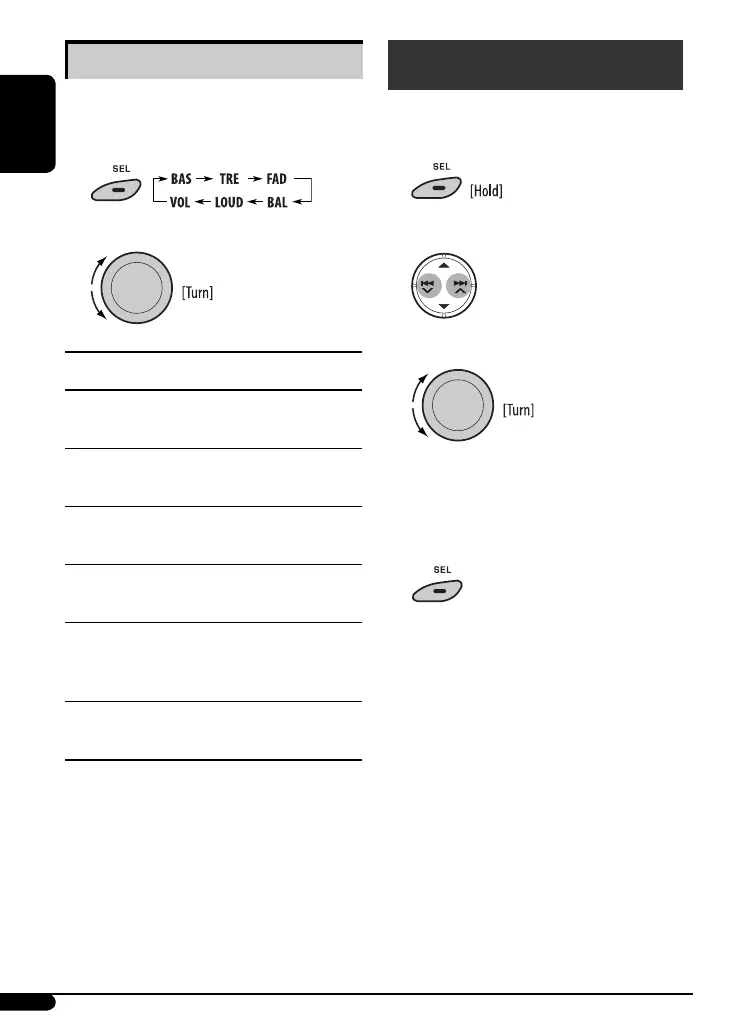
Adjusting the sound
You can adjust the sound characteristics to your
preference.
1
2
Indication, [Range]
BAS*
1
(bass), [–06 to +06]
Adjust the bass.
TRE*
1
(treble), [–06 to +06]
Adjust the treble.
FAD*
2
(fader), [R06 to F06]
Adjust the front and rear speaker balance.
BAL (balance), [L06 to R06]
Adjust the left and right speaker balance.
LOUD*
1
(loudness), [LOUD ON or LOUD OFF]
Boost low and high frequencies to produce a
well-balanced sound at a low volume level.
VOL (volume), [00 to 50 or 00 to 30]*
3
Adjust the volume.
*
1
When you adjust the bass, treble, or loudness, the
adjustment you have made is stored for the currently
selected sound mode (c-EQ) including “USER.”
*
2
If you are using a two-speaker system, set the fader
level to “00.”
*
3
Depending on the amplifier gain control setting. (See
page 14 for details.)
You can change PSM (Preferred Setting Mode) items
listed on pages 13 and 14.
1
2 Select a PSM item.
3 Adjust the PSM item selected.
4 Repeat steps 2 and 3 to adjust other PSM
items if necessary.
5 Finish the procedure.
General settings — PSM
EN06-13_KD-R201_006A_1.indd 12EN06-13_KD-R201_006A_1.indd 12 8/7/08 9:32:08 AM8/7/08 9:32:08 AM



 To Next Page
 Loading...