R
robert34Aug 31, 2025
What to do if JVC KD-R411 disc won't eject?
- JJohn RamirezAug 31, 2025
If the disc can neither be played back nor ejected from your JVC Car Receiver, unlock the disc or eject the disc forcibly.


 To Next PageTo Next Page
What to do if JVC KD-R411 disc won't eject?
If the disc can neither be played back nor ejected from your JVC Car Receiver, unlock the disc or eject the disc forcibly.
What to do if my JVC KD-R411 does not work at all?
If your JVC Car Receiver is not working, try resetting the unit.
Why won't my JVC Car Receiver play the disc?
If your JVC Car Receiver will not play a disc, ensure that the disc is inserted correctly.
How to fix sound not working on JVC KD-R411 Car Receiver?
If you can't hear any sound from the speakers of your JVC Car Receiver, make sure the volume is at an audible level and that the unit isn't muted or paused. Also, check the cords and connections to ensure they are properly connected.
How to stop noise from JVC KD-R411?
If your JVC Car Receiver is generating noise, skip to another track or change the disc. Do not add the extension code or to non-MP3 or WMA tracks.
Why is sound interrupted while playing on my JVC Car Receiver?
If, while playing a track on your JVC Car Receiver, sound is sometimes interrupted, the MP3/WMA tracks have not been properly copied into the USB device. Copy MP3/WMA tracks again into the USB device, and try again.
How to fix static noise on JVC KD-R411 Car Receiver radio?
To resolve static noise while listening to the radio on your JVC Car Receiver, connect the aerial firmly.
What to do if JVC KD-R411 displays “PLEASE” and “EJECT“?
If your JVC Car Receiver displays “PLEASE” and “EJECT“ alternately, press 0, then insert a disc correctly.
Why is JVC Car Receiver disc sound interrupted?
If your JVC Car Receiver disc sound is sometimes interrupted, stop playback while driving on rough roads, change the disc, or check the cords and connections.
How to fix JVC KD-R411 disc not playing?
If your JVC Car Receiver disc cannot be played back, insert the disc correctly.
 General
| CD Playback | Yes |
|---|---|
| Bluetooth | No |
| Radio Data System (RDS) | Yes |
| MP3 Playback | Yes |
| WMA Playback | Yes |
| Detachable Face | Yes |
| Channels | 4 |
| Preset EQ | Yes |
| Tuner | FM/AM |
| Power Output | 50W x 4 Channels |
Covers class 1 laser product details, cautions for opening the unit, and radiation warnings.
Provides information on the disposal of old equipment and batteries according to EU directives.
Offers essential safety advice for operating the unit while driving, including volume and temperature considerations.
Explains the icons and symbols used throughout the instruction manual for clarity.
Details the steps for detaching and reattaching the control panel of the unit.
Provides instructions on how to reset the unit and how to forcibly eject a disc.
Guides users on how to turn off the unit's automatic display demonstration feature.
Provides step-by-step instructions for setting the unit's internal clock.
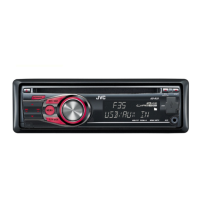
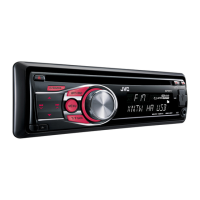
Identifies key components of the car stereo unit like the display, control dial, and input jacks.
Details the general operations performed by pressing or holding various buttons on the unit.
Explains how to manually preset stations and use SSM for automatic station storage.
Covers adjusting reception for FM stereo broadcasts and selecting mono for weaker signals.
Describes how to change the display information shown during radio listening.
Instructions for storing specific FM/AM radio stations into memory presets.
Enables searching for radio stations based on programme type (PTY code).
Explains the TA standby feature for automatic switching to traffic announcements.
Details PTY standby reception and Network-Tracking for continuous programme reception.
Describes automatic station selection based on Radio Data System (RDS) AF data.
Covers turning on the unit, inserting discs, and general playback behaviour.
Explains how to stop playback, eject discs, and prohibit disc ejection.
Guides on using Repeat (Track/Folder) and Random play modes for discs.
Details how to select specific tracks and folders for MP3/WMA discs.
Explains how to change the display to show disc title, track name, and time.
Instructions for connecting USB devices and playing MP3/WMA tracks stored on them.
Provides crucial warnings and precautions for using USB devices with the unit.
Details how to connect external audio components via the auxiliary input jack.
Covers the procedure for installing the lithium coin battery into the remote controller.
Explains button functions, sensor usage, and critical safety warnings for the remote.
Guides on choosing preset sound modes and storing custom sound adjustments.
Explains how to access and operate various menu settings for customization.
Covers time display modes, clock adjustment, and display illumination settings.
Details settings for strong-station memory, alternative frequency, and PTY standby.
Configuration for TA volume, programme search, monaural mode, and intermediate frequency band.
Adjustments for sound balance, speaker output, and tone enhancement.
Adjusts the auxiliary input level to prevent sudden output level changes when switching sources.
Settings for volume adjustment, line output modes, and subwoofer frequency/level.
Covers keypress tones, telephone muting, amplifier gain, and source enable/disable options.
Information on power-off playback continuation and menu operation timeouts.
Covers storing stations, manual presetting, and general tuner operation.
Explains PI/AF signals for Network-Tracking and PTY codes for programme identification.
Discusses DualDisc playback caution, CD-R/RW compatibility, and multi-session discs.
Provides reasons why CD-Rs/CD-RWs may not play and lists incompatible disc types.
Specifies bit rates, sampling frequencies, and file naming conventions for MP3/WMA playback.
Covers playback order, file compatibility, and connection guidelines for USB devices.
Details unsupported file types, character limits, and device limitations for USB playback.
Instructions for cleaning the unit's connectors and maintaining disc cleanliness.
Advice on managing moisture condensation and proper disc storage practices.
Lists types of discs that should not be used with the unit to prevent damage or malfunction.
Addresses common unit issues like no sound, 'PROTECT' message, and unit non-responsiveness.
Resolves issues related to AUX selection, SSM presetting, static noise, and AM reception.
Provides solutions for discs not playing, skipping, not ejecting, or interrupted sound.
Covers common errors like noise, long read times, incorrect order, and file not supported.
Addresses USB playback issues such as noise, file errors, incorrect order, and character display.
Details power output, load impedance, tone control ranges, and signal-to-noise ratios.
Lists specifications for FM and AM tuners, including frequency range, sensitivity, and selectivity.
Details CD player type, USB standard, compatible file systems, and audio formats.
Covers power requirements, operating voltage, temperature limits, and unit dimensions/mass.