EasyManua.ls Logo

JVC KD-R411 - User Manual

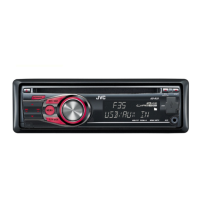
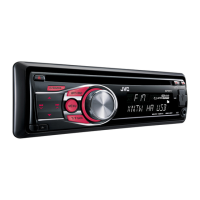
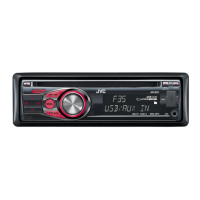
JVC KD-R411
49 pages
Print Icon
To Next Page IconTo Next Page
Loading...
FRANÇAIS
ENGLISH
GET0624-003A
[E/EU]
EN, FR
1009DTSMDTJEIN© 2009 Victor Company of Japan, Limited
For canceling the display demonstration, see page 4. / Pour annuler la démonstration des
affichages, référez-vous à la page 4.
CD RECEIVER / RÉCEPTEUR CD
KD-R412 / KD-R411 /
KD-R35 / KD-R312 / KD-R311
INSTRUCTIONS
MANUEL D’INSTRUCTIONS
For installation and connections, refer to the separate manual. / Pour l’installation et les
raccordements, se référer au manuel séparé.
Dear Customer,
This apparatus is in conformance with the valid
European directives and standards regarding
electromagnetic compatibility and electrical safety.
European representative of Victor Company of
Japan, Limited is:
JVC Technical Services Europe GmbH
Postfach 10 05 04
61145 Friedberg
Germany
Cher(e) client(e),
Cet appareil est conforme aux directives et
normes européennes en vigueur concernant la
compatibilité électromagnétique et à la sécurité
électrique.
Représentant européen de la société Victor
Company of Japan, Limited:
JVC Technical Services Europe GmbH
Postfach 10 05 04
61145 Friedberg
Allemagne
Having TROUBLE with operation?
Please reset your unit
Refer to page of How to reset your unit
Vous avez des PROBLÈMES de fonctionnement?
Réinitialisez votre appareil
Référez-vous à la page intitulée Comment réinitialiser votre appareil
CoverRear_KD-R412_003A_f.indd 1-2CoverRear_KD-R412_003A_f.indd 1-2 10/13/09 11:51:18 AM10/13/09 11:51:18 AM

Questions and Answers

JVC KD-R411 Specifications

General IconGeneral
CD PlaybackYes
BluetoothNo
Radio Data System (RDS)Yes
MP3 PlaybackYes
WMA PlaybackYes
Detachable FaceYes
Channels4
Preset EQYes
TunerFM/AM
Power Output50W x 4 Channels

Summary

IMPORTANT FOR LASER PRODUCTS AND SAFETY

Laser Product Safety and Warnings

Covers class 1 laser product details, cautions for opening the unit, and radiation warnings.

Product Disposal and Environmental Concerns

Provides information on the disposal of old equipment and batteries according to EU directives.

Driving Safety and Operation Precautions

Offers essential safety advice for operating the unit while driving, including volume and temperature considerations.

MANUAL INTRODUCTION AND BASIC PROCEDURES

How to Read the Manual

Explains the icons and symbols used throughout the instruction manual for clarity.

Control Panel Attachment and Removal

Details the steps for detaching and reattaching the control panel of the unit.

Unit Reset and Disc Ejection

Provides instructions on how to reset the unit and how to forcibly eject a disc.

DISPLAY DEMONSTRATION AND CLOCK SETTING

Canceling the Display Demonstration

Guides users on how to turn off the unit's automatic display demonstration feature.

Setting the Clock

Provides step-by-step instructions for setting the unit's internal clock.

BASIC OPERATIONS AND UNIT LAYOUT

Unit Component Identification

Identifies key components of the car stereo unit like the display, control dial, and input jacks.

Button Functions Overview

Details the general operations performed by pressing or holding various buttons on the unit.

RADIO OPERATION AND TUNING

Manual and Automatic Radio Presetting

Explains how to manually preset stations and use SSM for automatic station storage.

Stereo vs. Mono Reception

Covers adjusting reception for FM stereo broadcasts and selecting mono for weaker signals.

Display Information Customization

Describes how to change the display information shown during radio listening.

RADIO PRESETTING AND SEARCH FEATURES

Manual FM;AM Station Presetting

Instructions for storing specific FM/AM radio stations into memory presets.

PTY Search for Radio Programmes

Enables searching for radio stations based on programme type (PTY code).

Traffic Announcement (TA) Standby Reception

Explains the TA standby feature for automatic switching to traffic announcements.

ADVANCED RADIO FEATURES AND DISC PLAYBACK

PTY and Network-Tracking Reception

Details PTY standby reception and Network-Tracking for continuous programme reception.

Programme Search Functionality

Describes automatic station selection based on Radio Data System (RDS) AF data.

Disc Playback Basics

Covers turning on the unit, inserting discs, and general playback behaviour.

Disc Playback Control

Explains how to stop playback, eject discs, and prohibit disc ejection.

DISC PLAYBACK MODES AND TRACK SELECTION

Selecting Playback Modes (Repeat;Random)

Guides on using Repeat (Track/Folder) and Random play modes for discs.

Navigating Tracks and Folders

Details how to select specific tracks and folders for MP3/WMA discs.

Display Information During Playback

Explains how to change the display to show disc title, track name, and time.

USB DEVICE PLAYBACK AND HANDLING

Connecting and Operating USB Devices

Instructions for connecting USB devices and playing MP3/WMA tracks stored on them.

USB Device Safety and Cautions

Provides crucial warnings and precautions for using USB devices with the unit.

EXTERNAL AUDIO COMPONENT CONNECTION

Connecting Devices to the AUX Input

Details how to connect external audio components via the auxiliary input jack.

REMOTE CONTROLLER USAGE AND MAINTENANCE

Installing the Remote Battery

Covers the procedure for installing the lithium coin battery into the remote controller.

Remote Control Operation and Safety

Explains button functions, sensor usage, and critical safety warnings for the remote.

AUDIO SETTINGS AND MENU CONFIGURATION

Selecting and Storing Sound Modes

Guides on choosing preset sound modes and storing custom sound adjustments.

Navigating and Using Menu Options

Explains how to access and operate various menu settings for customization.

DETAILED MENU SETTINGS: CLOCK, DISPLAY, TUNER

Clock and Display Configuration

Covers time display modes, clock adjustment, and display illumination settings.

Tuner and Reception Settings

Details settings for strong-station memory, alternative frequency, and PTY standby.

DETAILED MENU SETTINGS: TUNER AND AUDIO

Traffic Announcement and Programme Search

Configuration for TA volume, programme search, monaural mode, and intermediate frequency band.

Monaural, IF Band, Fader, Balance, Loudness

Adjustments for sound balance, speaker output, and tone enhancement.

Auxiliary Input Level Adjustment

Adjusts the auxiliary input level to prevent sudden output level changes when switching sources.

DETAILED MENU SETTINGS: AUDIO AND SRC

Volume, Line Output, and Subwoofer

Settings for volume adjustment, line output modes, and subwoofer frequency/level.

Beep, Muting, Amplifier Gain, and Source Selection

Covers keypress tones, telephone muting, amplifier gain, and source enable/disable options.

ADVANCED UNIT FEATURES AND DISC CONSIDERATIONS

General Unit Operation Notes

Information on power-off playback continuation and menu operation timeouts.

Tuner Operations Details

Covers storing stations, manual presetting, and general tuner operation.

FM Radio Data System Features

Explains PI/AF signals for Network-Tracking and PTY codes for programme identification.

Disc Playback and Compatibility

Discusses DualDisc playback caution, CD-R/RW compatibility, and multi-session discs.

MP3;WMA DISC PLAYBACK GUIDELINES

CD-R;CD-RW Disc Handling

Provides reasons why CD-Rs/CD-RWs may not play and lists incompatible disc types.

MP3;WMA File Format Requirements

Specifies bit rates, sampling frequencies, and file naming conventions for MP3/WMA playback.

USB MP3;WMA PLAYBACK AND SPECIFICATIONS

USB Device File Playback Rules

Covers playback order, file compatibility, and connection guidelines for USB devices.

USB Device Limitations and File Support

Details unsupported file types, character limits, and device limitations for USB playback.

PRESET SOUND MODE TABLE

MAINTENANCE AND CARE PROCEDURES

Cleaning Unit Connectors and Discs

Instructions for cleaning the unit's connectors and maintaining disc cleanliness.

Handling Moisture and Disc Storage

Advice on managing moisture condensation and proper disc storage practices.

Disc Usage Restrictions

Lists types of discs that should not be used with the unit to prevent damage or malfunction.

TROUBLESHOOTING GUIDE: GENERAL AND RADIO

General Unit Troubleshooting Steps

Addresses common unit issues like no sound, 'PROTECT' message, and unit non-responsiveness.

Radio Reception Troubleshooting

Resolves issues related to AUX selection, SSM presetting, static noise, and AM reception.

Disc Playback Problem Resolution

Provides solutions for discs not playing, skipping, not ejecting, or interrupted sound.

TROUBLESHOOTING GUIDE: MP3;WMA DISC ISSUES

MP3;WMA Disc Playback Errors

Covers common errors like noise, long read times, incorrect order, and file not supported.

TROUBLESHOOTING GUIDE: USB DEVICE ISSUES

USB Device Playback Errors and Data

Addresses USB playback issues such as noise, file errors, incorrect order, and character display.

TECHNICAL SPECIFICATIONS: AUDIO AND TUNER SECTIONS

Audio Amplifier Specifications

Details power output, load impedance, tone control ranges, and signal-to-noise ratios.

Tuner Section Specifications

Lists specifications for FM and AM tuners, including frequency range, sensitivity, and selectivity.

TECHNICAL SPECIFICATIONS: CD PLAYER, USB, AND GENERAL

CD Player and USB Interface Specifications

Details CD player type, USB standard, compatible file systems, and audio formats.

General Unit Power and Dimensions

Covers power requirements, operating voltage, temperature limits, and unit dimensions/mass.

Related product manuals