Data Size: B6L (182 mm x 128 mm)
Book Size: B6L (182 mm x 128 mm)
RADIO
Default:
XX
SSM SSM01–06
/
SSM07–12
/
SSM13–18
:Automatically presets up
to 18 stations for FM. “SSM” stops flashing when the first 6 stations are
stored. Select
SSM07–12
/
SSM13–18
to store the following 12
stations.
IF BAND AUTO
:Increases the tuner selectivity to reduce interference noises from
adjacent FM stations. (Stereo effect may be lost.);
WIDE
:Subjects to
interference noises from adjacent FM stations, but sound quality will not
be degraded and the stereo effect will remain.
MONO
Displayed only when the source is FM.
ON
:Improves the FM reception, but the stereo effect will be lost.;
OFF
:Cancels.
AREA AREAUS
: For North/Central/South America, AM/FM intervals:
10kHz/200kHz.;
AREASA
:For some South American countries, AM/
FM intervals: 10kHz/50kHz.;
AREAEU
:For any other areas, AM/FM
intervals: 9kHz/50kHz.
PTY SEARCH
Select a PTY code (see below).
If there is a station broadcasting a program of the same PTY code as you
have selected, that station is tuned in.
PTY code
:
NEWS
,
INFORM
(information),
SPORTS
,
TALK
,
ROCK
,
CLSROCK
(classic
rock),
ADLTHIT
(adult hits),
SOFTRCK
(softrock),
TOP40
,
COUNTRY
,
OLDIES
,
SOFT
,
NOSTALGA
(nostalgia),
JAZZ
,
CLASSICL
(classical),
R&B
(rhythm and blues),
SOFTR&B
(soft rhythm and blues),
LANGUAGE
,
RELMUSC
(religious music),
RELTALK
(religious talk),
PERSNLTY
(personality),
PUBLIC
,
COLLEGE
,
HABLESP
(Spanish talk),
MUSCESP
(Spanish music),
HIPHOP
,
WEATHER
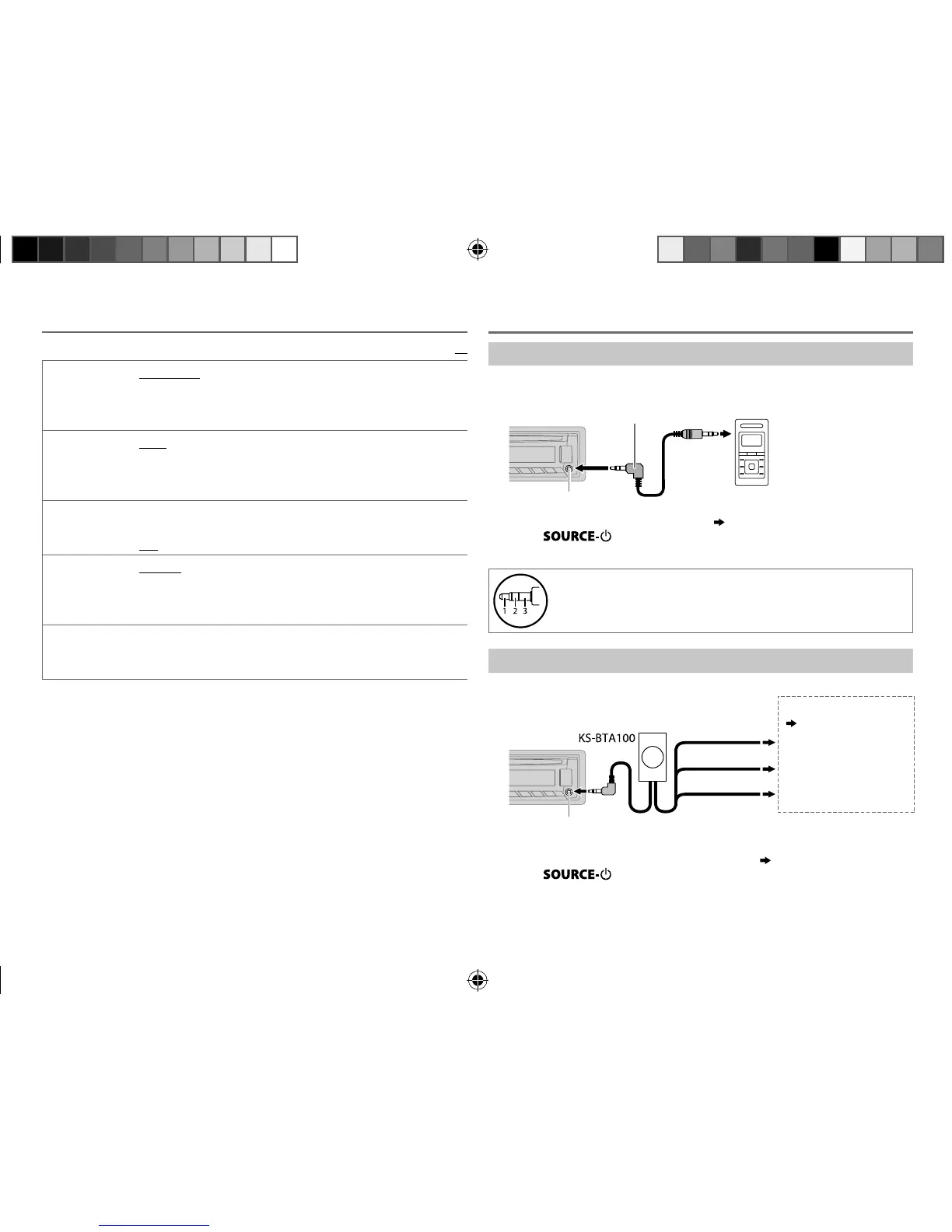
Use a portable audio player
1
Connect a portable audio player (commercially available).
2 Select [
ON
] for [
AUX
] in [
SRC SELECT
]. (
4
)
3 Press repeatedly to select AUX.
4 Turn on the portable audio player and start playback.
Use a 3-core plug head stereo mini plug for optimum audio
output.
Use a Bluetooth® device
1
Connect the Bluetooth adapter, KS-BTA100 (separately purchased).
2 Register (pair) the Bluetooth device with KS-BTA100.
3 Select [
BT ADAPTER
] for [
AUX
] in [
SRC SELECT
]. (
4
)
4 Press repeatedly to select BT AUDIO.
5 Start using the Bluetooth device.
For details, refer to the instruction manual of KS-BTA100.
3.5mm (1/8") stereo mini plug with “L” shaped connector
(commercially available)
Portable audio player
Auxiliary input jack
AUX
Auxiliary input jack
Blue/white
Blue/white: Remote
Black
Black: Ground
Brown
Brown: Tel muting
Wiring harness of the unit
(
23
)
JS_JVC_KD_AR765S_J_EN_f.indd 8JS_JVC_KD_AR765S_J_EN_f.indd 8 4/8/2014 2:41:58 PM4/8/2014 2:41:58 PM



 To Next Page