3ENGLISH
CONTENTS
3 How to read this manual
3 How to attach/detach the control
panel
3 How to reset your unit
3 How to forcibly eject a disc
4
Canceling the display
demonstration
4 Setting the clock
5 Basic operations
6 Listening to the radio
9 Listening to a disc
10 Listening to the USB device
11 Listening to the other external
components
12 Using the remote controller
13 Selecting a preset sound mode
14 Menu operations
20 Maintenance
21 More about this unit
23 Troubleshooting
26 Specifications
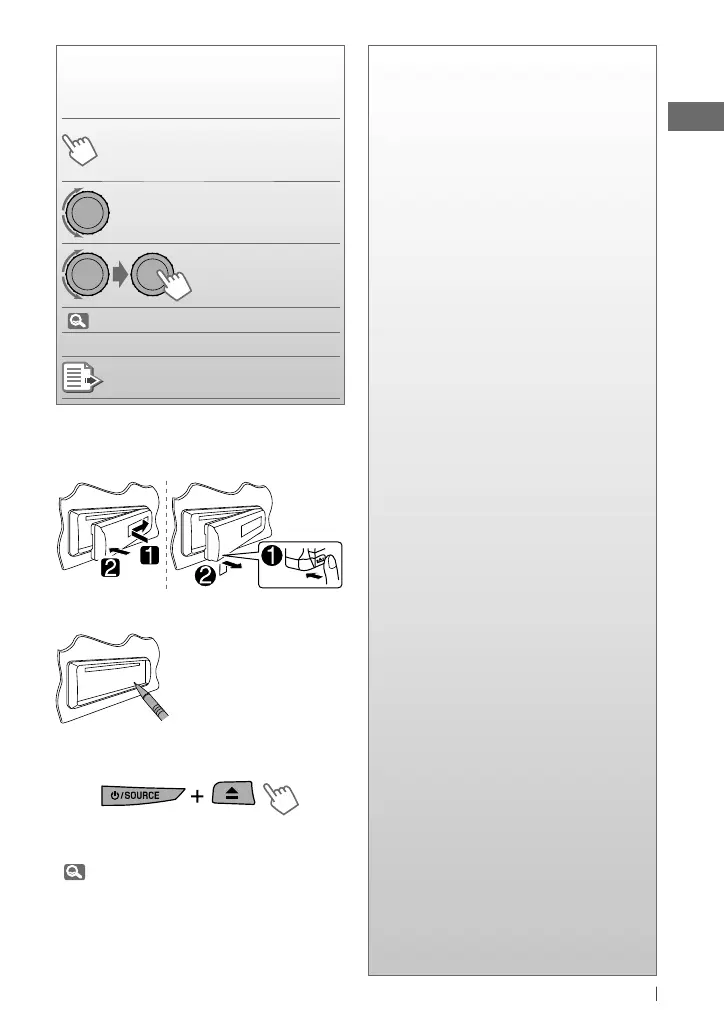
How to read this manual
The following icons/symbols are used to
indicate:
Press and hold the button(s)
until the desired operation
begins.
Turn the control dial.
Turn the control dial
to make a selection,
then press to confirm.
(
XX)
Reference page number
<XXXX> Menu setting item
Continued on the next page
How to attach/detach the control
panel
How to reset your unit
Your preset adjustments
will also be erased.
How to forcibly eject a disc
• You can forcibly eject the loaded disc even
if the disc is locked. To lock/unlock the disc,
9.
• Be careful not to drop the disc when it ejects.
• If this does not work, reset your unit.
[Hold]
[Hold]
EN02-11_KD-R511_003A_f.indd 3EN02-11_KD-R511_003A_f.indd 3 12/10/09 4:58:48 PM12/10/09 4:58:48 PM



 To Next Page