7ENGLISH
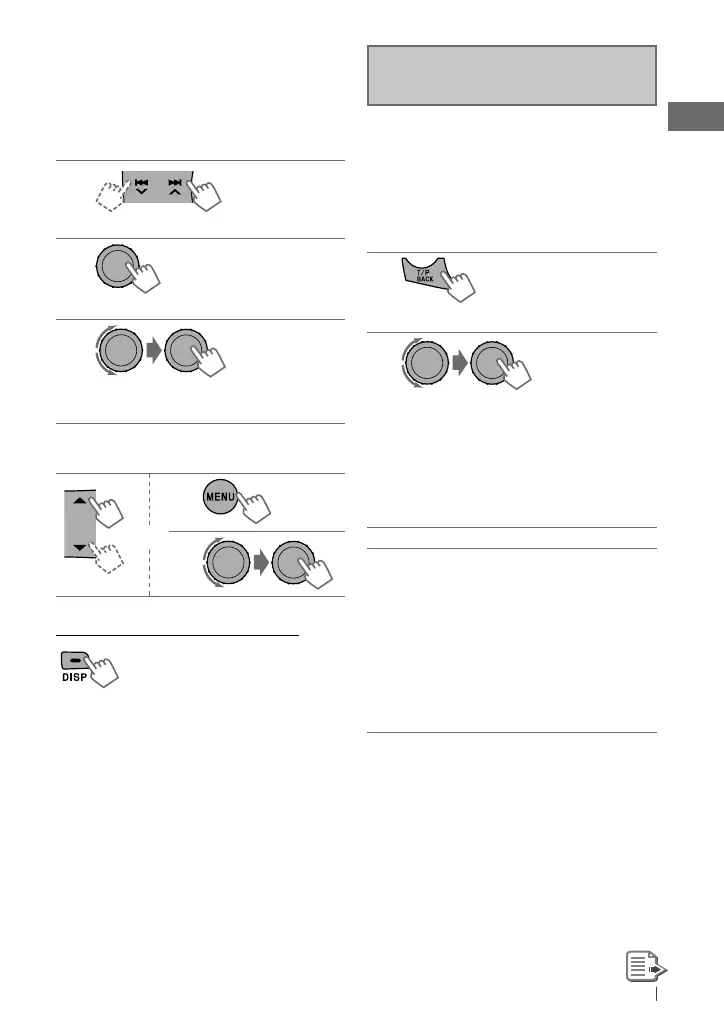
Manual presetting (FM/AM)
You can preset up to 18 stations for FM and 6
stations for AM.
Ex.: Storing FM station of 92.50 MHz into preset
number “04.”
1
]
“92.50MHz”
2
“PRESET MODE” flashes.
3
]
Selects preset number “04.”
“P04” flashes and “MEMORY” appears.
Selecting a preset station
or
1
2
Changing the display information
Frequency
=
Clock
=
(back to
the beginning)
[Hold]
The following features are available
only for FM Radio Data System stations.
Searching for your favourite
FM Radio Data System
programme—
PTY Search
You can tune in to a station broadcasting your
favourite programme by searching for a PTY
code.
1
The last selected PTY code appears.
2
]
Select one of your favourite
programme types or a PTY code, and
start searching.
If there is a station broadcasting a
programme of the same PTY code as you
have selected, that station is tuned in.
PTY codes: NEWS, AFFAIRS, INFO, SPORT,
EDUCATE, DRAMA, CULTURE, SCIENCE,
VARIED, POP M (music), ROCK M (music),
EASY M (music), LIGHT M (music), CLASSICS,
OTHER M (music), WEATHER, FINANCE,
CHILDREN, SOCIAL, RELIGION, PHONE IN,
TRAVEL, LEISURE, JAZZ, COUNTRY,
NATION M (music), OLDIES, FOLK M (music),
DOCUMENT
[Hold]
EN02-11_KD-R511_003A_1.indd 7EN02-11_KD-R511_003A_1.indd 7 10/28/09 10:06:46 AM10/28/09 10:06:46 AM



 To Next Page