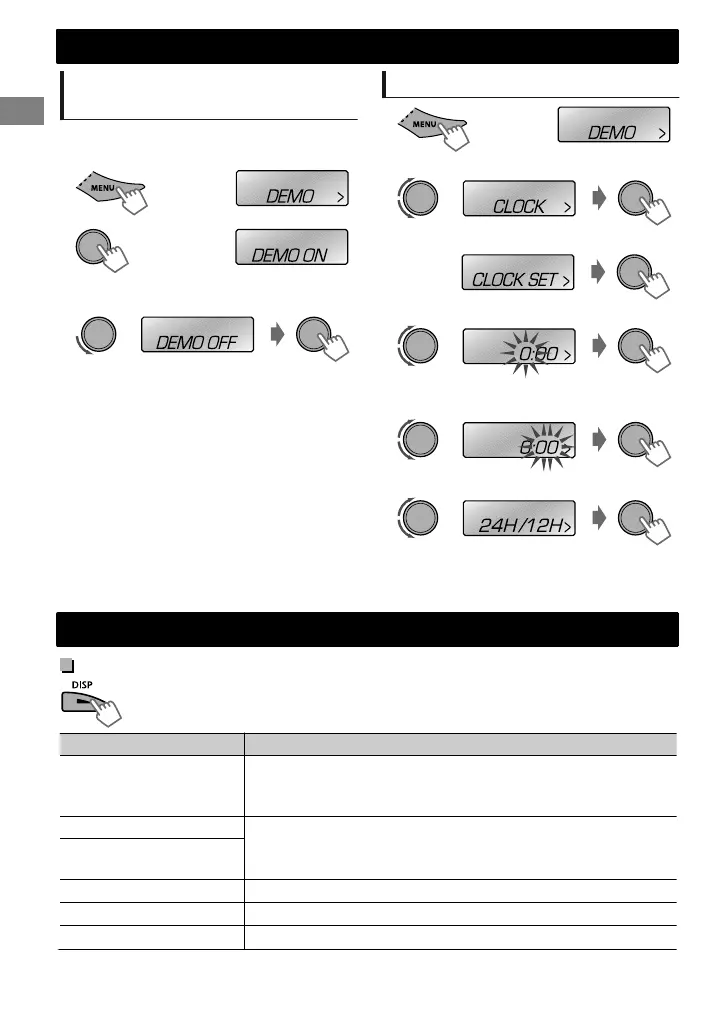
Canceling the display
demonstration
The display demonstration is always turned on
unless you cancel it.
(Hold)
1
(Initial setting)
2
3
Select <DEMO OFF>.
4
Press MENU to exit.
Setting the clock
1
2
Select <CLOCK>.
3
Select <CLOCK SET>.
4
Adjust the hour.
5
Adjust the minute.
6
Select <24H/12H>.
7
Select <24 HOUR> or <12 HOUR>.
8
Press MENU to exit.
Basic operations
Display information
Changes the display information. (Press)
Scrolls the current display information. (Hold)
Source Display
Radio
Non-Radio Data System station: Frequency ) Clock
FM Radio Data System station: Station name (PS) - Frequency -
Programme type (PTY) - Clock - (back to the beginning)
CD/USB
Album title/Artist* - Track title* - Track no./Playing time - Track
no./Clock - (back to the beginning)
* “NO NAME” appears for conventional CDs or if not recorded.
iPod/iPhone (HEAD MODE/
IPOD MODE) *1
iPod/iPhone (EXT MODE) *1
EXT MODE) Clock
External Components (AUX)
F-AUX or R-AUX) Clock
Bluetooth Audio
BT AUDIO) Clock
*1 For KD-R531 only.
Preparation
Preparation
4
|ޓENGLISH
2011/10/3ޓ19:21:12KD-R531_E_EN


 To Next Page
 Loading...