Need help?
Do you have a question about the JVC KD-R651 and is the answer not in the manual?
Guidelines for proper disposal of electronic waste and batteries according to EU standards.
Important warnings and cautions for safe operation and driving.
Instructions for cleaning the unit, connector, and handling discs properly.
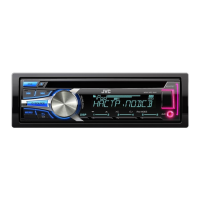
Overview of the JVC unit's faceplate layout and key controls.
How to use the remote control and perform a system reset.
Steps to cancel demonstration, set the clock, and configure basic settings.
Instructions for starting playback and navigating tracks/folders.
Managing files, changing USB drives, and audiobook playback speed.
Methods for finding, saving, and searching radio stations by program type.
Configuring radio reception settings like IF BAND, MONO, and AF SET.
How to connect and use a portable audio player via AUX input.
Steps to connect and use a Bluetooth device via the KS-BTA100 adapter.
Selecting preset equalizers and creating custom sound settings.
Detailed settings for subwoofer, fader, balance, gain, and other audio parameters.
Adjusting display and button illumination for day and night.
Setting specific colors for different display zones and patterns.
Information on playable discs, audio file formats, and character limits.
Specifications and limitations for connecting USB devices and iPod/iPhone.
Troubleshooting common issues like no sound, connection errors, or display problems.
Resolving problems related to device compatibility, file formats, and playback errors.
Important safety warnings and preliminary steps before installation.
Step-by-step guide for installing the unit and connecting the wiring harness.
Detailed technical specifications for the tuner and CD player components.
Technical specs for USB, audio output, power, and general unit dimensions.
 General
| Power Output | 50W x 4 |
|---|---|
| RMS Power | 22W x 4 |
| CD Playback | Yes |
| USB Input | Yes |
| Bluetooth | No |
| Display Type | LCD |
| Subwoofer Preamp Output | Yes |
| AUX Input | Yes |
| MP3 Playback | Yes |
| WMA Playback | Yes |
| Detachable Face | Yes |
| CD-R/RW Playback | Yes |
| Remote Control | Yes |
| Channels | 4 |
| Tuner | AM/FM |
| Button Illumination | Red |


 To Next Page