Need help?
Do you have a question about the JVC KD-R453 and is the answer not in the manual?
Guidelines for disposing of old electrical products and batteries according to EU regulations.
Statements regarding compliance with EMC and RoHS directives.
Explains the Class 1 laser product marking and its safety implications.
Crucial safety warnings, cautions, and general handling advice for the unit.
Instructions for remote control handling, unit cleaning, and disc care.
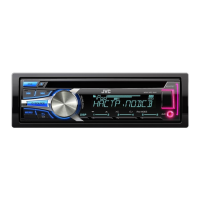
Details the unit's faceplate, including attachment, detachment, and basic controls.
Covers remote control usage, reset procedures, and battery replacement.
Guides through cancelling demonstration mode, setting the clock, and basic settings.
How to start playback from CD, USB, or iPod, and manage playback modes.
Steps to select iPod/iPhone as a source and manage its operating modes.
Methods for selecting tracks or songs from lists or by name.
Managing USB drives and adjusting audiobook playback speed.
How to find and save favorite radio stations using automatic or manual tuning.
Utilizing PTY search and activating Traffic Announcement standby.
Scheduling radio playback and adjusting tuner functions like SSM and IF BAND.
Activating NEWS-STBY, REGIONAL, and AF SET for enhanced reception.
Connecting and playing audio from external portable players via the AUX input.
Connecting and using a Bluetooth adapter for wireless audio streaming.
Configuring preset/custom equalizers and applying bass boost or loudness.
Adjusting speaker output balance, fader, and source-specific volume levels.
Managing amplifier gain, sound expansion, muting, and output modes.
Adjusting display scrolling, dimmer, and brightness levels for day/night.
Selecting and creating custom color schemes for display illumination.
Controls color guide behavior and menu color settings.
Details on supported media, files, and devices for playback.
Information on JVC software and handling of Cyrillic characters in display.
Solutions for common problems such as no sound, selection errors, or display malfunctions.
Resolving problems related to unsupported devices, formats, or file reading errors.
Resolving problems related to iPod/iPhone not turning on or being detected.
Essential safety warnings and the fundamental steps for installing the unit.
Identifies installation parts and provides instructions for dashboard mounting.
Guidance on how to remove the unit and install it without a mounting sleeve.
Details the wiring harness, front/rear outputs, and remote connections.
Explains ISO connector pin functions and wiring modifications for certain car models.
Technical data for tuner, CD player, USB, and auxiliary input functions.
Specifications for audio output, general operating conditions, and power requirements.


 To Next Page
 General