Need help?
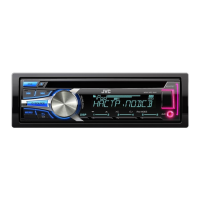
Do you have a question about the JVC KD-R551 and is the answer not in the manual?
Explains the meaning of the Class 1 Laser Product marking on the unit.
Do not operate functions that distract from safe driving. Adjust volume to hear outside sounds.
Adjust volume to hear outside sounds, avoid distraction, and handle device usage carefully.
Covers remote control care, unit cleaning, connector cleaning, and disc handling precautions.
Overview of the faceplate, its components, and instructions for attachment and detachment.
Details on remote control operation, sensor, battery replacement, and reset procedure.
Step-by-step guide to reset the unit, which will also erase preset adjustments.
Instructions for turning the unit on/off, adjusting volume, selecting sources, and changing display information.
Step-by-step instructions to disable the demo mode on the unit.
Guide to manually set the clock time and format (12/24 hour).
Instructions for accessing and setting basic system parameters like clock, sources, and language.
Explains how playback starts and covers CD insertion and ejection.
Instructions for connecting USB devices and iPod/iPhone via the USB terminal.
Guides on selecting tracks, folders, and setting repeat/random play modes for various media.
Instructions for automatically or manually searching and tuning radio stations.
How to save favorite radio stations to preset memory buttons.
Search for radio programs based on specific PTY codes like NEWS, SPORT, etc.
Enables temporary switching to Traffic Announcements from other sources.
How to connect a portable audio player using a 3.5mm stereo mini plug.
Steps to connect a Bluetooth adapter (KS-BTA100) for wireless audio.
Select from various preset sound profiles like FLAT, ROCK, JAZZ, etc.
Create and save custom sound settings for SUB.W, BASS, MID, and TREBLE.
Access settings for EQ, volume adjustment, and other audio parameters.
Configures display scrolling behavior and brightness adjustment for day/night modes.
Selects preset colors, custom colors, or color flows for display and buttons on specific models.
Sets separate brightness levels for day and night for buttons, display, and USB terminal.
Lists playable CD types, file extensions, bit rates, sampling frequencies, and character limits.
Information on supported USB mass storage devices, file systems, and character limits.
Lists compatible iPod/iPhone models and notes on video browsing and song order.
Resolves issues related to no sound or inability to select sources.
Addresses wiring errors, warning messages, and unit reset procedures.
Solutions for poor radio reception and incorrect character display.
Troubleshoots issues with disc playback, ejection, and time display.
Critical warnings about power, battery disconnection, wiring, and grounding for safe installation.
Advises professional installation, handling hot parts, correct speaker wiring, and power matching.
Step-by-step guide for removing the key, disconnecting the battery, wiring, installing, and resetting.
Diagrams for audio output wiring and points for antenna, remote, and amplifier.
Instructions for modifying wiring for specific car models and cars without ISO terminals.
Detailed table showing pin assignments and functions for the ISO connector.
Technical details for FM/AM reception, sensitivity, stereo separation, and CD playback performance.
Technical specifications for USB, auxiliary input, and audio output power.
General specifications including operating voltage, temperature range, dimensions, and weight.
 General
| Power Output | 50W x 4 |
|---|---|
| RMS Output Power | 22W x 4 |
| CD Playback | Yes |
| USB Port | Yes |
| Bluetooth | No |
| Display Type | LCD |
| Subwoofer Output | Yes |
| AUX Input | Yes |
| MP3 Playback | Yes |
| WMA Playback | Yes |
| ID3 Tag Display | Yes |
| Detachable Face | Yes |
| Channels | 4 |
| Auxiliary Input | Yes |
| Remote Control | Yes |
| Tuner | FM/AM |
| Preamp Outputs (Pair) | 1 |


 To Next Page