EasyManua.ls Logo

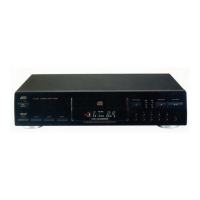
JVC XL-V130BK - User Manual

JVC XL-V130BK
19 pages
Print Icon
To Next Page IconTo Next Page
Loading...
For Customer Use:
Enter below the Model No. and Serial
No. which are located either on the rear,
bottom or side of the cabinet. Retain this
information for future reference.
Model No.
Serial No.
LET0029-001A
[BS]
COMPACT COMPONENT SYSTEM
INSTRUCTIONS
XL-V130BK/XL-V230BK
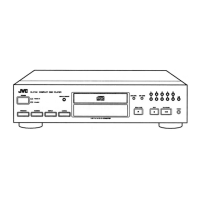
COMPACT DISC PLAYER
'
XL-V230BK
XL-V130BK
COMPACT
DIGITAL AUDIO
RM-SX230EU REMOTE CONTROL
123
CANCEL RANDOM
4567
8 9 10 +10
OPEN /
CLOSE
PROGRAM
AUTO SEARCH / CHECK
SEARCH
REPEAT DISPLAY INDEX
ALL / 1
MODE
STANDBY
XL-V130 COMPACT DISC PLAYER
STANDBY/ON
PROGRAM
RANDOM REPEAT CANCEL
OPEN / CLOSE
STOP/CLEAR
PLAY / PAUSE
6 7 8 9 10 +10
/
1 2 3 4 5
/
Pulse Edge Modulation Differential Linearity Errorless D/A Converter
P E M D D CONVERTER CONVERTER
STANDBY
XL-V230 COMPACT DISC PLAYER
STANDBY/ON
PROGRAM
RANDOM REPEAT CANCEL
OPEN / CLOSE
STOP/CLEAR
PLAY / PAUSE
6 7 8 9 10 +10
/
1 2 3 4 5
/
Pulse Edge Modulation Differential Linearity Errorless D/A Converter
P E M D D CONVERTER CONVERTER
XL-V130/230[BS]COVER 97.3.7, 3:55 PM1

Questions and Answers

  • K
    Kenneth ThomasJul 30, 2025
    How to fix a JVC XL-V130BK that is not operative?
    • G
      gutierrezannaJul 30, 2025
      If your JVC CD Player isn't working, check these things: * Make sure the power plug is securely connected to an AC outlet. * Verify the AC power cord is properly connected to the unit's AC power cord inlet. * Ensure a disc is loaded correctly in the disc tray.
  • L
    Laura JohnstonAug 8, 2025
    Why is my JVC XL-V130BK CD Player remote control not working?
    • T
      Terri ShermanAug 8, 2025
      If your JVC CD Player remote control isn't working, here's what to check: 1. Replace the batteries in the remote. 2. Make sure there's nothing blocking the path between the remote and the CD player. 3. Shield the CD player from direct sunlight.
  • E
    eric52Aug 19, 2025
    What to do if my JVC XL-V130BK playback is not possible?
    • A
      Andrew HannaAug 19, 2025
      If your JVC CD Player won't play discs, try the following: * Make sure the disc is loaded with the label-side up. * Ensure the disc is correctly positioned in the disc tray. * If moisture has condensed inside the unit, leave it turned on until it evaporates.

Summary

Safety, Warnings, and Precautions

Electrical, Mains Plug, and Laser Safety

Covers UK mains plug safety, general electrical cautions, and important laser product warnings.

Initial Setup and System Connectivity

Power Supply Configuration

Basic Disc Playback Functions

Powering On;Off, Disc Loading, and Remote Operation

Covers turning the unit on/off, loading discs, and basic remote control usage.

Disc Navigation and Playback Control

Advanced Playback and Time Display

Playback Sequencing Modes

Repeat Playback Options

COMPU LINK System Features

System Integration, Sync Recording, and Auto Power

Describes COMPU LINK functionality, synchronized recording, and automatic power control.

Troubleshooting Common Issues

Problem Diagnosis and Solutions

Lists common malfunctions with their possible causes and remedies.

Technical Specifications and Accessories

JVC XL-V130BK Specifications

General IconGeneral
TypeCD Player
Disc Capacity1
Frequency Response2 Hz - 20 kHz
Signal-to-Noise Ratio100 dB
Line output2 V
Weight3.5 kg
Channels2
Power RequirementsAC 230 V, 50 Hz
Power Consumption12W
Disc formatCD
Digital outputsOptical
Output Level2V

Related product manuals