11
ENGLISH |
Data Size: B6L (182 mm x 128 mm)
Book Size: B6L (182 mm x 128 mm)
DISPLAY SETTINGS
KD-R757 / KD-R751
KD-R651 / KD-R457 / KD-R453 / KD-R452 / KD-R451
KD-R557 / KD-R551
1 Press and hold MENU.
2 Turn the volume knob to make a selection (see the following table),
then press the knob.
Repeat step
2 until the desired item is selected.
• To return to the previous setting item or hierarchy, press GT/P.
• To cancel, press MENU.
Default:
XX
DISPLAY
DIMMER
Selects the display and button illumination adjusted in the
[BRIGHTNESS]
setting.
AUTO
:Changes between the day and night adjustments when you turn off
or on the car headlights. *
1
;
ON
:Selects the night adjustments.;
OFF
:Selects
the day adjustments.
BRIGHTNESS
Sets the button, display and USB input terminal brightness for day and night
separately.
1
DAY
/
NIGHT
:Select day or night.
2
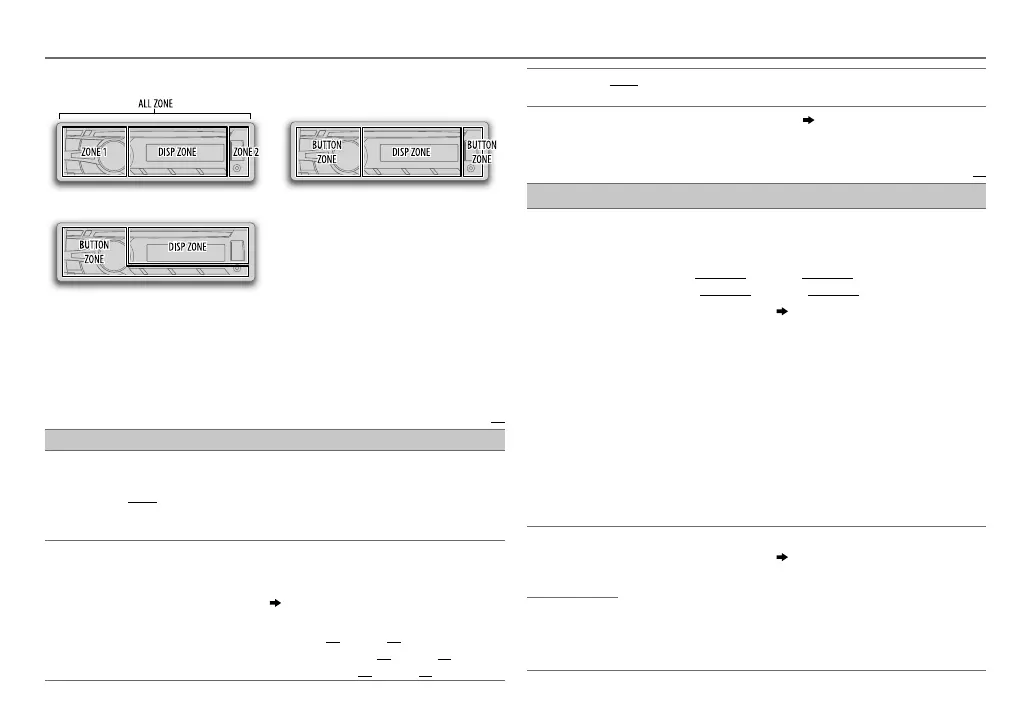
Select a zone for setting.
( Illustration above)
3
Set the brightness level (
00
to
31
).
(Default:
KD-R757
/
KD-R751
:
DAY
:
31
;
NIGHT
:
11
Other models
:
BUTTON ZONE
:
DAY
:
25
;
NIGHT
:
09
DISP ZONE
:
DAY
:
31
;
NIGHT
:
12
)
SCROLL
*
2
ONCE
:Scrolls the display information once.;
AUTO
:Repeats scrolling at
5-second intervals.;
OFF
:Cancels.
*
1
The illumination control wire connection is required.
( 16)
*
2
Some characters or symbols will not be shown correctly (or will be blanked).
Default:
XX
COLOR
(for
KD-R757
/
KD-R751
)
PRESET
You can select a color for [
ALL ZONE
], [
ZONE 1
], [
DISP ZONE
], or
[
ZONE 2
] separately. For [
ALL ZONE
], you can also select a color pattern.
Default color:
ALL ZONE
: [
COLOR 06
],
ZONE 1
: [
COLOR 06
],
DISP ZONE
: [
COLOR 01
],
ZONE 2
: [
COLOR 27
]
1
Select a zone for setting.
( Illustration on left column)
2
Select a color for the selected zone.
•
COLOR 01
to
COLOR 29
•
USER
: The color you have created for [
DAY COLOR
] or
[
NIGHT COLOR
] is shown.
•
COLOR FLOW 01
to
COLOR FLOW 03
: Color changes at different
speeds.
•
SPECTRUM
/
GROOVE
/
TECHNO
/
EMOTION
/
RELAX
/
NIGHT SWEEP
: The selected color pattern is shown.* (Selectable
only when [
ALL ZONE
] is selected in step
1
.)
* If one of these color pattern is selected, the [
ZONE 1
], [
DISP ZONE
],
[
ZONE 2
] illumination color will change to the default color.
DAY COLOR
Store your own day and night colors for different zone.
1
Select a zone for setting.
( Illustration on left column)
2
RED
/
GREEN
/
BLUE
:Select a primary color.
3
00
to
31
:Select the level.
Repeat steps
2
and
3
for all the primary colors.
• Your setting is stored to
[USER]
in
[COLOR]
.
• If
[00]
is selected for all primary colors for
[DISP ZONE]
, nothing
appears on the display.
NIGHT COLOR
EN_KD-R757_R751[EE_E]2.indd 11EN_KD-R757_R751[EE_E]2.indd 11 9/25/2013 12:26:56 PM9/25/2013 12:26:56 PM



 To Next Page
 Loading...