EasyManua.ls Logo

JVC KD-W110 - Page 4

JVC KD-W110
20 pages
Print Icon
To Next Page IconTo Next Page
To Previous Page IconTo Previous Page
Loading...
CAUTIONS
1.
Installation
1)
Avoid
installing
the
unit
in
a
location
subject,
to
-
>
ambient
temperatures
exceeding
40°C
(104°F)
(e.
g.
direct
sunlight,
near
heaters,
etc.)
or
less
than
o°c
(32°F),
excessive
humidity,
dust
or
vibrations.
2)
Avoid
placing
the
unit
on
or
adjacent
to
an
ampli-
fier,
to
prevent
hum
from
being
produced
by
some
types
of
amplifiers.
Move
the
unit
to
a
place
not
affected
by
the
amplifier.
Keep
the
unit
as
far
as
possible
from
a
TV
set.
3)
When
the
deck
is
moved
from
a
cold
place
of
around
0°C
to
a
warm
place,
it
may
not
operate
normally,
because
moisture
has
formed
inside
the
deck.
Normal
operation
will
be
restored
after
waiting
about
30
minutes.
2.
Safety
hints
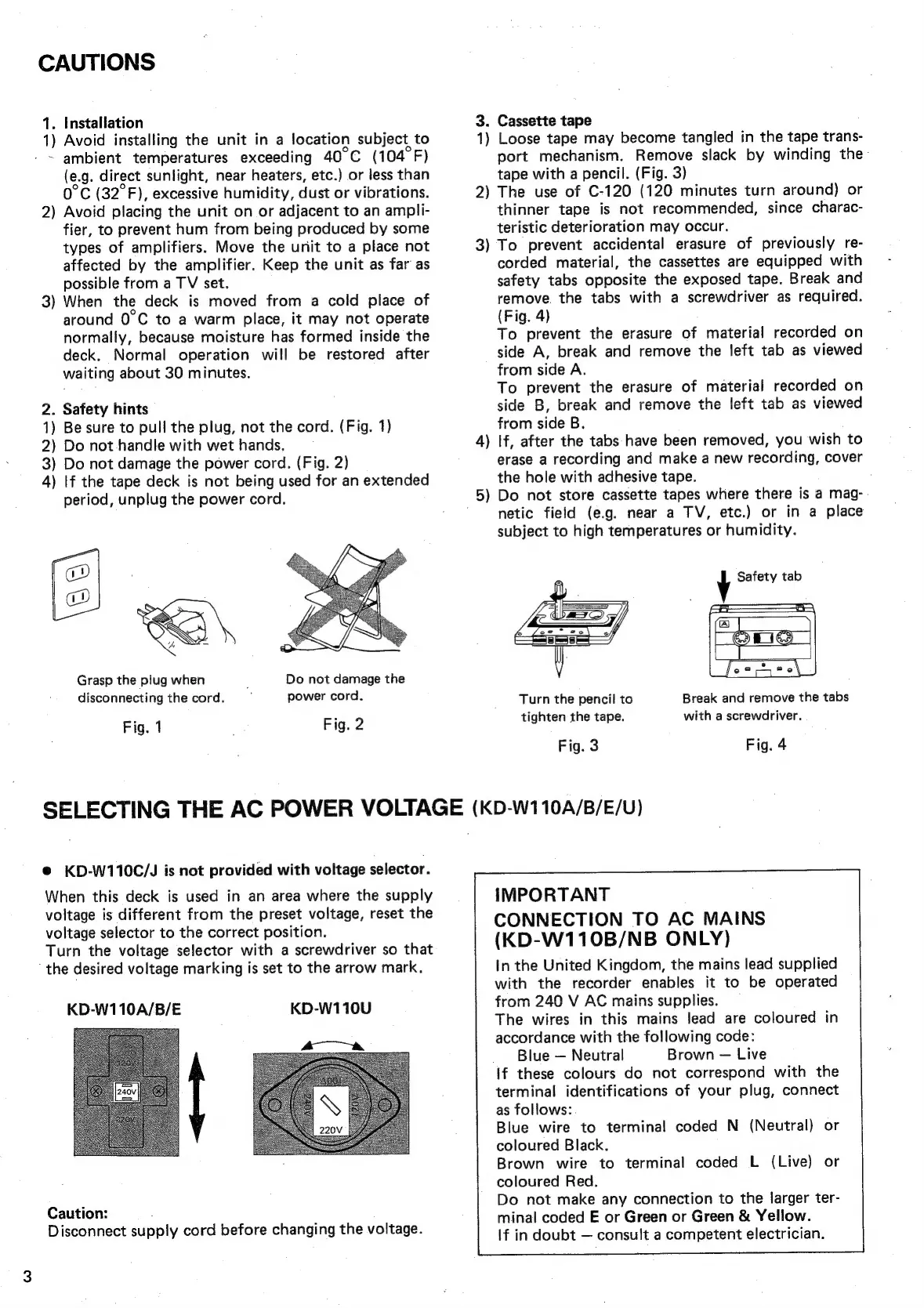
1)
Be
sure
to
pull
the
plug,
not
the
cord.
(Fig.
1)
2)
Do
not
handle
with
wet
hands.
3)
Do
not
damage
the
power
cord.
(Fig.
2)
4)
If
the
tape
deck
is
not
being
used
for
an
extended
period,
unplug
the
power
cord.
Grasp
the
plug
when
disconnecting
the
cord.
Fig.
1
Fig.
2
Do
not
damage
the
power
cord.
45
3.
Cassette
tape
1)
Loose
tape
may
become
tangled
in
the
tape
trans-
port
mechanism.
Remove
slack
by
winding
the:
tape
with
a
pencil.
(Fig.
3)
2)
The
use
of
C-120
(120
minutes
turn
around)
or
thinner
tape
is
not
recommended,
since
charac-
teristic
deterioration
may
occur.
3)
To
prevent
accidental
erasure
of
previously
re-
corded
material,
the
cassettes
are
equipped
with
safety
tabs
opposite
the
exposed
tape.
Break
and
remove.
the
tabs
with
a
screwdriver
as
required.
(Fig.
4)
To
prevent
the
erasure
of
material
recorded
on
side
A,
break
and
remove
the
left
tab
as
viewed
from
side
A.
To
prevent
the
erasure
of
material
recorded
on
side
B,
break
and
remove
the
left
tab
as
viewed
from
side
B.
If,
after
the
tabs
have
been
removed,
you
wish
to
erase
a
recording
and
make
a
new
recording,
cover
the
hole
with
adhesive
tape.
Do
not
store
cassette
tapes
where
there
is
a
mag-
netic
field
(e.g.
near
a
TV,
etc.)
or
in
a
place
subject
to
high
temperatures
or
humidity.
4
~~
y
Safety
tab
Break
and
remove
the
tabs
with
a
screwdriver.
Turn
the
pencil
to
tighten
the
tape.
Fig.
3
Fig.
4
SELECTING
THE
AC
POWER
VOLTAGE
(KD-W110A/B/E/U)
®
KD-W110C/J
is
not
provided
with
voltage
selector.
When
this
deck
is
used
in
an
area
where
the
supply
voltage
is
different
from
the
preset
voltage,
reset
the
voltage
selector
to
the
correct
position.
Turn
the
voltage
selector
with
a
screwdriver
so
that
‘the
desired
voltage
marking
is
set
to
the
arrow
mark.
KD-W110U
KD-W110A/B/E
Caution:
:
Disconnect
supply
cord
before
changing
the
voltage.
IMPORTANT
CONNECTION
TO AC
MAINS
(KD-W110B/NB
ONLY)
In
the
United
Kingdom,
the
mains
lead
supplied
with
the
recorder
enables
it
to
be
operated
from
240
V
AC
mains
supplies.
The
wires
in
this
mains
lead
are
coloured
in
accordance
with
the
following
code:
_
Blue
Neutral
Brown
Live
if
these
colours
do
not
correspond
with
the
terminal
identifications
of
your
plug,
connect
as
follows:
Blue
wire
to
terminal
coded
N
(Neutral)
or
coloured
Black.
Brown
wire
to
terminal
coded
L
(Live)
or
coloured
Red.
Do
not
make
any
connection
to
the
larger
ter-
minal
coded
E
or
Green
or
Green
&
Yellow.
If
in
doubt
consult
a
competent
electrician.

Related product manuals