EasyManua.ls Logo

JVC KD-W110 - Page 5

JVC KD-W110
20 pages
Print Icon
To Next Page IconTo Next Page
To Previous Page IconTo Previous Page
Loading...
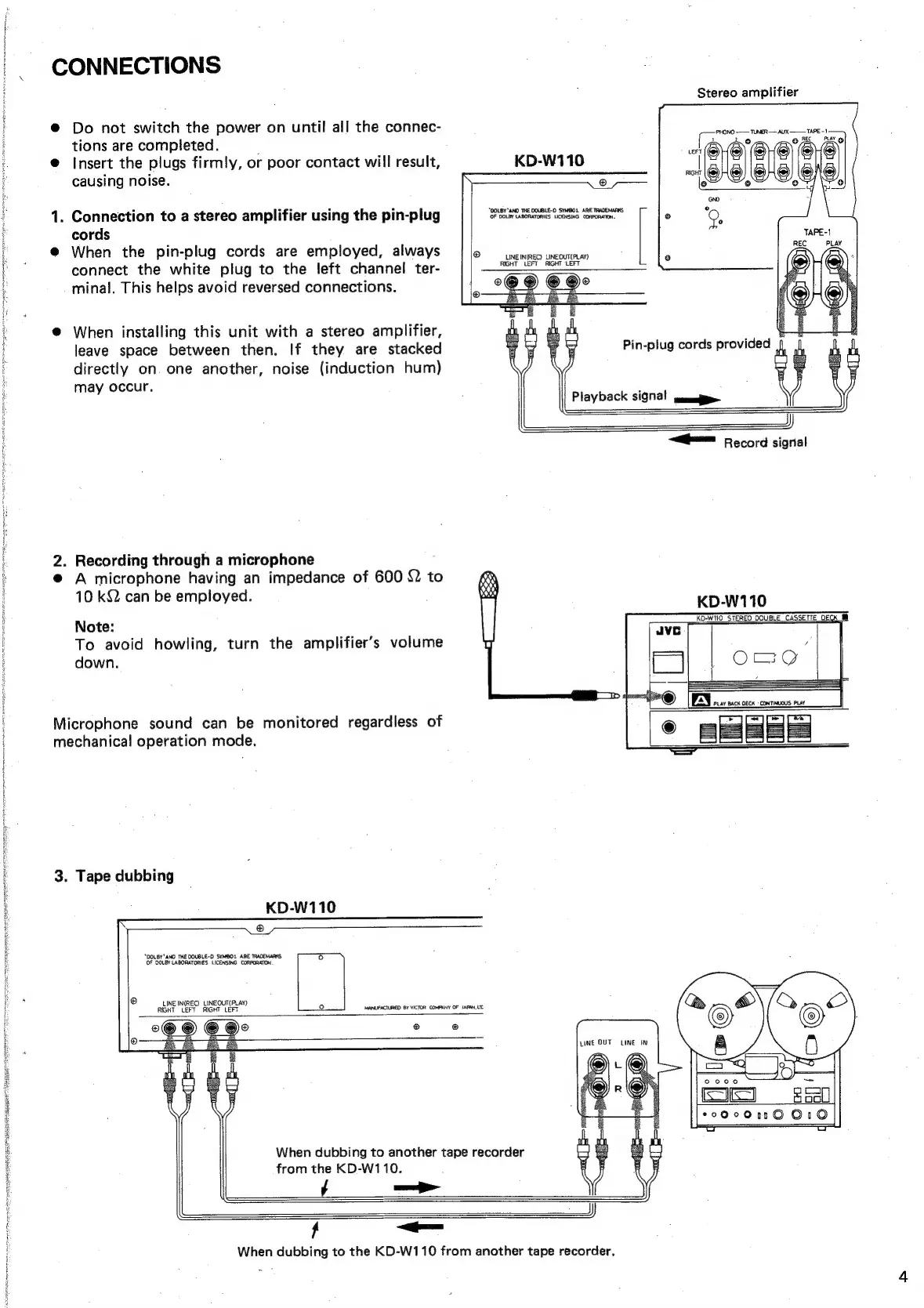
CONNECTIONS
Stereo
amplifier
@
Do
not
switch
the
power
on
until
all
the
connec-
tions
are
completed.
@
Insert
the
plugs
firmly,
or
poor
contact
will
result,
KD-W110
causing
noise.
TUNER
AUX
TAPE
-1
PHO!
‘geeate
®
“DOLBY'AND
THE
DOUBLE-D
SYMBOL
ARE
TRADEMARKS
OF
DOLBY
LABORATORIES
LICENSING
CORPORATION.
1.
Connection
to
a
stereo
amplifier
using
the
pin-plug
cords
@
When
the
pin-plug
cords
are
employed,
always
connect
the
white
plug
to
the
left
channel
ter-
minal.
This
helps
avoid
reversed
connections.
LINE
IN(REC)
LINEOUT(PLAY)
RIGHT
LEFT
RIGHT
‘LEFT
@
When
installing
this
unit
with
a
stereo
amplifier,
leave
space
between
then.
If
they
are
stacked
:
Pin-plug
cords
provided
directly
on
one
another,
noise
(induction
hum)
may
occur.
=
Record
signal
2.
Recording
through
a
microphone
@
A
microphone
having
an
impedance
of
600
{2
to
10
k&2
can
be
employed.
KD-W110
RO.wi0
STEREO
OOUBLE
CASSETTE
O&G
Note:
To
avoid
howling,
turn
the
amplifier’s
volume
down.
Microphone
sound
can
be
monitored
regardless
of
mechanical
operation
mode.
3.
Tape
dubbing
KD-W110
®
“DOLBY’ANO
THE
DOUBLE-O
SYMBOL
ARE
TRADEMARKS
OF
DOLBY
LABORATORIES
LICENSING
CORPORATION
®
INE
IN(REC)
LINEOUT(PLAY)
Ul
RIGHT
LEFT
RIGHT
LEFT
MANUFACTURED
BY
VICTOR
COMPANY
OF
JAPAN,
LTC
®
@
When
dubbing
to
another
tape
recorder
from
the
KD-W110.
/
f
When
dubbing
to
the
KD-W110
from
another
tape
recorder,

Related product manuals