EasyManua.ls Logo

JVC KD-W110 - Page 6

JVC KD-W110
20 pages
Print Icon
To Next Page IconTo Next Page
To Previous Page IconTo Previous Page
Loading...
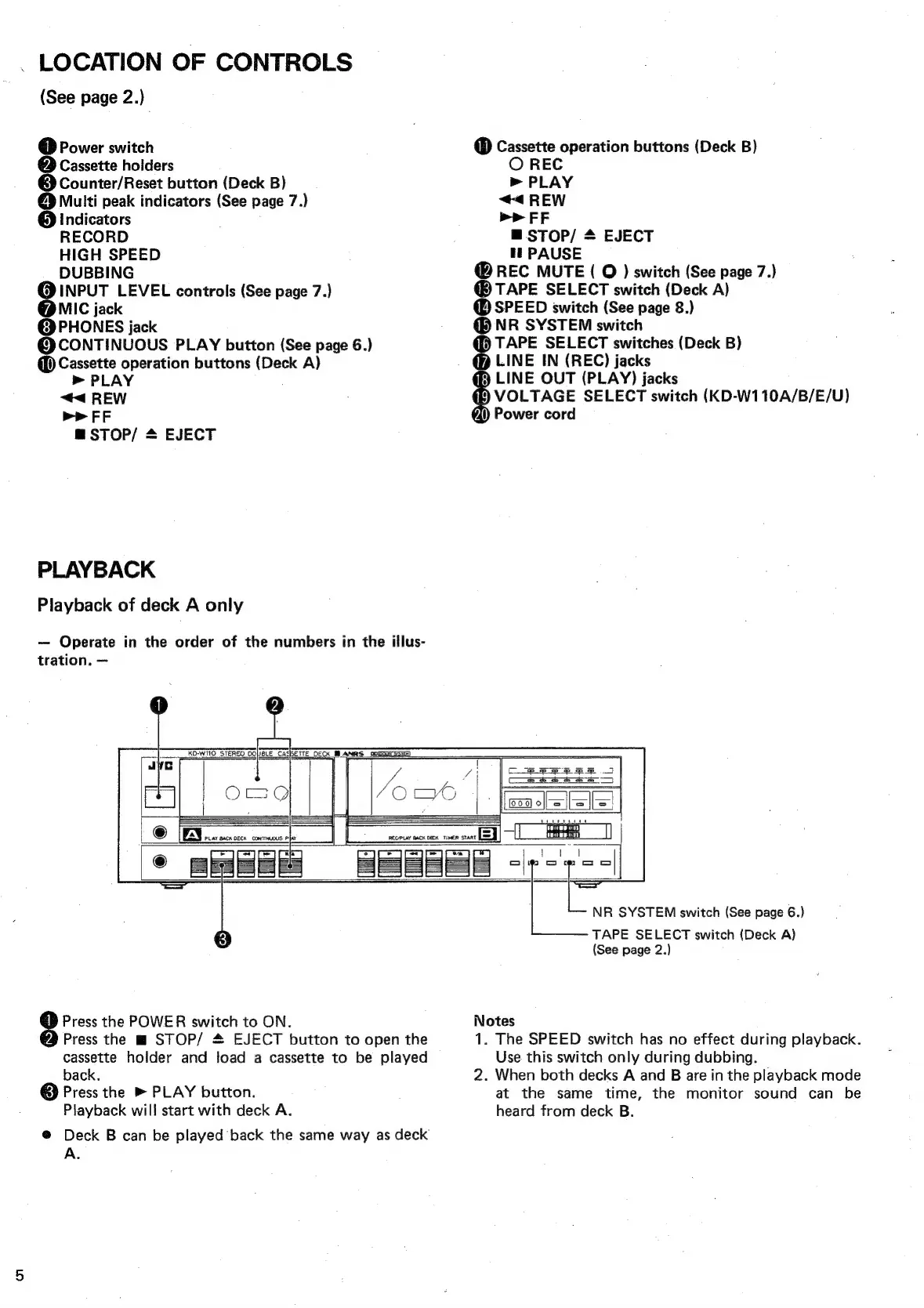
LOCATION
OF
CONTROLS
(See
page
2.)
@
Power
switch
@
Cassette
holders
@
Counter/Reset
button
(Deck
B)
@
Multi
peak
indicators
(See
page
7.)
@
Indicators
RECORD
HIGH
SPEED
DUBBING
INPUT
LEVEL
controls
(See
page
7.)
MIC
jack
@
PHONES
jack
@
CONTINUOUS
PLAY
button
(See
page
6.)
@
Cassette
operation
buttons
Deak
A)
>
PLAY
<<
REW
PP
FF
@STOP/
*
EJECT
PLAYBACK
Playback
of
deck
A
only
Operate
in
the
order
of
the
numbers
in
the
illus-
tration.
_.KO-WITO_
STEREO
DOBLE
CASSETTE
DECK
MLANRS
OUGoRr
asic)
Cassette
operation
buttons
(Deck
B)
O
REC
>
PLAY
<<
REW
p>
FF
=
STOP/
*
fl
PAUSE
@
REC
MUTE
(
O
)
switch
(See
page
7.)
TAPE
SELECT
switch
(Deck
A)
@
SPEED
switch
(See
page
8.)
NR
SYSTEM
switch
@
TAPE
SELECT
switches
(Deck
B)
@D
LINE
IN
(REC)
jacks
LINE
OUT
(PLAY)
jacks
.)
0
EJECT
BE)
VOLTAGE
SELECT
switch
(KD-W110A/B/E/U)
A)
Power
cord
Teese
8
Press
the
POWER
switch
to
ON.
Press
the
m
STOP/
#
EJECT
button
to
open
the
cassette
holder
and
load
a
cassette
to
be
played
back.
@
Press
the
PLAY
button.
Playback
will
start
with
deck
A.
@
Deck
B
can
be
played
back
the
same
way
as
deck
A.
=
NR
SYSTEM
switch
(See
page
6.)
TAPE
SELECT
switch
(Deck
A)
(See
page
2.)
Notes
1.
The
SPEED
switch
has
no
effect
during
playback.
Use
this
switch
only
during
dubbing.
2.
When
both
decks
A
and
B
are
in
the
playback
mode
at
the
same
time,
the
monitor
sound
can
be
heard
from
deck
B.

Related product manuals