ENGLISH
9
Data Size: B6L (182 mm x 128 mm)
Book Size: B6L (182 mm x 128 mm)
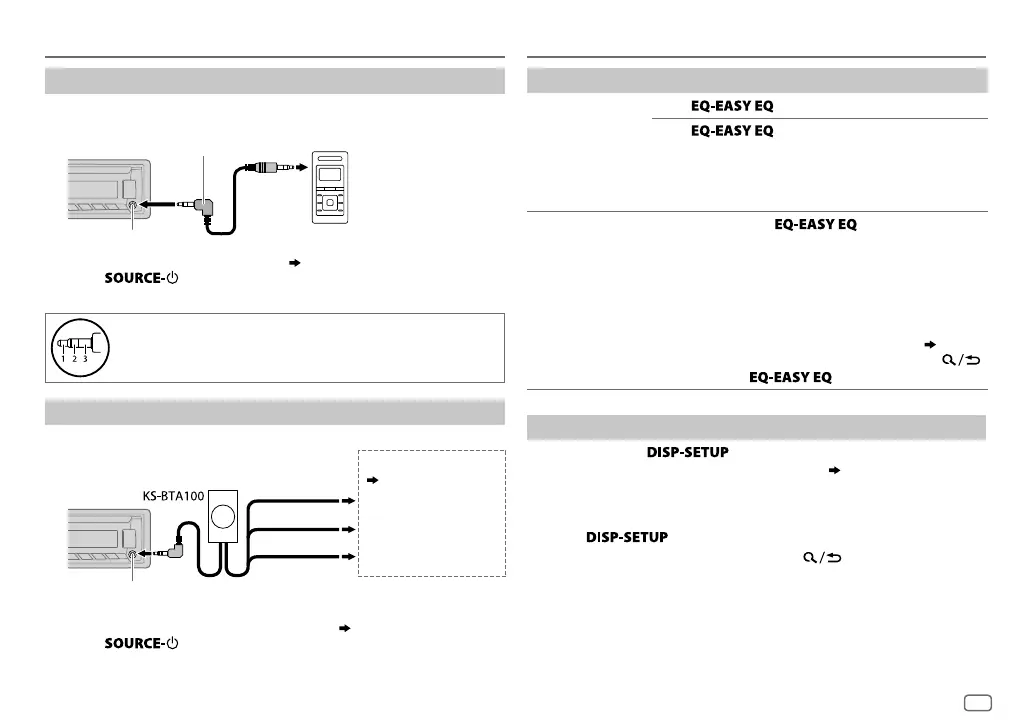
Use a portable audio player
1
Connect a portable audio player (commercially available).
2 Select [
ON
] for [
AUX
] in [
SRC SELECT
]. (
4
)
3 Press repeatedly to select AUX.
4 Turn on the portable audio player and start playback.
Use a 3-core plug head stereo mini plug for optimum audio
output.
Use a Bluetooth® device
1
Connect the Bluetooth adapter, KS-BTA100 (separately purchased).
2 Register (pair) the Bluetooth device with KS-BTA100.
3 Select [
BT ADAPTER
] for [
AUX
] in [
SRC SELECT
]. (
4
).
4 Press repeatedly to select BT AUDIO.
5 Start using the Bluetooth device.
For details, refer to the instruction manual of KS-BTA100.
3.5mm stereo mini plug with “L” shaped connector
(commercially available)
Portable audio player
Auxiliary input jack
AUX
Auxiliary input jack
Blue/white
Blue/white: Remote
Black
Black: Ground
Brown
Brown: Tel muting
Wiring harness of the unit
(
17
)
AUDIO SETTINGS
To
On the faceplate
Select a preset
equalizer
Press repeatedly.
Press
, then turn the volume knob
within 2seconds.
Preset equalizer
:
FLAT
(default),
HARD ROCK
,
JAZZ
,
POP
,
R&B
,
TALK
,
USER1
,
USER2
,
VOCAL BOOST
,
BASS BOOST
,
CLASSICAL
,
DANCE
Store your own
sound settings
1 Press and hold .
2 Turn the volume knob to select [
EASY EQ
], then
press the knob.
3 Turn the volume knob to select [
USER1
] or
[
USER2
], then press the knob.
4 Turn the volume knob to make a selection,
then press the knob.
For settings, refer to step
2 of [
EASYEQ
].
(
10
)
• To return to the previous setting item, press .
• To exit, press
.
Other settings
1
Press and hold .
2 Turn the volume knob to make a selection (
10
), then press the
knob.
3 Repeat step 2 until the desired item is selected/activated or follow
the instructions stated on the selected item.
4 Press to exit.
To return to the previous setting item, press .
JS_JVC_KD_X220_E_EE_EN_3.indd 9JS_JVC_KD_X220_E_EE_EN_3.indd 9 17/9/2014 8:58:35 AM17/9/2014 8:58:35 AM



 To Next Page
 Loading...