ENGLISH
5
Data Size: B6L (182 mm x 128 mm)
Book Size: B6L (182 mm x 128 mm)
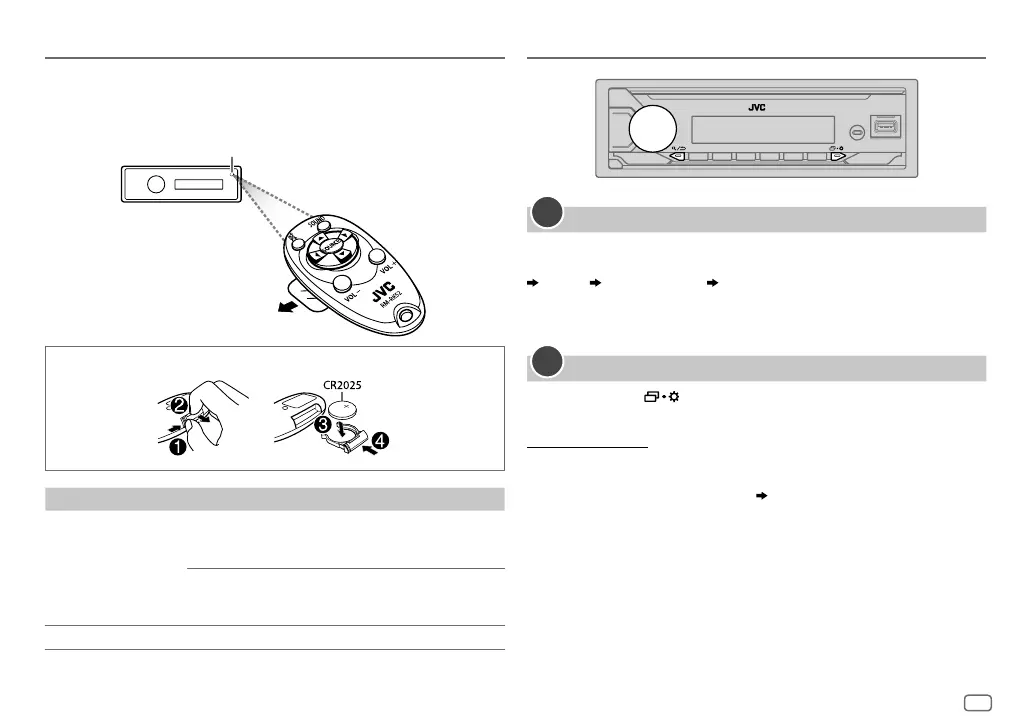
Remote control (RM-RK52)
This unit can be remotely controlled with an optionally purchased remote
control.
How to replace the battery
To On the remote control
Adjust the volume Press VOL + or VOL – .
• Press and hold VOL + to continuously increase
the volume to 15.
Press d to mute the sound or pause playback.
• Press again to cancel. The volume level returns to
the previous level before muting or pause.
Select a source Press SOURCE repeatedly.
Basics Getting Started
Acknowledge the crossover type
When you turn on the power for the first time (or
[FACTORY RESET]
is set to
[YES]
, see page6), the display shows: “2-WAY X’OVER” or “3-WAY X’OVER”
“PRESS” “VOLUME KNOB” “TO CONFIRM”.
Press the volume knob to acknowledge the current crossover type.
• To change the crossover type, see page19.
Set the clock and date
1
Press and hold .
2 Turn the volume knob to select
[CLOCK]
, then press the knob.
To adjust the clock
3 Turn the volume knob to select
[CLOCKADJUST]
, then press the knob.
4 Turn the volume knob to make the settings, then press the knob.
Set the time in the order of “Hour” “Minute”.
5 Turn the volume knob to select
[CLOCK FORMAT]
, then press the knob.
6 Turn the volume knob to select
[12H]
or
[24H]
, then press the knob.
1
2
Pull out the insulation sheet
when using for the first time.
Remote sensor
(Do not expose to bright sunlight.)
KD-X182BT_A9_B5A-4093-00_EN_2nd Draft.indd 5KD-X182BT_A9_B5A-4093-00_EN_2nd Draft.indd 5 17/1/2022 10:04:43 AM17/1/2022 10:04:43 AM


 To Next Page
 Loading...