EasyManua.ls Logo

JVC KD-X210 - USB and iPod;iPhone Usage; Connecting and Selecting Devices; Playback Control and Modes

JVC KD-X210
22 pages
Print Icon
To Next Page IconTo Next Page
To Previous Page IconTo Previous Page
Loading...
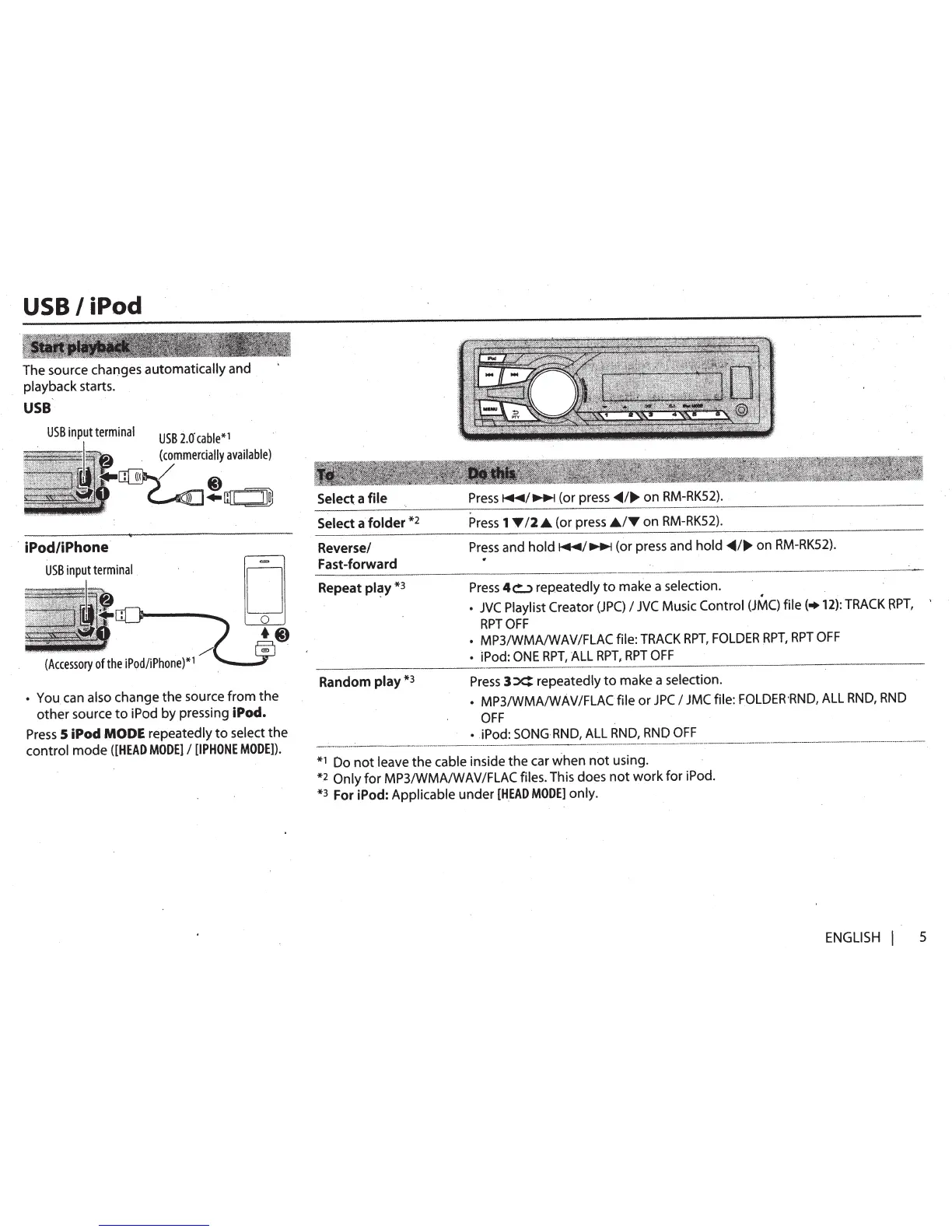
USB
I
iPod
The
source changes
automatically
and
playback starts.
USB
USB
input
terminal
USB
l.o·
cable*
1
(commercially
available)
·
iPod/iPhone
11
-~~
USB
inputterminal
o
co
{_
••
(Accessory
0
)
*1
f
the
iPod/iPhone
~
~
You
can
also
change the source from the
other source
to
iPod by pressing
iPod.
Press
5
iPod MODE
repeatedly
to
select the
control mode
([HEAD
MODE]
I
[IPHONE
MODE]).
Select a
file
Select
a
folder
*2
Reverse/
Fast-forward
Repeat
pl~y
*
3
Random play
*3
Press~~~
(or
press~~
...
on
RM-RK52}.
Press
1
Y
12
.A
(or
press
.AIY
on
RM-RK52}.
Press
and
hold~~~
(or
press
and
hold~~
...
on
RM-RK52}.
Press
4b
repeatedly
to
make
a selection.
.
JVC
Playlist Creator
(JPC)
I
JVC
Music Control
{JMC)
file(+
12):
TRACK
RPT,
'
RPTOFF
MP31W
.MA/WAVIFLAC file:
TRACK
RPT,
FOLDER
HPT,
RPT
OFF
iPod:
ONE
RPT,
ALL
RPT,
RPT
OFF
Press
3
X:
repeatedly
to
make a selection.
MP3/WMA/WAVIFLACfile or
JPC
I
JMC
file:
FOLDER·RND,
ALL
RND,
RND
OFF
iPod:
SONG
RND,
ALL
RND,
RND
OFF
*1
Do
not
leave the cable inside the
car
when
not using.
*2
Only for MP3/WMAIWAVIFLAC files.
This
does not work for iPod.
*3
For iPod:
Applicable under
[HEAD
MODE]
only.
ENGLISH
I
5

Related product manuals