EasyManua.ls Logo

JVC KW-SD70BT - Initial Setup and Preparation; Canceling the Display Demonstration; Setting the Clock

JVC KW-SD70BT
62 pages
Print Icon
To Next Page IconTo Next Page
To Previous Page IconTo Previous Page
Loading...
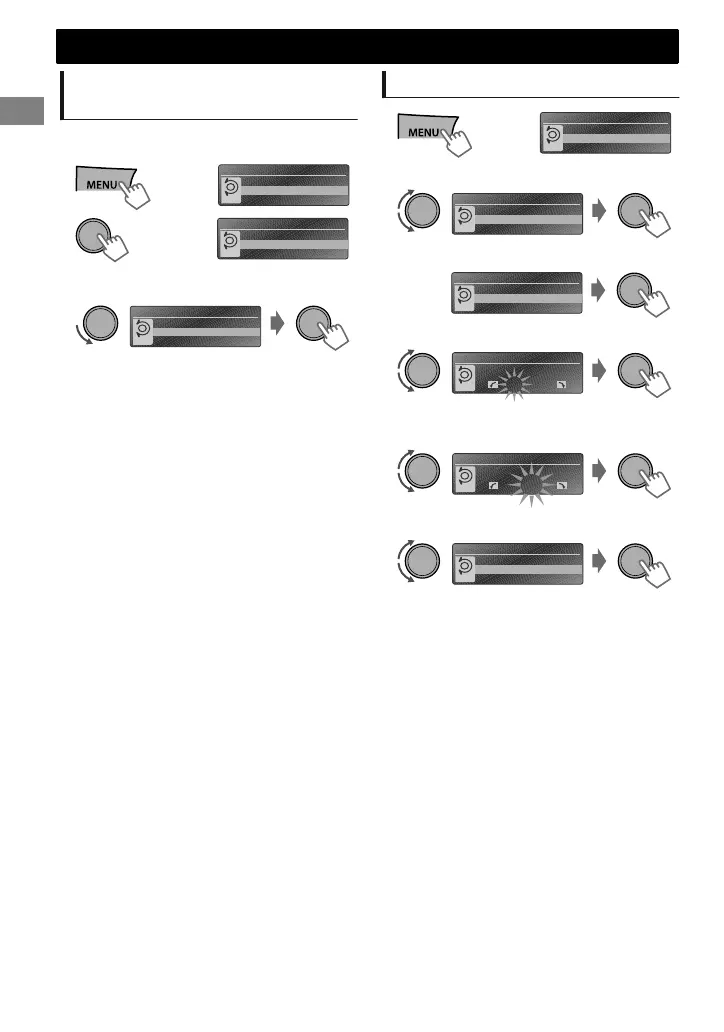
Canceling the display
demonstration
The display demonstration is always turned on
unless you cancel it.
SET UP
DEMO
Clock
PUSH
(Hold)
1
(Initial setting)
DEMO
Off
On
PUSH
2
DEMO
Off
On
PUSH
3
Select <Off>.
4
Press MENU to exit.
Setting the clock
SET UP
DEMO
Clock
PUSH
(Hold)
1
Clock
DEMO
Clock
Color
PUSH
2
Select <Clock>.
Clock
Clock Display
Set Clock
24/12H
PUSH
3
Select <Set Clock>.
(Initial setting)
0 : 00
Set Clock
PUSH
4
Adjust the hour.
0 : 00
Set Clock
PUSH
5
Adjust the minute.
Clock
Set Clock
Clock Adjust
24/12H
PUSH
6
Select <24H/12H>.
7
Select <24Hours> or <12Hours>.
8
Press MENU to exit.
Preparation
Preparation
4
|ޓENGLISH
2012/1/2ޓ21:44:54KW-SD70BT_E_EN

Related product manuals