Searching for a station
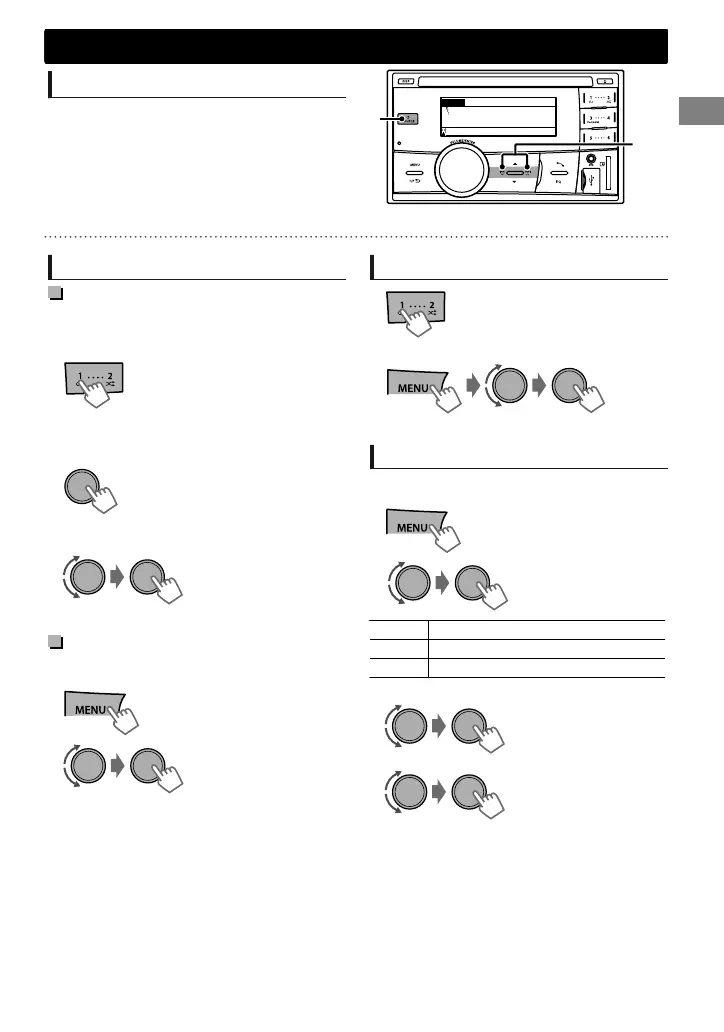
Select <FM> or <AM>.
Auto search. (Press)
Manual search. (Hold)
“M” appears, then press the button repeatedly.
STAF DYNAMIC 0:00FM
88.3 MHz
A
“ST” lights up when receiving an FM stereo broadcast with sufficient signal strength.
Storing stations in memory
Manual presetting
You can preset up to 18 stations for FM and 6
stations for AM.
While listening to a station...
(Hold)
The preset number flashes. The current station is
stored to the selected number button (1 - 6).
- - - - - - - - or - - - - - - - -
(Hold)
“Preset Mode” screen appears.
1
The preset number flashes.
2
Select preset number.
Auto presetting (FM only)
SSM (Strong-station Sequential Memory)
You can preset up to 18 stations for FM.
(Hold)
1
-<Tuner>
-<SSM>
-<SSM 01 – 06>
“SSM” appears. When all the stations are stored,
“SSM” disappears.
2
To preset <SSM 07 – 12>/<SSM 13 – 18>,
repeat steps 1 and 2.
Selecting a preset station
- - - - - - - - or - - - - - - - -
You can also select a preset station using / .
Setting the Radio Timer
You can tune in to a preset station at a specific
time regardless of the current source.
1
-<Tuner>
-<Radio Timer>
-<Off>/<Once>/
<Daily>
[Off] Cancels Radio Timer.
Once Activates once.
Daily Activates daily.
2
-<FM>/<AM>
-<1> ... <18> for FM/
<1> ... <6> for AM
3
Select the preset station.
4
Set the activation time.
5
Press MENU to exit.
lights up after the Radio Timer has been set.
Only one timer can be set. Setting a new timer
will override the previous setting.
The Radio Timer will not activate if the unit is
turned off or if <AM> is set to <Hide> after
selecting an AM station for the timer.
(' page 24)
Radio
Radio
ENGLISHޓ|
7
2012/1/2ޓ21:44:54KW-SD70BT_E_EN



 To Next Page