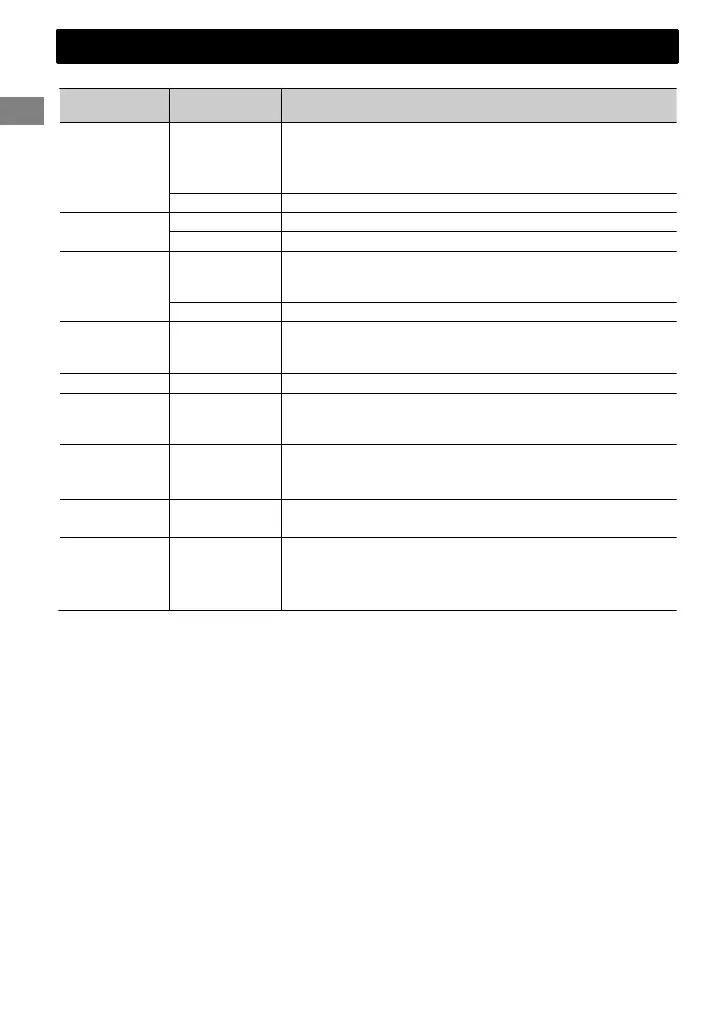
When you press or hold the following button(s)...
Control panel
Remote
controller
General function
SOURCE
—
Turns on.
Turns off. (Hold)
Press the SOURCE button on the control panel and turn
the control dial within 2 seconds to select the source.
SOURCE Press repeatedly to select the source.
Control dial
(turn)
VOL - / + Adjusts the volume level.
— Selects items.
Control dial
(press)
)
Mutes the sound or pauses playback.
Press the button again to cancel muting or resume
playback.
— Confirms selection.
Number
buttons
(1 - 6)
—
Selects the preset stations.
Stores the current station into the selected number button.
(Hold) (' page 7)
EQ SOUND
Selects the preset sound mode. (' page 21)
—
Enters “Hands-Free” menu (' page 16), or answers
incoming call when the unit rings.
Ends a call. (Hold)
—
Activates/deactivates TA Standby Reception. (' page 8)
Enters PTY Search mode. (Hold) (' page 8)
Returns to the previous menu.
/ /
Selects a preset station. (' page 7)
Selects MP3/WMA/WAV folder. (' page 9)
/
/
Searches for a station automatically. (' page 7)
Searches for a station manually. (Hold)
Selects track. (' page 9, 11, 19)
Fast-forwards or reverses track. (Hold)
Basic operations
6
|ޓENGLISH
2012/1/2ޓ21:44:54KW-SD70BT_E_EN



 To Next Page