32
SETTINGSSETTINGS
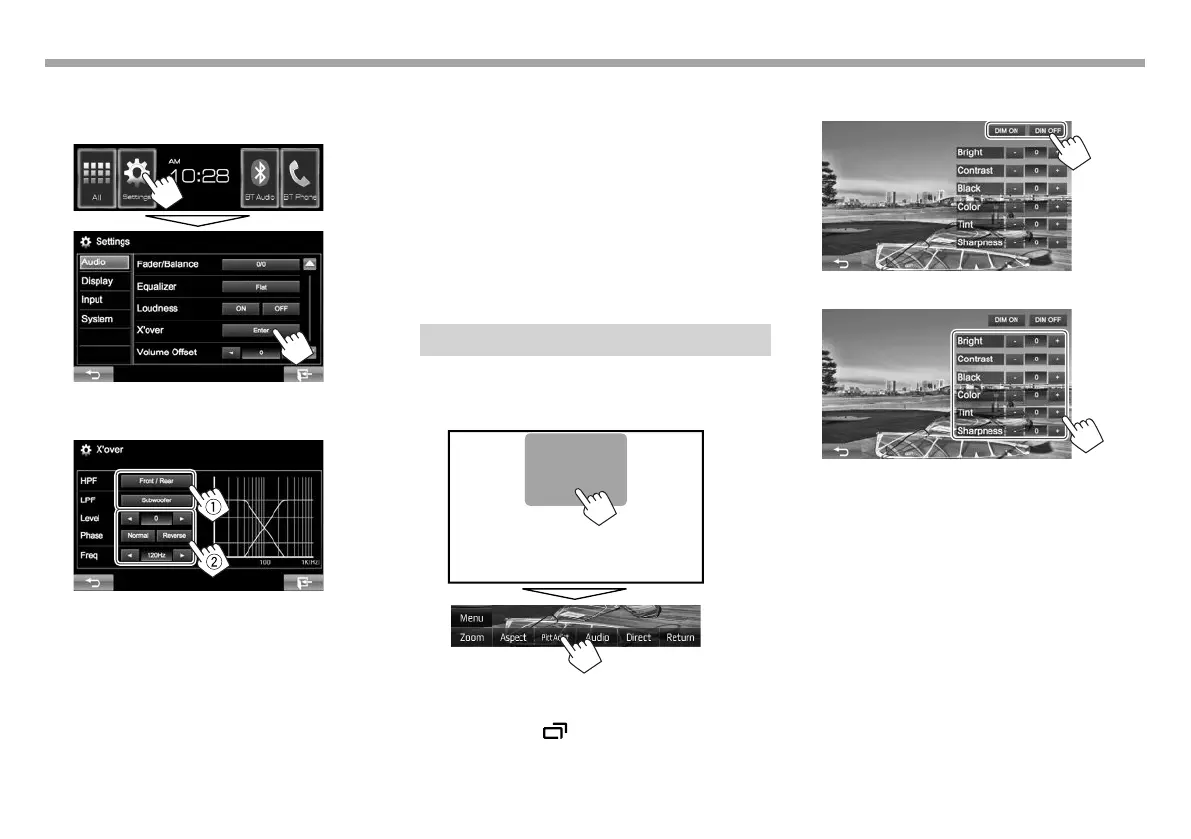
R Adjusting the crossover frequency
1 Display the <X’over> screen.
On the Home screen:
2 Select the item to adjust (1), then make
adjustments (2).
<HPF> Adjusts the crossover for the
front/rear speakers (high pass
filter).
<LPF> Adjusts the crossover for the
subwoofer (low pass filter).*
1
<Level> Adjusts the subwoofer level.*
1
<Phase> Selects the phase for the
subwoofer.*
2
<Freq> Adjusts the crossover frequency.
*
1
Adjustable only when the subwoofer is activated. (Page37)
*
2
Not selectable when <Freq> is set to <Through>.
Adjustment for video playback
R Adjusting the picture
You can adjust the picture quality.
1 Display the adjustment menu.
• When the App or navigation*
1
screen is
displayed, you can press and hold DISP (for
KW-V41BT)/ (for KW-V21BT/KW-V11) on
the monitor panel to switch to the picture
adjustment menu.
2 Select [DIM ON] (dimmer on) or [DIM OFF]
(dimmer off).
3 Adjust the picture (–15 to +15).
<Bright> Adjusts the brightness.
<Contrast> Adjusts the contrast.
<Black> Adjusts the blackness.
<Color> Adjusts the color.
<Tint>*
2
Adjusts the tint.
<Sharpness> Adjusts the sharpness.
*
1
Navigation is available for KW-V41BT/KW-V21BT only.
*
2
Adjustable only when the incoming signal is NTSC.
KW-VEntryU.indb32KW-VEntryU.indb32 2014/09/1019:502014/09/1019:50



 To Next Page